
- ✔ Verified by VirusTotal
- ✔ 100% Original Product & Virus-Free
- ✔ Lifetime Free Updates on Single Purchase
- ✔ Unlimited Website Usage
- ✔ Prices in USD (Tax Included)
🔥 Limited-Time Deal — Ends Soon!
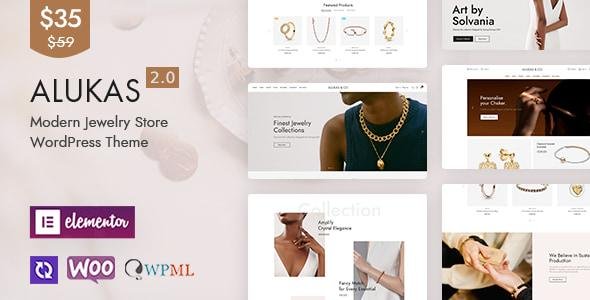
Alukas Theme – Modern Jewelry Store WordPress Theme 2.0.9
$35.00 Original price was: $35.00.$2.99Current price is: $2.99.
Instant Access
7 Day Money Back Guarantee
Online Support 24/7
Secure Payment
Description
Alukas Theme – Modern Jewelry
Alukas WordPress Theme is a modern, elegant, and feature-rich eCommerce theme designed specifically for jewelry stores, luxury shops, fashion accessories, watch retailers, and online boutiques. With its clean design, advanced WooCommerce integration, and Elementor compatibility, Alukas helps you build a stunning online jewelry store without touching a single line of code.
Whether you’re selling rings, necklaces, watches, diamonds, or handmade jewelry, this theme provides everything you need: custom product layouts, Ajax filters, wishlist & compare features, advanced mega menus, and fast performance optimized for conversions.
This is a GPL-distributed version – clean, secure, and legally redistributed under the GPL license, meaning you can use it on unlimited websites without restrictions.
✨ Alukas Jewelry WordPress Theme Features
🎨 Alukas Theme – Modern Jewelry Elegant & Modern Store Design
20+ pre-built homepage demos tailored for jewelry, watches, and luxury stores.
Elementor page builder support – build pages with drag-and-drop ease.
Multiple header & footer layouts for unique branding.
Retina-ready & mobile-optimized for perfect display on all devices.
🛒 WooCommerce-Powered Online Shop
Fully integrated with WooCommerce for seamless eCommerce functionality.
Custom product pages to highlight jewelry collections beautifully.
Product quick view, wishlist & compare features.
Ajax product filter & search – improve customer shopping experience.
Flexible checkout & cart system with multiple payment gateways.
Catalog mode option for showrooms or offline stores.
⚡ Advanced Shopping Features
Mega menu with product categories, images & icons.
Smart product swatches for colors, materials & sizes.
Countdown timers & deals sections to boost sales.
Lookbook & collection showcase for luxury branding.
360° product view & video support to highlight premium jewelry.
📈 SEO & Performance Ready
Lightweight, fast-loading, and performance-optimized for better rankings.
SEO-friendly structure with schema markup.
Lazy loading & image optimization for speed.
Compatible with Yoast SEO & RankMath plugins.
🌍 Extra Tools & Integrations
Slider Revolution included – stunning sliders for jewelry collections.
Contact Form 7 & Mailchimp support for inquiries & newsletters.
Translation ready, WPML & RTL compatible – sell globally.
One-click demo importer – launch your store in minutes.
Detailed documentation & regular updates.
🌟 Why Choose Alukas Theme?
Specifically built for jewelry & luxury eCommerce stores.
Professional, modern & elegant design enhances credibility.
Packed with conversion-focused features like wishlists, compare & quick view.
Elementor + WooCommerce integration = full customization without coding.
Fast, lightweight, and SEO-optimized for better Google rankings.
GPL licensed – use it freely on unlimited sites.
📊 Use Cases of Alukas Theme
Online Jewelry Shops (Rings, Necklaces, Earrings, Bracelets).
Luxury Watch Retailers & Diamond Sellers.
Fashion Accessories & Handmade Jewelry Stores.
High-end Boutiques & Luxury Lifestyle Brands.
Jewelry Designers & Craft Exhibitions.
Be the first to review “Alukas Theme – Modern Jewelry Store WordPress Theme 2.0.9” Cancel reply
How to Install
Follow these quick steps to install from a .zip file or directly from your WP dashboard.
-
1
Go to Plugins → Add New
In your WordPress dashboard, open Plugins and click Add New.
-
2
Click Upload Plugin
Press Upload Plugin → Choose File and select the downloaded
plugin-name.zip. -
3
Install & Activate
Click Install Now, then Activate. You’re done!
-
4
(Optional) Enter License / Use Shortcode
Open Plugins → Your Plugin → Settings to enter your license. Add the box on the product page with:
[plugin_info_box]
Alternative: Install from WordPress directory
Go to Plugins → Add New, search the plugin name, click Install then Activate.
Manual (FTP) method
Unzip locally → upload the folder to /wp-content/plugins/ using FTP → activate from Plugins.
-
1
Go to Appearance → Themes
Click Add New → Upload Theme.
-
2
Upload the .zip file
Select
theme-name.zip, click Install Now, then Activate. -
3
Install Required Plugins
If prompted, click Begin installing plugins and activate them.
-
4
(Optional) Import Starter Content
Use the theme’s Demo Import (if provided) to load sample pages and settings.
Manual (FTP) theme install
Unzip the theme → upload to /wp-content/themes/ → activate from Appearance → Themes.




Reviews
There are no reviews yet.