
- ✔ Verified by VirusTotal
- ✔ 100% Original Product & Virus-Free
- ✔ Lifetime Free Updates on Single Purchase
- ✔ Unlimited Website Usage
- ✔ Prices in USD (Tax Included)
🔥 Limited-Time Deal — Ends Soon!
Direct Checkout for WooCommerce Pro 3.3.4
$30.00 Original price was: $30.00.$2.99Current price is: $2.99.
Instant Access
7 Day Money Back Guarantee
Online Support 24/7
Secure Payment
Description
🚀 Direct Checkout for WooCommerce – Simplify Checkout & Boost Conversions
Looking to increase your WooCommerce sales and improve the user experience?Checkout for WooCommerce is the perfect plugin to simplify the checkout process and reduce cart abandonment. This GPL-distributed version is clean, secure, and legally redistributed under the GPL license.
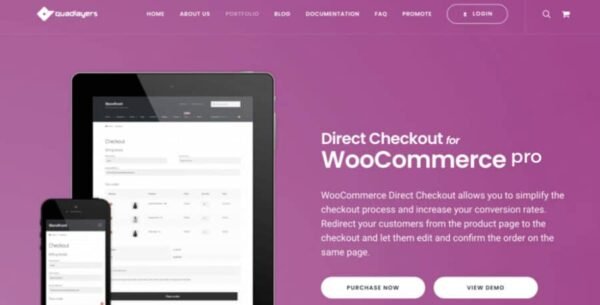
With this plugin, you can redirect your customers straight from the product page to checkout, speed up the purchase process, and increase your conversion rates effortlessly.
⚡ One-Page Checkout – Faster & Smoother
Forget multiple steps! Direct Checkout allows you to include the cart form directly on the checkout page. Users can edit the cart and confirm the order on the same page, making the purchase process faster and simpler.
🗑️ Remove Unnecessary Checkout Fields
Speed up the checkout process by removing fields you don’t need:
Order comments
Shipping address
Coupon forms
Policy text and terms & conditions
And more
A cleaner checkout page reduces friction and increases conversions.
🛒 Ajax Add-to-Cart on Single Products
Enhance your store’s functionality with WooCommerce Ajax add-to-cart:
Add single, grouped, or variable products without reloading the page
Instant feedback for users with added-to-cart alerts via Ajax
Improve user experience while reducing server load and bandwidth usage
⏩ Speed Up the Purchase Experience
Checkout is designed to speed up user purchases:
Reduce page reloads
Minimize checkout steps
Provide a quick purchase button on single product pages
Allow users to select variable product attributes directly from the shop page
Faster checkout means higher sales and happier customers.
🔄 Checkout Redirect – One Step to Complete Purchase
Redirect users directly to the checkout page from the product page. By reducing the checkout process to a single step, you make it easier for customers to complete their purchase without distractions.
👀 Quick Shop & Product Category View
Enable a quick view button for your WooCommerce shop and product categories:
Perfect for variable products
Users can choose product attributes and add items directly to the cart
Keep customers engaged and reduce bounce rates
🏆 Why Choose Direct Checkout for WooCommerce?
✅ One-Page Checkout – Edit and confirm orders on the same page
✅ Remove Unnecessary Fields – Cleaner checkout for faster conversions
✅ Ajax Add-to-Cart – Add products instantly without page reload
✅ Added-to-Cart Alerts – Immediate feedback for users
✅ Quick Purchase Button – Directly buy products from product pages
✅ Quick Shop View – Browse and add products without leaving the page
✅ Reduce Server Load – Efficient and optimized performance
Simplify your WooCommerce checkout process and increase sales with. Give your customers a faster, smoother, and more enjoyable shopping experience from start to finish! 🌟
Be the first to review “Direct Checkout for WooCommerce Pro 3.3.4” Cancel reply
How to Install
Follow these quick steps to install from a .zip file or directly from your WP dashboard.
-
1
Go to Plugins → Add New
In your WordPress dashboard, open Plugins and click Add New.
-
2
Click Upload Plugin
Press Upload Plugin → Choose File and select the downloaded
plugin-name.zip. -
3
Install & Activate
Click Install Now, then Activate. You’re done!
-
4
(Optional) Enter License / Use Shortcode
Open Plugins → Your Plugin → Settings to enter your license. Add the box on the product page with:
[plugin_info_box]
Alternative: Install from WordPress directory
Go to Plugins → Add New, search the plugin name, click Install then Activate.
Manual (FTP) method
Unzip locally → upload the folder to /wp-content/plugins/ using FTP → activate from Plugins.
-
1
Go to Appearance → Themes
Click Add New → Upload Theme.
-
2
Upload the .zip file
Select
theme-name.zip, click Install Now, then Activate. -
3
Install Required Plugins
If prompted, click Begin installing plugins and activate them.
-
4
(Optional) Import Starter Content
Use the theme’s Demo Import (if provided) to load sample pages and settings.
Manual (FTP) theme install
Unzip the theme → upload to /wp-content/themes/ → activate from Appearance → Themes.




Reviews
There are no reviews yet.