
- ✔ Verified by VirusTotal
- ✔ 100% Original Product & Virus-Free
- ✔ Lifetime Free Updates on Single Purchase
- ✔ Unlimited Website Usage
- ✔ Prices in USD (Tax Included)
🔥 Limited-Time Deal — Ends Soon!
Fluent Boards Pro – Step into the Future of Project Management 1.85
$58.00 Original price was: $58.00.$2.99Current price is: $2.99.
Instant Access
7 Day Money Back Guarantee
Online Support 24/7
Secure Payment
Description
📌 Fluent Boards Pro GPL – Latest Version
This is a GPL-distributed version – clean, secure, and legally redistributed under the GPL license. No official support is included.
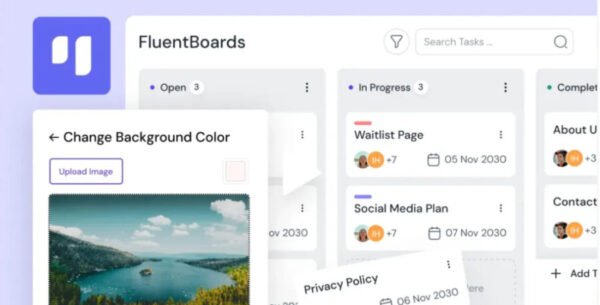
Fluent Boards Pro is the ultimate project management plugin for WordPress. Designed for teams of all sizes, it helps you organize projects, manage tasks, collaborate effortlessly, and boost productivity — all within your WordPress dashboard.
🚀 Why Choose Fluent Boards Pro?
Managing projects doesn’t need to be complicated. Fluent Boards offers:
✅ Unlimited projects, tasks, and subtasks
✅ Infinite assignees without affecting costs
✅ A clean drag-and-drop interface for easy task flow
✅ Seamless collaboration and team communication
✅ Integration with FluentCRM, Fluent Forms, and more
📊 Fluent Boards Pro Key Features
🔥 Seamless Task Management
Create unlimited projects & tasks
Assign multiple team members without restrictions
Use multi-stage workflows for clarity
Track progress with clear visual boards
🤝 Team Collaboration Made Easy
Add CRM contacts to tasks for unified communication
Collaborate via FluentCRM, Fluent Forms, and FluentRoadmap
Convert Trello boards directly into Fluent Boards
Share updates with clients through a frontend portal
⚡ Advanced Productivity Tools
Drag-and-drop interface for effortless task control
Build and reuse task templates
Centralize support tickets in one dashboard
Run automations with FluentCRM triggers
🎯 Who Can Benefit from Fluent Boards Pro?
✅ Small businesses looking for easy project management
✅ Marketing teams needing structured workflows
✅ Agencies managing multiple clients & tasks
✅ Developers and designers coordinating projects
✅ Any WordPress site owner who wants Trello-like boards without external tools
🌟 Why Fluent Boards Stands Out
Unlike other SaaS project management tools, Fluent Boards Pro:
Works natively inside WordPress
Has no monthly fees or user restrictions
Offers deep integration with other Fluent plugins
Keeps all your project data under your control
🏆 Conclusion
Fluent Boards Pro GPL is the perfect project management solution for WordPress users. With unlimited projects, powerful integrations, and client-friendly features, it helps you take productivity to the next level without leaving your WordPress dashboard.
Be the first to review “Fluent Boards Pro – Step into the Future of Project Management 1.85” Cancel reply
How to Install
Follow these quick steps to install from a .zip file or directly from your WP dashboard.
-
1
Go to Plugins → Add New
In your WordPress dashboard, open Plugins and click Add New.
-
2
Click Upload Plugin
Press Upload Plugin → Choose File and select the downloaded
plugin-name.zip. -
3
Install & Activate
Click Install Now, then Activate. You’re done!
-
4
(Optional) Enter License / Use Shortcode
Open Plugins → Your Plugin → Settings to enter your license. Add the box on the product page with:
[plugin_info_box]
Alternative: Install from WordPress directory
Go to Plugins → Add New, search the plugin name, click Install then Activate.
Manual (FTP) method
Unzip locally → upload the folder to /wp-content/plugins/ using FTP → activate from Plugins.
-
1
Go to Appearance → Themes
Click Add New → Upload Theme.
-
2
Upload the .zip file
Select
theme-name.zip, click Install Now, then Activate. -
3
Install Required Plugins
If prompted, click Begin installing plugins and activate them.
-
4
(Optional) Import Starter Content
Use the theme’s Demo Import (if provided) to load sample pages and settings.
Manual (FTP) theme install
Unzip the theme → upload to /wp-content/themes/ → activate from Appearance → Themes.




Reviews
There are no reviews yet.