
- ✔ Verified by VirusTotal
- ✔ 100% Original Product & Virus-Free
- ✔ Lifetime Free Updates on Single Purchase
- ✔ Unlimited Website Usage
- ✔ Prices in USD (Tax Included)
🔥 Limited-Time Deal — Ends Soon!
Free Gifts for WooCommerce 12.5.0
$57.00 Original price was: $57.00.$2.99Current price is: $2.99.
Instant Access
7 Day Money Back Guarantee
Online Support 24/7
Secure Payment
Description
🎁 Free Gifts for WooCommerce – Boost Sales with Gift Rewards
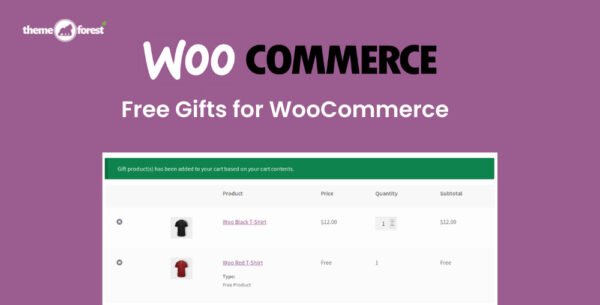
Free Gifts for WooCommerce is a powerful plugin that allows store owners to offer free gifts to customers in multiple ways, increasing engagement, loyalty, and sales. Reward your customers automatically, manually, or let them choose their gifts during checkout for a personalized shopping experience.
This GPL-distributed version is clean, secure, and legally redistributed, providing all features without official support.
⚡ Key Ways to Offer Free Gifts
Manual Gift Assignment
Admin can manually send free gifts to any user
Perfect for promotions, VIP customers, or special occasions
Automatic Gift Addition
Gift products can be automatically added to the cart based on rules
Streamline the gifting process without manual intervention
Customer Choice on Cart Page 🛒
Customers can choose their own gifts from available options
Provides a personalized experience and increases satisfaction
Buy X Get Y (BOGO) Offers
Admin can offer free gifts based on purchases
Supports Buy One Get One or Buy X Get Y promotions
🛠️ Features Offered
Award free gifts for purchases on your site
Automatically add gifts to the cart based on rules
Customers can select gifts themselves if enabled
Create unlimited rules for gifting
Set rules based on cart subtotal or quantity
Admin can manually send gifts anytime
Customize maximum gifts per order
Restrict gifts if a WooCommerce coupon is already applied
Restrict multiple quantities of the same free product
✅ Benefits at a Glance
Boost customer engagement and sales 🎯
Flexible gifting options: automatic, manual, customer choice, or BOGO
Easy setup and unlimited gifting rules
Reward loyal customers and encourage larger orders
Maintain full control over gift limits and conditions
Integrates seamlessly with WooCommerce checkout
Free Gifts for WooCommerce makes it easy to delight your customers and increase conversions by offering gifts automatically or manually. With multiple gifting options, customizable rules, and full WooCommerce integration, it’s the ultimate solution for adding free gift incentives to your store. 🎁✨
Be the first to review “Free Gifts for WooCommerce 12.5.0” Cancel reply
How to Install
Follow these quick steps to install from a .zip file or directly from your WP dashboard.
-
1
Go to Plugins → Add New
In your WordPress dashboard, open Plugins and click Add New.
-
2
Click Upload Plugin
Press Upload Plugin → Choose File and select the downloaded
plugin-name.zip. -
3
Install & Activate
Click Install Now, then Activate. You’re done!
-
4
(Optional) Enter License / Use Shortcode
Open Plugins → Your Plugin → Settings to enter your license. Add the box on the product page with:
[plugin_info_box]
Alternative: Install from WordPress directory
Go to Plugins → Add New, search the plugin name, click Install then Activate.
Manual (FTP) method
Unzip locally → upload the folder to /wp-content/plugins/ using FTP → activate from Plugins.
-
1
Go to Appearance → Themes
Click Add New → Upload Theme.
-
2
Upload the .zip file
Select
theme-name.zip, click Install Now, then Activate. -
3
Install Required Plugins
If prompted, click Begin installing plugins and activate them.
-
4
(Optional) Import Starter Content
Use the theme’s Demo Import (if provided) to load sample pages and settings.
Manual (FTP) theme install
Unzip the theme → upload to /wp-content/themes/ → activate from Appearance → Themes.




Reviews
There are no reviews yet.