
- ✔ Verified by VirusTotal
- ✔ 100% Original Product & Virus-Free
- ✔ Lifetime Free Updates on Single Purchase
- ✔ Unlimited Website Usage
- ✔ Prices in USD (Tax Included)
🔥 Limited-Time Deal — Ends Soon!
gAppointments | Appointment booking addon for Gravity Forms 1.14.1
$60.00 Original price was: $60.00.$2.99Current price is: $2.99.
Instant Access
7 Day Money Back Guarantee
Online Support 24/7
Secure Payment
Description
📅 gAppointments | Appointment Booking Addon for Gravity Forms (GPL Version)
(GPL Licensed – Clean, Secure, and Legally Redistributed. No official developer support included in this version.)
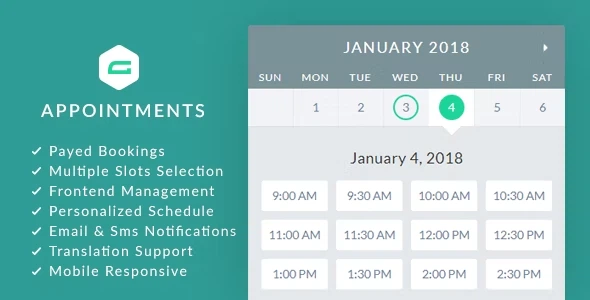
Turn Gravity Forms into a complete appointment booking system with gAppointments. Perfect for businesses that rely on scheduling, reservations, and time-slot management, this add-on allows you to seamlessly manage appointments, services, providers, and payments—all directly within your WordPress site.
Whether you’re running a salon, spa, fitness center, consultancy, clinic, or any service-based business, gAppointments makes it simple to accept and manage bookings without third-party software.
🚀 Key Features
💳 Payment Flexibility
Paid or non-paid booking options.
Supports all Gravity Forms-compatible payment gateways (PayPal, Stripe, Authorize.net, etc.).
Auto-cancel unpaid appointments after a set time.
🕒 Appointment & Slot Management
Service-based scheduling per form.
Flexible service intervals (duration, cleanup time, capacity, gaps, lead time, show/hide end times, time formats, remove AM/PM text).
Custom time slots with individual pricing, capacity, and lead times.
Allow multiple slot selection per booking.
Limit maximum bookings per date.
📆 Advanced Scheduling Options
Appointments can start today or in the future.
Define custom ranges of available dates.
Allow bookings only on specific custom dates.
Define minimum booking window (lead time) for new appointments.
👨💼 Service Providers & Staff
Assign registered users as service providers.
Personalized provider working hours, breaks, and holidays.
Providers can manage their schedule from the front end.
Provider and client front-end appointment management.
📲 Notifications & Communication
Custom HTML email notifications.
SMS notifications via Twilio + WP Twilio Core (free).
Add calendar links (Google, Yahoo, iCal) to emails for instant scheduling.
🖥️ User Experience & Front-End Tools
Clients & providers can add appointments to personal calendars.
Activity page for quick appointment tracking.
Mobile-responsive interface with endless color customization.
Works seamlessly with Gravity Perks Preview Submission & Multi-Page Navigation.
🌍 Translation & Localization
Translation support per individual form.
Fully flexible translation system for multilingual sites.
📑 Additional Features
Auto-confirm or auto-complete appointments.
Use built-in Gravity Forms fields (name, email, phone) for booking records.
Front-end schedule management for clients & providers.
Set first day of the week (Sunday or Monday).
CSV export support for appointment data.
💼 Use Cases
✔️ Salons & Spas – Let clients book stylists, services, and treatments.
✔️ Medical Clinics – Doctors, therapists, or specialists manage appointments.
✔️ Consultants & Coaches – Book calls, sessions, or meetings online.
✔️ Fitness Studios – Schedule classes, sessions, or trainers.
✔️ Service Providers – Legal, finance, repair, or any business requiring bookings.
📦 Technical Details
Plugin Name: gAppointments | Appointment Booking Addon for Gravity Forms
Version: Latest GPL Release
License: 100% GPL (General Public License)
Compatibility: Gravity Forms (latest), WordPress 6.x +, PHP 7.4+
Distribution: Clean & Secure GPL Version
Be the first to review “gAppointments | Appointment booking addon for Gravity Forms 1.14.1” Cancel reply
How to Install
Follow these quick steps to install from a .zip file or directly from your WP dashboard.
-
1
Go to Plugins → Add New
In your WordPress dashboard, open Plugins and click Add New.
-
2
Click Upload Plugin
Press Upload Plugin → Choose File and select the downloaded
plugin-name.zip. -
3
Install & Activate
Click Install Now, then Activate. You’re done!
-
4
(Optional) Enter License / Use Shortcode
Open Plugins → Your Plugin → Settings to enter your license. Add the box on the product page with:
[plugin_info_box]
Alternative: Install from WordPress directory
Go to Plugins → Add New, search the plugin name, click Install then Activate.
Manual (FTP) method
Unzip locally → upload the folder to /wp-content/plugins/ using FTP → activate from Plugins.
-
1
Go to Appearance → Themes
Click Add New → Upload Theme.
-
2
Upload the .zip file
Select
theme-name.zip, click Install Now, then Activate. -
3
Install Required Plugins
If prompted, click Begin installing plugins and activate them.
-
4
(Optional) Import Starter Content
Use the theme’s Demo Import (if provided) to load sample pages and settings.
Manual (FTP) theme install
Unzip the theme → upload to /wp-content/themes/ → activate from Appearance → Themes.




Reviews
There are no reviews yet.