
- ✔ Verified by VirusTotal
- ✔ 100% Original Product & Virus-Free
- ✔ Lifetime Free Updates on Single Purchase
- ✔ Unlimited Website Usage
- ✔ Prices in USD (Tax Included)
🔥 Limited-Time Deal — Ends Soon!
Hide Price and Add to Cart Button – WooCommerce 1.5.1
$64.00 Original price was: $64.00.$2.99Current price is: $2.99.
Instant Access
7 Day Money Back Guarantee
Online Support 24/7
Secure Payment
Description
🛡️ Hide Price & Add to Cart Button – WooCommerce Plugin (GPL)
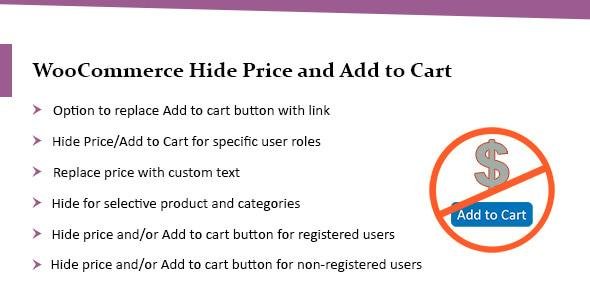
The Hide Price & Add to Cart Button plugin for WooCommerce gives you full control over product visibility and purchasing access. Perfect for B2B stores, wholesale businesses, catalog-only shops, and permission-based selling, this plugin allows you to hide product pricing and disable purchasing options for specific users — keeping your pricing private and encouraging customers to register or contact you.
Whether you’re offering exclusive pricing, custom quotes, or membership-only products, this plugin provides a simple yet powerful method to manage access based on login status, user roles, products, or categories. You can even replace hidden prices with custom text or redirect the Add to Cart button to a custom URL for inquiries, quote requests, or user login.
With flexible settings and user role visibility rules, this plugin helps you build a professional, controlled WooCommerce store experience.
✨ Key Features
✅ Hide Pricing & Purchase Options
Hide price for logged-out users
Hide price for logged-in users by role
Remove “Add to Cart” button globally or selectively
🎯 Targeted Visibility Rules
Restrict by user role (wholesale, B2B, guest, etc.)
Apply to specific products or entire categories
Custom rules for different customer segments
📝 Custom Messaging Options
Replace price with custom text (e.g., Login to view price)
Replace Add to Cart button with a custom link or text
Guide users to register, login, or request a quote
⚙️ Flexible WooCommerce Integration
Works with standard & variable products
Easy setup — no coding needed
Keeps store layout clean and professional
🛒 Note: An advanced version is available at the official WooCommerce marketplace for more enhanced features.
💡 Why Choose This Plugin?
Ideal for wholesale & B2B stores
Great for membership-based or quote-based businesses
Encourages users to register to view prices
Helps protect pricing strategy and sensitive information
Simple, lightweight, and easy to configure
Provides a clean catalog-only mode without buying options
When you need professional price control and private access rules, this plugin delivers a seamless solution.
🏁 Conclusion
The Hide Price & Add to Cart Button plugin gives you complete power over who can see your prices and make purchases. Whether you’re running a wholesale shop, offering exclusive pricing, or simply want users to contact you first — this tool ensures privacy, professionalism, and control over your WooCommerce store.
Be the first to review “Hide Price and Add to Cart Button – WooCommerce 1.5.1” Cancel reply
How to Install
Follow these quick steps to install from a .zip file or directly from your WP dashboard.
-
1
Go to Plugins → Add New
In your WordPress dashboard, open Plugins and click Add New.
-
2
Click Upload Plugin
Press Upload Plugin → Choose File and select the downloaded
plugin-name.zip. -
3
Install & Activate
Click Install Now, then Activate. You’re done!
-
4
(Optional) Enter License / Use Shortcode
Open Plugins → Your Plugin → Settings to enter your license. Add the box on the product page with:
[plugin_info_box]
Alternative: Install from WordPress directory
Go to Plugins → Add New, search the plugin name, click Install then Activate.
Manual (FTP) method
Unzip locally → upload the folder to /wp-content/plugins/ using FTP → activate from Plugins.
-
1
Go to Appearance → Themes
Click Add New → Upload Theme.
-
2
Upload the .zip file
Select
theme-name.zip, click Install Now, then Activate. -
3
Install Required Plugins
If prompted, click Begin installing plugins and activate them.
-
4
(Optional) Import Starter Content
Use the theme’s Demo Import (if provided) to load sample pages and settings.
Manual (FTP) theme install
Unzip the theme → upload to /wp-content/themes/ → activate from Appearance → Themes.




Reviews
There are no reviews yet.