
- ✔ Verified by VirusTotal
- ✔ 100% Original Product & Virus-Free
- ✔ Lifetime Free Updates on Single Purchase
- ✔ Unlimited Website Usage
- ✔ Prices in USD (Tax Included)
🔥 Limited-Time Deal — Ends Soon!
HomeID Theme – Real Estate WordPress Theme 1.8.8
$60.00 Original price was: $60.00.$2.99Current price is: $2.99.
Instant Access
7 Day Money Back Guarantee
Online Support 24/7
Secure Payment
Description
HomeID Theme
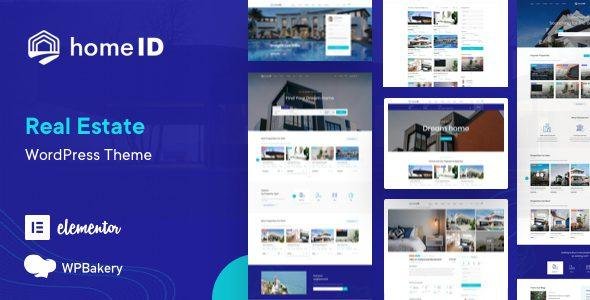
HomeId theme gracefully presents properties information to website visitors and facilitates real estate business owners by making properties management easier. HomeID is a handcrafted WordPress theme for real estate businesses, It is regularly updated and well-maintained.
This is a GPL-distributed version. No official support. Clean, secure, and legally redistributed under the GPL license.
HomeID theme GPL Features
- 8 Pre Homepages & Updating
- One-Click Install Demo Data
- Property Submission via BackEnd
- Property Submission via FrontEnd
- Payment Gateways: PAYPAL, STRIPE, WIRE TRANSFER
- Google Maps, Mapbox, OpenStreetMap
- Payment for packages
- Payment for listing
- Free Submission
- Social Login
- Social Network Share
- Advanced Filter Search
- Geo-Location Search
- Google Suggestions
- Multiple Listing View
- Email Listing Alert
- Mortgage Calculator
- Near Place Options
- Get Directions
- Featured Listings
- Agent Listing
- Unlimited Sidebar & Colors
- WPBakery Page Builder included
- Sticky Header
- Retina Ready
- Highly Customizable
- Responsive
- Boxed/Wide layout
- See our HomeID Live Demo to view all features
- View Documentation Online
- Translation Ready(po/mo files)
- Google Fonts Included
- Font Awesome Icons
- Built-in with HTML5, CSS3 & LESS
- Advanced Custom CSS Ready
- Integrated Mailchimp Subscription
- Cross-Browser Compatibility
- Child Theme included helping you make the most out of it.
Easy to Get Started
We already build 8 Pre-homepage demos are available to get you started in seconds. Build website within a seconds as easily as never before. Import whole demo content, and set up your web site to look just like any of our demo examples in One Click Install Demo Data.
1 Click Install Demo Data
The easiest and fastest way to build your website, one-click import pages, post…etc. Build website within a seconds as easily as never before. Import whole demo content, and set up your website to look just like any of our demo examples in one click
Included Premium Plugins
HomeID includes a powerful page builder plugin – WPBakery Page Builder ($64 value for free), with ERE shortcode and HomeID shortcode built-in, gives you total layout control over pages & posts.
Supported 3 payments method
Already integrate PAYPAL, STRIPE, WIRE TRANSFER for payment. HomeID has more types for payment: free, pay for the package, pay per submission and users can define as their own. Overview video:
Management System via frontend (for users) and via backend (for admin)
BENAA has powerful Front End Listing Submission & Management System, allow users to favorite, submit, manage and edit their listings directly from the frontend with payment support. It provides your agents and clients with an easy way to manage their profiles, properties for sale, and other settings.
Be the first to review “HomeID Theme – Real Estate WordPress Theme 1.8.8” Cancel reply
How to Install
Follow these quick steps to install from a .zip file or directly from your WP dashboard.
-
1
Go to Plugins → Add New
In your WordPress dashboard, open Plugins and click Add New.
-
2
Click Upload Plugin
Press Upload Plugin → Choose File and select the downloaded
plugin-name.zip. -
3
Install & Activate
Click Install Now, then Activate. You’re done!
-
4
(Optional) Enter License / Use Shortcode
Open Plugins → Your Plugin → Settings to enter your license. Add the box on the product page with:
[plugin_info_box]
Alternative: Install from WordPress directory
Go to Plugins → Add New, search the plugin name, click Install then Activate.
Manual (FTP) method
Unzip locally → upload the folder to /wp-content/plugins/ using FTP → activate from Plugins.
-
1
Go to Appearance → Themes
Click Add New → Upload Theme.
-
2
Upload the .zip file
Select
theme-name.zip, click Install Now, then Activate. -
3
Install Required Plugins
If prompted, click Begin installing plugins and activate them.
-
4
(Optional) Import Starter Content
Use the theme’s Demo Import (if provided) to load sample pages and settings.
Manual (FTP) theme install
Unzip the theme → upload to /wp-content/themes/ → activate from Appearance → Themes.




Reviews
There are no reviews yet.