
- ✔ Verified by VirusTotal
- ✔ 100% Original Product & Virus-Free
- ✔ Lifetime Free Updates on Single Purchase
- ✔ Unlimited Website Usage
- ✔ Prices in USD (Tax Included)
🔥 Limited-Time Deal — Ends Soon!
Hoteller Hotel Booking Theme 6.8.7
$59.00 Original price was: $59.00.$2.99Current price is: $2.99.
Instant Access
7 Day Money Back Guarantee
Online Support 24/7
Secure Payment
Description
🏨 Hoteller Hotel Booking WordPress Theme
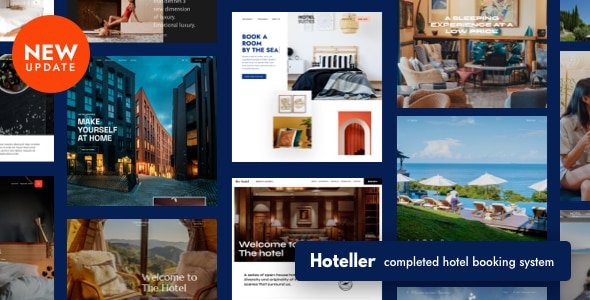
Hoteller Hotel Booking is a GPL-distributed, fully responsive WordPress theme designed for hotels, resorts, and apartments. It comes with a complete booking system, flexible pricing options, and ready-to-use demo sites that can be imported with a single click.
Built with the latest WordPress technology, Hoteller ensures your property website looks professional on all devices while offering an easy-to-manage booking system for both admins and guests.
✨ Key Features of Hoteller Hotel Booking
🏩 Ready-to-Use Websites
One-click setup for luxury, city, beach, mountain hotels, and apartments
Pre-built demo websites with booking system included
Continuous updates with new ready-to-use sites
📅 Complete Booking System
Search availability by number of adults and children
Single accommodation page with room details, gallery, pricing, and booking form
Flexible booking rules for min/max stay, check-in/out dates, and seasonal availability
Booking management calendar for admin overview
💰 Flexible Pricing Options
Seasonal pricing and variable rates for accommodations
Weekly and monthly pricing customization
Packages and services add-ons (free or paid)
Dynamic pricing based on guest search parameters
💳 Online & Offline Payments
Built-in gateways: PayPal, 2Checkout, Stripe, Beanstream/Bambora
Charge full fee or deposit
Taxes and fees fully managed and visible to guests
🔄 iCal & Booking Management
Sync bookings with Airbnb, Booking.com, and other OTAs
Avoid overbooking with automatic iCal updates
Store and sort bookings with complete admin dashboard
🎁 Discounts & Multilingual Support
Create coupons with custom conditions and expiration dates
Full multilingual support with free Polylang plugin
✅ What We Offer
Fully responsive hotel, resort, and apartment theme
One-click demo installation
Advanced booking system with flexible pricing
Integrated payment gateways and iCal sync
Multilingual-ready and easy to customize
🎯 Conclusion
Hoteller Hotel Booking WordPress Theme is the ultimate solution for creating professional hotel, resort, or apartment websites. Manage bookings, payments, and pricing efficiently while providing a seamless experience for your guests on any device.
Be the first to review “Hoteller Hotel Booking Theme 6.8.7” Cancel reply
How to Install
Follow these quick steps to install from a .zip file or directly from your WP dashboard.
-
1
Go to Plugins → Add New
In your WordPress dashboard, open Plugins and click Add New.
-
2
Click Upload Plugin
Press Upload Plugin → Choose File and select the downloaded
plugin-name.zip. -
3
Install & Activate
Click Install Now, then Activate. You’re done!
-
4
(Optional) Enter License / Use Shortcode
Open Plugins → Your Plugin → Settings to enter your license. Add the box on the product page with:
[plugin_info_box]
Alternative: Install from WordPress directory
Go to Plugins → Add New, search the plugin name, click Install then Activate.
Manual (FTP) method
Unzip locally → upload the folder to /wp-content/plugins/ using FTP → activate from Plugins.
-
1
Go to Appearance → Themes
Click Add New → Upload Theme.
-
2
Upload the .zip file
Select
theme-name.zip, click Install Now, then Activate. -
3
Install Required Plugins
If prompted, click Begin installing plugins and activate them.
-
4
(Optional) Import Starter Content
Use the theme’s Demo Import (if provided) to load sample pages and settings.
Manual (FTP) theme install
Unzip the theme → upload to /wp-content/themes/ → activate from Appearance → Themes.




Reviews
There are no reviews yet.