
- ✔ Verified by VirusTotal
- ✔ 100% Original Product & Virus-Free
- ✔ Lifetime Free Updates on Single Purchase
- ✔ Unlimited Website Usage
- ✔ Prices in USD (Tax Included)
🔥 Limited-Time Deal — Ends Soon!
JetBooking For Elementor 3.8.4
$69.00 Original price was: $69.00.$2.99Current price is: $2.99.
Instant Access
7 Day Money Back Guarantee
Online Support 24/7
Secure Payment
Description
JetBooking for Elementor – Latest GPL Version
This is a GPL-distributed version. No official support is provided. Clean, secure, and legally redistributed under the GPL license.
🌟 Overview
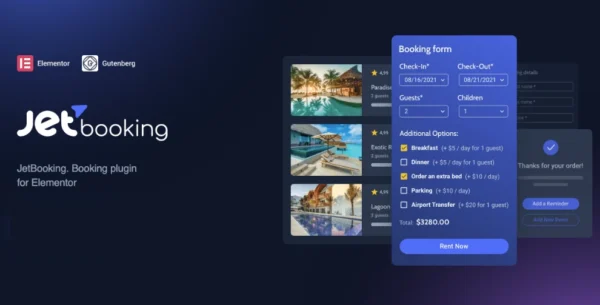
JetBooking for Elementor is a powerful add-on by Crocoblock, designed to seamlessly integrate booking functionality into your Elementor-powered WordPress site. Unlike generic booking plugins, JetBooking is built specifically for Elementor, giving you full visual control over design and functionality.
Whether you’re building a hotel booking system, bike rental site, studio reservation form, or apartment booking platform, JetBooking delivers a smooth and flexible experience for both site owners and customers.
🚀 Why JetBooking?
There are many booking plugins for WordPress — but none crafted exclusively for Elementor like JetBooking. That means no conflicts, no clunky interfaces, and no design limitations. Instead, you get complete integration with Elementor’s ecosystem, allowing you to design booking forms, listings, and confirmation flows exactly how you want.
✨ JetBooking Features
⚡ One-Click Setup – Create booking product pages and listings in just a few clicks.
🔗 Seamless Integration – Works perfectly with JetEngine, JetThemeCore, or Elementor Pro.
🔍 Smart Filtering – Let visitors filter by availability, property features, categories, or custom parameters.
📋 Advanced Booking Forms – Build eye-catching, fully customizable booking forms to collect visitor details.
📩 Custom Notifications – Send personalized booking confirmations and automate workflows with hooks.
🔄 Third-Party Sync – Integrate with top services to synchronize schedules and manage reservations automatically.
🎨 Elementor Styling – Design everything visually with Elementor widgets and Crocoblock add-ons.
🏨 Perfect For
Hotel & Apartment Reservations
Studio & Venue Bookings
Bike & Vehicle Rentals
Tours, Classes, or Service Reservations
Any Elementor-based project needing booking functionality
💡 Key Benefits
✅ 100% Elementor-native – no more switching between dashboards.
✅ Highly flexible – set booking conditions, time slots, and custom fields.
✅ Customizable forms – collect exactly the data you need.
✅ Scalable – works for small businesses, agencies, or large booking platforms.
✅ Fast deployment – get your booking system live in minutes.
Be the first to review “JetBooking For Elementor 3.8.4” Cancel reply
How to Install
Follow these quick steps to install from a .zip file or directly from your WP dashboard.
-
1
Go to Plugins → Add New
In your WordPress dashboard, open Plugins and click Add New.
-
2
Click Upload Plugin
Press Upload Plugin → Choose File and select the downloaded
plugin-name.zip. -
3
Install & Activate
Click Install Now, then Activate. You’re done!
-
4
(Optional) Enter License / Use Shortcode
Open Plugins → Your Plugin → Settings to enter your license. Add the box on the product page with:
[plugin_info_box]
Alternative: Install from WordPress directory
Go to Plugins → Add New, search the plugin name, click Install then Activate.
Manual (FTP) method
Unzip locally → upload the folder to /wp-content/plugins/ using FTP → activate from Plugins.
-
1
Go to Appearance → Themes
Click Add New → Upload Theme.
-
2
Upload the .zip file
Select
theme-name.zip, click Install Now, then Activate. -
3
Install Required Plugins
If prompted, click Begin installing plugins and activate them.
-
4
(Optional) Import Starter Content
Use the theme’s Demo Import (if provided) to load sample pages and settings.
Manual (FTP) theme install
Unzip the theme → upload to /wp-content/themes/ → activate from Appearance → Themes.


Reviews
There are no reviews yet.