
- ✔ Verified by VirusTotal
- ✔ 100% Original Product & Virus-Free
- ✔ Lifetime Free Updates on Single Purchase
- ✔ Unlimited Website Usage
- ✔ Prices in USD (Tax Included)
🔥 Limited-Time Deal — Ends Soon!
JetSearch For Elementor 3.5.13
$22.00 Original price was: $22.00.$2.99Current price is: $2.99.
Instant Access
7 Day Money Back Guarantee
Online Support 24/7
Secure Payment
Description
🔍 JetSearch for Elementor (GPL) – Fast & Powerful AJAX Search Widget
This is a GPL-distributed version of JetSearch for Elementor. It is 100% clean, secure, and legally redistributed under the GPL license. (No official developer support included.)
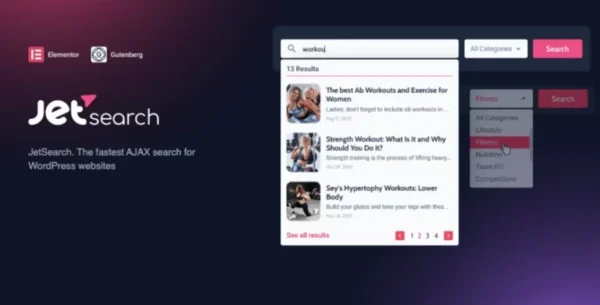
JetSearch is the ultimate AJAX-powered search addon for Elementor Page Builder. With JetSearch, you can add a lightning-fast, live search bar to any page and give your visitors the ability to find content instantly—without waiting for page reloads.
Perfect for blogs, WooCommerce shops, directories, or any content-heavy website, JetSearch lets you fully customize how search results are displayed, from thumbnails and metadata to layout and pagination.
✨ JetSearch Features
⚡ Ultra-Fast AJAX Search
Search results load in real time as users type.
No more page reloads—results appear instantly.
🎯 Smart Search Options
Search within any custom post type.
Narrow results by categories, tags, or taxonomies.
Prioritize results by relevance to ensure the most important content appears first.
🖼 Customizable Results Preview
Display post thumbnails for visual browsing.
Set content length and adjust excerpt display.
Use pagination to show more results in a clean, user-friendly way.
🎨 Flexible Styling
Full control over search bar design in Elementor.
Customize colors, typography, spacing, and alignment.
Match the search widget seamlessly with your site’s theme.
🚀 Why Use JetSearch?
✔️ Improves user experience by providing instant search results.
✔️ Increases conversions in WooCommerce stores by helping customers quickly find products.
✔️ Perfect for blogs, news sites, directories, and eCommerce shops.
✔️ Fully integrated with Elementor & Crocoblock plugins.
Whether you’re running a large online store or a content-rich blog, JetSearch makes it easy for visitors to find what they need—fast.
💡 Example Use Cases
🛒 E-Commerce Stores – Customers can search by product name, category, or SKU instantly.
📰 News Portals & Blogs – Readers find relevant articles without browsing archives.
📂 Directories & Listings – Users can filter and search through massive amounts of data easily.
📚 Educational Websites – Let students search courses, lessons, or materials quickly.
🎯 Why JetSearch GPL?
🔓 100% Genuine GPL Files – Safe, secure, and unmodified.
🌍 Unlimited Use – Install on as many websites as you want.
⚡ Latest Version – Always up to date with new features.
💰 Affordable – Get premium features at a fraction of the official cost.
🧩 Works perfectly with JetEngine, JetSmartFilters, JetWooBuilder, and Elementor Pro.
Be the first to review “JetSearch For Elementor 3.5.13” Cancel reply
How to Install
Follow these quick steps to install from a .zip file or directly from your WP dashboard.
-
1
Go to Plugins → Add New
In your WordPress dashboard, open Plugins and click Add New.
-
2
Click Upload Plugin
Press Upload Plugin → Choose File and select the downloaded
plugin-name.zip. -
3
Install & Activate
Click Install Now, then Activate. You’re done!
-
4
(Optional) Enter License / Use Shortcode
Open Plugins → Your Plugin → Settings to enter your license. Add the box on the product page with:
[plugin_info_box]
Alternative: Install from WordPress directory
Go to Plugins → Add New, search the plugin name, click Install then Activate.
Manual (FTP) method
Unzip locally → upload the folder to /wp-content/plugins/ using FTP → activate from Plugins.
-
1
Go to Appearance → Themes
Click Add New → Upload Theme.
-
2
Upload the .zip file
Select
theme-name.zip, click Install Now, then Activate. -
3
Install Required Plugins
If prompted, click Begin installing plugins and activate them.
-
4
(Optional) Import Starter Content
Use the theme’s Demo Import (if provided) to load sample pages and settings.
Manual (FTP) theme install
Unzip the theme → upload to /wp-content/themes/ → activate from Appearance → Themes.




Reviews
There are no reviews yet.