
- ✔ Verified by VirusTotal
- ✔ 100% Original Product & Virus-Free
- ✔ Lifetime Free Updates on Single Purchase
- ✔ Unlimited Website Usage
- ✔ Prices in USD (Tax Included)
🔥 Limited-Time Deal — Ends Soon!
Madara Theme – WordPress Theme for Manga 2.2.4
$57.00 Original price was: $57.00.$2.99Current price is: $2.99.
Instant Access
7 Day Money Back Guarantee
Online Support 24/7
Secure Payment
Description
🌐 Madara Theme Manga WordPress Theme (GPL Version)
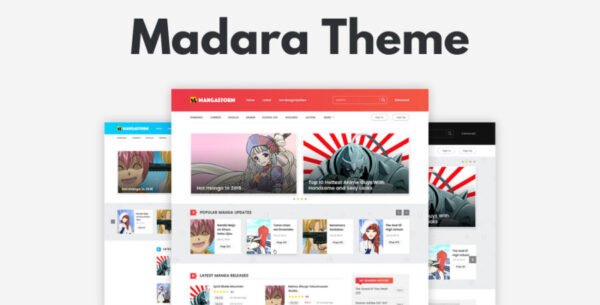
Mangabooth presents a premium, responsive, and fully-featured WordPress theme designed for manga, comic, novel, and drama websites. Ideal for manga creators, publishers, and fans, this theme offers powerful tools, flexible storage options, and advanced reading features for building professional manga platforms. With the core MANGA plugin included, it’s easy to launch your manga website in minutes.
⚡ Madara Theme Key Features
1. Quick & Easy Setup
One-click demo import saves time and effort
No coding skills required
Sample data included for instant setup
2. Madara Theme Core Plugin & Add-ons
Buy 1 get 2: Core MANGA plugin + MADARA theme included
Optional add-ons: Members Upload Manga, Member Download, Import Manga Data
3. Responsive & RTL Support
Fully responsive design for desktop, tablet, and mobile
Right-to-left language support for global audiences
4. Advanced Reading Experience
AJAX pagination for fast chapter navigation
Text & video iframe support per chapter
Reading history, bookmarks, and global chapter messages
Lazy-load chapters and reverse chapters list for flexible reading
5. Manga Information & Organization
Detailed metadata for author, artist, genre, tags, and ranking
Big & small thumbnail layouts for manga listing and detail pages
Multiple layout options: left/right sidebar, full-width, one-shot layout
6. Powerful Widgets & Shortcodes
Manga sliders, hero sliders, and custom shortcodes
Multiple column layouts for manga listings (2,3,4,5 columns)
Pre-defined ad locations and 10 sidebar locations
7. Storage Flexibility
Store manga on multiple locations: Amazon S3, BlogSpot, Imgur, FTP/SFTP
Multi-source import support for external manga content
8. Membership & Community Features
Front-end user uploads and chapter type selection
Download permissions by user role
WooCommerce integration for monetization
WP Discuz support for comments
9. SEO & Performance Optimized
AMP support for faster mobile loading
Caching support
Full SEO support including Yoast integration
Multilingual support
10. Additional Features
Adult content warning, family safe toggle
Light/Dark reading mode
Manga badges (Hot, New, etc.)
Chapter reading in single-page or all-pages layouts
Blog posts section with extensive theme options
💡 Ideal For:
Manga, comic, and novel publishers
Online reading platforms
Fan sites for comics, dramas, or novels
Monetized manga websites
Be the first to review “Madara Theme – WordPress Theme for Manga 2.2.4” Cancel reply
How to Install
Follow these quick steps to install from a .zip file or directly from your WP dashboard.
-
1
Go to Plugins → Add New
In your WordPress dashboard, open Plugins and click Add New.
-
2
Click Upload Plugin
Press Upload Plugin → Choose File and select the downloaded
plugin-name.zip. -
3
Install & Activate
Click Install Now, then Activate. You’re done!
-
4
(Optional) Enter License / Use Shortcode
Open Plugins → Your Plugin → Settings to enter your license. Add the box on the product page with:
[plugin_info_box]
Alternative: Install from WordPress directory
Go to Plugins → Add New, search the plugin name, click Install then Activate.
Manual (FTP) method
Unzip locally → upload the folder to /wp-content/plugins/ using FTP → activate from Plugins.
-
1
Go to Appearance → Themes
Click Add New → Upload Theme.
-
2
Upload the .zip file
Select
theme-name.zip, click Install Now, then Activate. -
3
Install Required Plugins
If prompted, click Begin installing plugins and activate them.
-
4
(Optional) Import Starter Content
Use the theme’s Demo Import (if provided) to load sample pages and settings.
Manual (FTP) theme install
Unzip the theme → upload to /wp-content/themes/ → activate from Appearance → Themes.




Reviews
There are no reviews yet.