
- ✔ Verified by VirusTotal
- ✔ 100% Original Product & Virus-Free
- ✔ Lifetime Free Updates on Single Purchase
- ✔ Unlimited Website Usage
- ✔ Prices in USD (Tax Included)
🔥 Limited-Time Deal — Ends Soon!
Multistep Checkout Pro for WooCommerce 2.42
$58.00 Original price was: $58.00.$2.99Current price is: $2.99.
Instant Access
7 Day Money Back Guarantee
Online Support 24/7
Secure Payment
Description
🛍️ Multistep Checkout Pro for WooCommerce (Latest Version)
This is a GPL-distributed version — clean, secure, and legally redistributed under the GPL license.
(No official support included.)
Transform your WooCommerce checkout page into a sleek, step-by-step process that boosts conversion rates and improves user experience. With Multistep Checkout Pro, customers can navigate easily, validate data instantly, and enjoy a visually appealing checkout flow.
✨ Key Features
🧭 Clickable Steps
Users can move through the checkout with Next/Previous buttons or by clicking directly on steps — a faster, more intuitive experience.
✅ Reliable Step-by-Step Validation
Catch errors early! Instead of validating at the end, you can enable step-by-step validation so customers see and fix errors immediately.
👥 Registration at Checkout
Simplify signups by adding the registration form beside the login form. New customers can register and continue checkout seamlessly.
🌍 Translation & WPML Ready
Easily translate your checkout into any language and support multilingual sites without compatibility issues.
🖼️ Product Thumbnails in Order Review
Show product images in the review section to boost confidence and reduce purchase errors.
🎨 Customizable Layouts
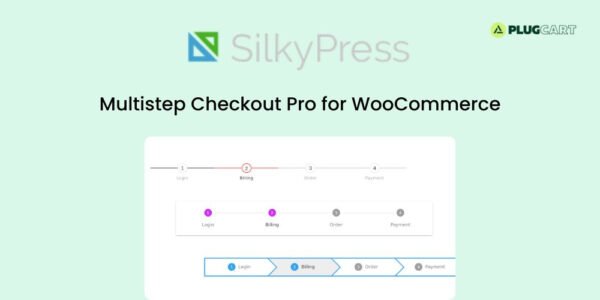
Choose from 3 display styles: Default, Material Design, or Breadcrumbs — all with customizable colors to match your site’s branding.
⚙️ Developer Friendly
Easily add, modify, or remove checkout steps programmatically for total flexibility.
💻 Theme Compatibility
Tested with popular WooCommerce themes like Storefront, Flatsome, Divi, Porto, and Bridge — ensuring perfect styling and smooth performance.
🚀 Why Choose It
✔️ Improves user experience
✔️ Reduces cart abandonment
✔️ Streamlines checkout navigation
✔️ Boosts conversion rates
✔️ Easy setup & customization
🏁 Conclusion
💡 The Multistep Checkout Pro for WooCommerce plugin transforms your plain checkout into a beautiful, guided, and user-friendly process. With real-time validation, flexible customization, and full theme compatibility, it’s the perfect solution to simplify checkout and increase your sales effortlessly.
Be the first to review “Multistep Checkout Pro for WooCommerce 2.42” Cancel reply
How to Install
Follow these quick steps to install from a .zip file or directly from your WP dashboard.
- 1
Go to Plugins → Add New
In your WordPress dashboard, open Plugins and click Add New.
- 2
Click Upload Plugin
Press Upload Plugin → Choose File and select the downloaded
plugin-name.zip. - 3
Install & Activate
Click Install Now, then Activate. You’re done!
- 4
(Optional) Enter License / Use Shortcode
Open Plugins → Your Plugin → Settings to enter your license. Add the box on the product page with:
[plugin_info_box]
Alternative: Install from WordPress directory
Go to Plugins → Add New, search the plugin name, click Install then Activate.
Manual (FTP) method
Unzip locally → upload the folder to /wp-content/plugins/ using FTP → activate from Plugins.
- 1
Go to Appearance → Themes
Click Add New → Upload Theme.
- 2
Upload the .zip file
Select
theme-name.zip, click Install Now, then Activate. - 3
Install Required Plugins
If prompted, click Begin installing plugins and activate them.
- 4
(Optional) Import Starter Content
Use the theme’s Demo Import (if provided) to load sample pages and settings.
Manual (FTP) theme install
Unzip the theme → upload to /wp-content/themes/ → activate from Appearance → Themes.




Reviews
There are no reviews yet.