
- ✔ Verified by VirusTotal
- ✔ 100% Original Product & Virus-Free
- ✔ Lifetime Free Updates on Single Purchase
- ✔ Unlimited Website Usage
- ✔ Prices in USD (Tax Included)
🔥 Limited-Time Deal — Ends Soon!
MyTravel Theme – Tours & Hotel Bookings WooCommerce Theme 1.0.28
$58.00 Original price was: $58.00.$2.99Current price is: $2.99.
Instant Access
7 Day Money Back Guarantee
Online Support 24/7
Secure Payment
Description
✈️ MyTravel Theme – Latest Version
This is a GPL-distributed version. No official support. Clean, secure, and legally redistributed under the GPL license.
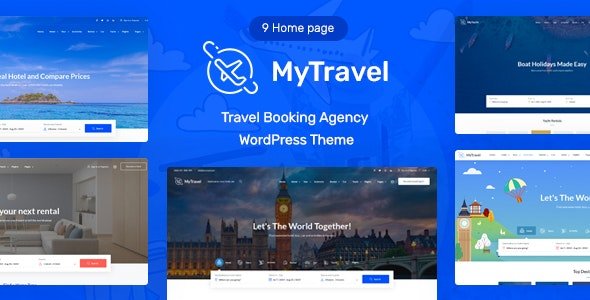
MyTravel is a powerful and feature-rich Travel WooCommerce Theme designed for building modern websites for hotels, vacations, rentals, cars, yachts, and travel activities. Whether you’re creating a booking platform, hotel aggregator, or tour agency website, MyTravel provides all the tools you need to deliver a seamless travel experience.
It integrates perfectly with WooCommerce, Advanced Custom Fields (ACF), and MAS Travels, along with booking plugins such as WooCommerce Easy Booking (Free) and WooCommerce Bookings (Paid) — giving you full control over your listings, availability, and pricing.
🌍 Key Features of MyTravel Theme
🏨 Built for the Travel Industry
Ideal for travel agencies, hotel aggregators, and tour consultants.
Manage bookings for hotels, rentals, vacations, cars, yachts, and activities effortlessly.
Fully compatible with WooCommerce Easy Booking and WooCommerce Bookings for single or range date reservations.
⚙️ Powered by WooCommerce & ACF
Leverages WooCommerce for payment gateways, order management, and customer tracking.
Uses ACF to extend product pages with additional custom fields and content layouts.
MAS Travels plugin adds a custom Product Format taxonomy to manage display styles and product metadata.
🏠 Beautiful, Flexible Design
Includes 9 stunning homepage layouts and 40+ unique sections.
Build a completely custom homepage for your business with Elementor.
Easily create engaging pages without writing any code.
🎨 Customizable Headers & Footers
Offers 7 header and 2 footer layout options.
Each page can have its own unique header or footer design using the Elementor editor.
Fully customizable through the WordPress Customizer.
🧩 Elementor Integration
All homepages and static pages are built using Elementor, the most popular page builder for WordPress.
Drag-and-drop page creation for total design freedom.
🏁 Conclusion
The MyTravel Theme is your all-in-one solution for building a professional and fully functional travel booking website. With deep WooCommerce integration, flexible Elementor customization, and advanced booking features, it empowers travel agencies, tour operators, and hotel businesses to create beautiful, conversion-focused websites with ease.
Whether you’re offering luxury hotel stays, car rentals, or global adventure tours — MyTravel Theme makes it simple to manage bookings, showcase destinations, and grow your travel business online.
Be the first to review “MyTravel Theme – Tours & Hotel Bookings WooCommerce Theme 1.0.28” Cancel reply
How to Install
Follow these quick steps to install from a .zip file or directly from your WP dashboard.
- 1
Go to Plugins → Add New
In your WordPress dashboard, open Plugins and click Add New.
- 2
Click Upload Plugin
Press Upload Plugin → Choose File and select the downloaded
plugin-name.zip. - 3
Install & Activate
Click Install Now, then Activate. You’re done!
- 4
(Optional) Enter License / Use Shortcode
Open Plugins → Your Plugin → Settings to enter your license. Add the box on the product page with:
[plugin_info_box]
Alternative: Install from WordPress directory
Go to Plugins → Add New, search the plugin name, click Install then Activate.
Manual (FTP) method
Unzip locally → upload the folder to /wp-content/plugins/ using FTP → activate from Plugins.
- 1
Go to Appearance → Themes
Click Add New → Upload Theme.
- 2
Upload the .zip file
Select
theme-name.zip, click Install Now, then Activate. - 3
Install Required Plugins
If prompted, click Begin installing plugins and activate them.
- 4
(Optional) Import Starter Content
Use the theme’s Demo Import (if provided) to load sample pages and settings.
Manual (FTP) theme install
Unzip the theme → upload to /wp-content/themes/ → activate from Appearance → Themes.




Reviews
There are no reviews yet.