
- ✔ Verified by VirusTotal
- ✔ 100% Original Product & Virus-Free
- ✔ Lifetime Free Updates on Single Purchase
- ✔ Unlimited Website Usage
- ✔ Prices in USD (Tax Included)
🔥 Limited-Time Deal — Ends Soon!
Orin Theme – Minimal Blog For WordPress 1.1.2
$19.00 Original price was: $19.00.$2.99Current price is: $2.99.
Instant Access
7 Day Money Back Guarantee
Online Support 24/7
Secure Payment
Description
Orin Theme – Minimal Blog For WordPress Websites
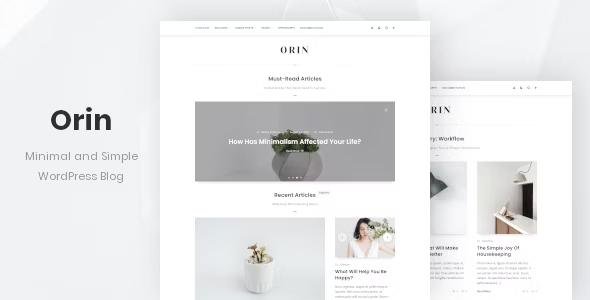
Orin theme is a personal blog WordPress theme designed for people who love minimalism and simplicity. This theme has a slider for featured posts, a hidden sidebar for widgets, and the ability to switch between fonts and color styles. It also supports popup images and popup galleries. In addition, this theme is fully responsive and looks good on mobile devices. Use it to make something cool!
Orin Theme GPL Feature list
- Compatible with WordPress 5.8.x.
- Minimal and easy to use.
- Optimized for both editors: Block Editor and Classic editor. Use the one you like!
- The theme has a responsive design and looks good on mobile devices.
- Compatible with all modern browsers: Firefox, Safari, Opera, Chrome, Edge.
- Includes a set of Font Awesome icons (Version 5+, 1600+ icons).
- Theme settings powered by WordPress Customizer. You can see all available settings in the online documentation.
- Two positions for menus: header and footer.
- Dropdown menu support (Only menu in the header).
- Sticky header (It can be disabled in the theme settings).
- Live switching between two different styles: Light and Dark. Each visitor can choose one of the color schemes (light or dark), and the theme will remember the choice of each visitor to improve the usability of the site. Note: Only your visitors can choose the style they want.
- Live switching between two types of fonts: Sans Serif and Serif fonts. Any of your visitors will also be able to choose the type of fonts that will be more convenient for them, and the theme will remember this choice for each visitor. Note: Only your visitors can choose the type of fonts they want.
- Dropdown search form in the header.
- Two types of logo: Text logo and Image.
- Slider with posts. You can display posts by category (all categories or one selected category) or your featured posts in this slider. Each featured post for the slider can be selected manually.
- Masonry layout for blog posts.
- Views counter for each post.
- Comments counter.
- “Back to top” button.
- Support for Contact Form 7.
Be the first to review “Orin Theme – Minimal Blog For WordPress 1.1.2” Cancel reply
How to Install
Follow these quick steps to install from a .zip file or directly from your WP dashboard.
-
1
Go to Plugins → Add New
In your WordPress dashboard, open Plugins and click Add New.
-
2
Click Upload Plugin
Press Upload Plugin → Choose File and select the downloaded
plugin-name.zip. -
3
Install & Activate
Click Install Now, then Activate. You’re done!
-
4
(Optional) Enter License / Use Shortcode
Open Plugins → Your Plugin → Settings to enter your license. Add the box on the product page with:
[plugin_info_box]
Alternative: Install from WordPress directory
Go to Plugins → Add New, search the plugin name, click Install then Activate.
Manual (FTP) method
Unzip locally → upload the folder to /wp-content/plugins/ using FTP → activate from Plugins.
-
1
Go to Appearance → Themes
Click Add New → Upload Theme.
-
2
Upload the .zip file
Select
theme-name.zip, click Install Now, then Activate. -
3
Install Required Plugins
If prompted, click Begin installing plugins and activate them.
-
4
(Optional) Import Starter Content
Use the theme’s Demo Import (if provided) to load sample pages and settings.
Manual (FTP) theme install
Unzip the theme → upload to /wp-content/themes/ → activate from Appearance → Themes.




Reviews
There are no reviews yet.