
- ✔ Verified by VirusTotal
- ✔ 100% Original Product & Virus-Free
- ✔ Lifetime Free Updates on Single Purchase
- ✔ Unlimited Website Usage
- ✔ Prices in USD (Tax Included)
🔥 Limited-Time Deal — Ends Soon!
Oxy Ultimate Tools – Addon for Oxygen Builder 1.6.14
$30.00 Original price was: $30.00.$2.99Current price is: $2.99.
Instant Access
7 Day Money Back Guarantee
Online Support 24/7
Secure Payment
Description
Oxy Ultimate Tools – Build Creative Websites With Ease 🎨
Oxy Ultimate Tools is a powerful WordPress plugin bundle designed to enhance the functionality of your Oxy Builder. With these tools, you can create stunning, professional, and interactive websites while speeding up your workflow.
This version is GPL-distributed, meaning it is clean, secure, and legally redistributed, though it does not include official support.
🎯 Key Benefits
Design visually stunning websites with advanced creative elements.
Boost productivity with ready-to-use components for Oxy Builder.
Create interactive galleries, sliders, and accordions without coding.
Style forms, buttons, and headings to match your website’s branding.
Enhance user experience with animations, lightboxes, tooltips, and more.
⚙️ Features of Oxy Ultimate Tools
Advanced Design Components 🖌️
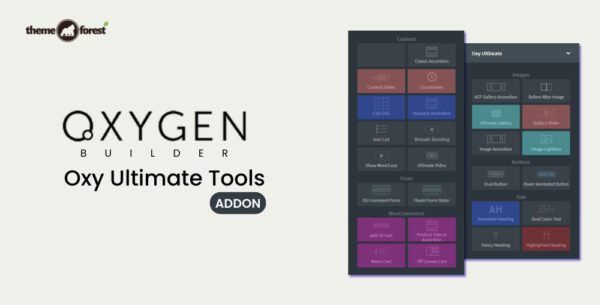
ACF Gallery & Gallery Slider – Showcase images dynamically and elegantly.
Ultimate Gallery & Image Accordion – Build interactive galleries for your content.
Fancy Heading, Animated Heading, Highlighted Heading – Grab attention with stylish text.
Dual Color Text & Dual Button – Add modern typography and buttons to your pages.
Form Styling & Integration ✉️
Fluent Forms Styler, Contact Form 7 Styler, Gravity Forms Styler, WPForms Styler, Formidable Forms Styler – Customize forms effortlessly.
Comment Form Styling – Enhance the look and feel of user interaction.
Add To Cart Integration – Perfect for WooCommerce-powered websites.
Interactive Elements & Animations ⚡
Before/After Image Slider – Showcase transformations visually.
Image Lightbox & Smooth Scrolling – Improve navigation and user experience.
Hotspot & Tooltip – Add interactive markers and information on images.
Countdown & Show More/Less – Create urgency or collapsible content sections.
Content & Layout Enhancements 📐
Classic & Dynamic Accordion – Organize content efficiently.
Content Slider & CSS Grid – Display content in visually appealing layouts.
Ultimate Video Integration – Add video content seamlessly.
CF7, Fluent Forms, Gravity Forms, WPForms Integration – Style all popular forms within your pages.
💡 Why Use Oxy Ultimate Tools
Speed up web design workflow with ready-to-use components.
Create highly interactive and visually appealing websites.
Style forms, galleries, buttons, and headings without touching code.
Add dynamic content, sliders, accordions, and animations to engage visitors.
Ideal for freelancers, agencies, and designers using Oxy Builder.
Conclusion 🌟
Oxy Ultimate Tools is the ultimate creative toolkit for Oxy Builder users. It empowers you to build stunning, interactive, and professional websites quickly, using advanced galleries, sliders, accordions, forms, buttons, and animations.
Transform your WordPress site into a visually impressive and highly functional experience with Oxy Ultimate Tools – the complete design toolkit for Oxy Builder.
Be the first to review “Oxy Ultimate Tools – Addon for Oxygen Builder 1.6.14” Cancel reply
How to Install
Follow these quick steps to install from a .zip file or directly from your WP dashboard.
-
1
Go to Plugins → Add New
In your WordPress dashboard, open Plugins and click Add New.
-
2
Click Upload Plugin
Press Upload Plugin → Choose File and select the downloaded
plugin-name.zip. -
3
Install & Activate
Click Install Now, then Activate. You’re done!
-
4
(Optional) Enter License / Use Shortcode
Open Plugins → Your Plugin → Settings to enter your license. Add the box on the product page with:
[plugin_info_box]
Alternative: Install from WordPress directory
Go to Plugins → Add New, search the plugin name, click Install then Activate.
Manual (FTP) method
Unzip locally → upload the folder to /wp-content/plugins/ using FTP → activate from Plugins.
-
1
Go to Appearance → Themes
Click Add New → Upload Theme.
-
2
Upload the .zip file
Select
theme-name.zip, click Install Now, then Activate. -
3
Install Required Plugins
If prompted, click Begin installing plugins and activate them.
-
4
(Optional) Import Starter Content
Use the theme’s Demo Import (if provided) to load sample pages and settings.
Manual (FTP) theme install
Unzip the theme → upload to /wp-content/themes/ → activate from Appearance → Themes.




Reviews
There are no reviews yet.