
- ✔ Verified by VirusTotal
- ✔ 100% Original Product & Virus-Free
- ✔ Lifetime Free Updates on Single Purchase
- ✔ Unlimited Website Usage
- ✔ Prices in USD (Tax Included)
🔥 Limited-Time Deal — Ends Soon!
Oxygen WooCommerce Integration 2.0.1
$57.00 Original price was: $57.00.$2.99Current price is: $2.99.
Instant Access
7 Day Money Back Guarantee
Online Support 24/7
Secure Payment
Description
🛒 Oxygen WooCommerce Integration – The Ultimate Visual Builder for Online Stores
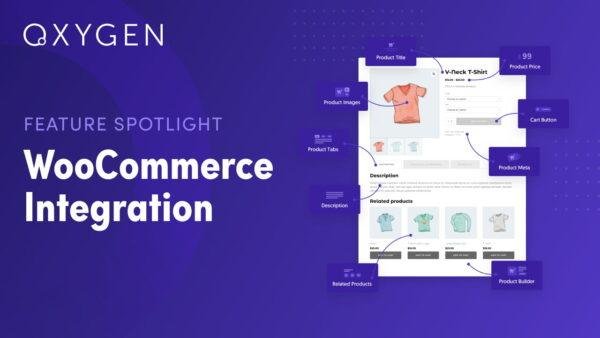
Oxygen WooCommerce Integration is a powerful extension that merges the flexibility of the Oxygen Builder with the functionality of WooCommerce. It gives you complete creative control over every part of your online store — from product listings to checkout pages — using 20+ customizable WooCommerce elements.
Whether you’re building a sleek boutique or a large eCommerce site, Oxygen makes it possible to craft a fully custom shopping experience without writing a single line of code.
🌟 Key Features of Oxygen WooCommerce Integration
🏬 Custom Shop Page Design
Use the Products List element to style and organize your product listings exactly how you want. Adjust layout, spacing, colors, and product details for a unique store design.
🧱 Modular Product Page Builder
The Product Builder element allows you to rearrange product components — title, image, price, add-to-cart button, and description — in any order. Build product pages that perfectly match your brand’s identity.
🛍️ Cart Page Customization
Redefine your cart page using the Shopping Cart element. Adjust styling, layout, and messaging to improve the customer experience and reduce cart abandonment.
💳 Checkout Page Personalization
Design a smooth, visually appealing checkout process using the Checkout element. Customize fields, colors, and typography for a seamless shopping flow that boosts conversions.
👤 My Account Page Styling
Enhance user engagement with a fully customized My Account page. Style every detail to give customers a consistent, branded experience across their journey.
💼 What We Offer
100% GPL-licensed, clean, and secure version
Over 20 dynamic WooCommerce design elements
Full control over store layouts, pages, and components
Built for Oxygen Builder with full WooCommerce compatibility
Perfect for designers, developers, and WooCommerce store owners
🚀 Conclusion
Oxygen WooCommerce Integration transforms how you build WooCommerce stores. With unmatched flexibility, visual design control, and modular components, you can create stunning, high-performing eCommerce pages that truly reflect your brand. From shop to checkout, this integration ensures every customer interaction is seamless and beautiful — all inside the Oxygen Builder.
Be the first to review “Oxygen WooCommerce Integration 2.0.1” Cancel reply
How to Install
Follow these quick steps to install from a .zip file or directly from your WP dashboard.
-
1
Go to Plugins → Add New
In your WordPress dashboard, open Plugins and click Add New.
-
2
Click Upload Plugin
Press Upload Plugin → Choose File and select the downloaded
plugin-name.zip. -
3
Install & Activate
Click Install Now, then Activate. You’re done!
-
4
(Optional) Enter License / Use Shortcode
Open Plugins → Your Plugin → Settings to enter your license. Add the box on the product page with:
[plugin_info_box]
Alternative: Install from WordPress directory
Go to Plugins → Add New, search the plugin name, click Install then Activate.
Manual (FTP) method
Unzip locally → upload the folder to /wp-content/plugins/ using FTP → activate from Plugins.
-
1
Go to Appearance → Themes
Click Add New → Upload Theme.
-
2
Upload the .zip file
Select
theme-name.zip, click Install Now, then Activate. -
3
Install Required Plugins
If prompted, click Begin installing plugins and activate them.
-
4
(Optional) Import Starter Content
Use the theme’s Demo Import (if provided) to load sample pages and settings.
Manual (FTP) theme install
Unzip the theme → upload to /wp-content/themes/ → activate from Appearance → Themes.




Reviews
There are no reviews yet.