
- ✔ Verified by VirusTotal
- ✔ 100% Original Product & Virus-Free
- ✔ Lifetime Free Updates on Single Purchase
- ✔ Unlimited Website Usage
- ✔ Prices in USD (Tax Included)
🔥 Limited-Time Deal — Ends Soon!
Pimwick WooCommerce Bulk Edit Pro 2.366
$57.00 Original price was: $57.00.$2.99Current price is: $2.99.
Instant Access
7 Day Money Back Guarantee
Online Support 24/7
Secure Payment
Description
⚙️ Pimwick WooCommerce Bulk Edit Pro – Latest Version
This is a GPL-distributed version of the Pimwick WooCommerce Bulk Edit Pro Plugin by Pimwick, ensuring it’s clean, secure, and legally redistributed under the GPL license (no official support included).
Managing a large WooCommerce store can be time-consuming — especially when you need to update prices, stock levels, or categories for hundreds (or thousands) of products. PW WooCommerce Bulk Edit Pro makes this process effortless, fast, and intuitive.
🚀 Say Hello to Pimwick WooCommerce Bulk Edit
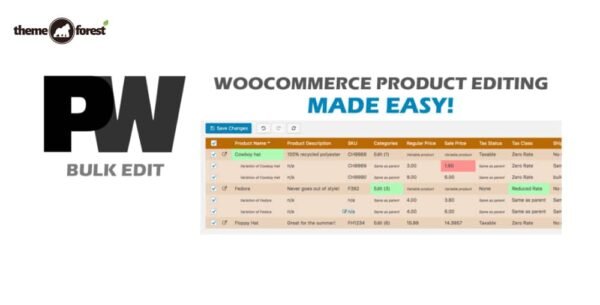
The PW Bulk Edit plugin is built for speed, accuracy, and convenience. It provides a spreadsheet-style interface that lets you edit multiple product fields instantly — no more opening each product one by one.
It’s responsive and efficient, even for large catalogs with thousands of SKUs, giving you a tremendously powerful way to manage your WooCommerce products.
✨ Core Features of Pimwick WooCommerce
🧠 Intuitive User Interface
PW Bulk Edit is designed with ease of use in mind. Make multiple changes at once and only apply them when you’re ready — no risk of accidental updates.
🛒 Mass Product Updates
Bulk edit product titles, prices, categories, SKUs, and stock levels.
Change regular and sale prices for thousands of items simultaneously.
Quickly apply or remove discounts across entire categories.
💸 Bulk Price Management
Adjust sale prices based on regular prices (e.g., 10% off across all products).
Ideal for seasonal sales or bulk pricing adjustments.
🧾 Advanced Filtering Options
Use custom filters to target only specific products.
Filter by fields like SKU, stock, category, or attributes.
Extra filters like “Is Empty” or “Is Not Empty” for precision editing.
Save and reload filters to make future edits even faster.
🧩 Comprehensive Edit Capabilities
Edit all major WooCommerce product fields, including:
Categories & Tags
Regular and Sale Prices
Stock Quantity
Product Type & Attributes
SKU & Status
Short Description & Visibility
Images and Gallery Photos
🧮 Regular Expression Search
Use RegEx to search and replace text patterns within product fields — a powerful tool for advanced store managers who want to make bulk text edits efficiently.
🧰 Bulk Product Actions
Create new variations automatically based on attributes.
Bulk delete products or variations instantly.
Apply edits to thousands of products without slowing down your site.
📦 Export to CSV
Export filtered results or entire product lists to a CSV file for analysis, backup, or external editing.
🔌 Seamless Compatibility
PW WooCommerce Bulk Edit Pro is compatible with major themes and extensions, including:
Dokan Multivendor Marketplace
Flatsome
WooCommerce Brands
YITH Multi Vendor
🧠 Why Store Owners Love PW Bulk Edit Pro
Massive time savings for large product catalogs.
User-friendly interface with real-time previews.
Perfect for storewide updates, bulk sales, and inventory adjustments.
Safe editing workflow — changes apply only when you confirm them.
🏁 Conclusion
The Pimwick WooCommerce Bulk Edit Pro Plugin is the ultimate productivity tool for WooCommerce store owners who manage large product inventories. With its intuitive spreadsheet-like interface, powerful filtering system, and mass editing capabilities, it turns hours of tedious product updates into just a few clicks.
Be the first to review “Pimwick WooCommerce Bulk Edit Pro 2.366” Cancel reply
How to Install
Follow these quick steps to install from a .zip file or directly from your WP dashboard.
-
1
Go to Plugins → Add New
In your WordPress dashboard, open Plugins and click Add New.
-
2
Click Upload Plugin
Press Upload Plugin → Choose File and select the downloaded
plugin-name.zip. -
3
Install & Activate
Click Install Now, then Activate. You’re done!
-
4
(Optional) Enter License / Use Shortcode
Open Plugins → Your Plugin → Settings to enter your license. Add the box on the product page with:
[plugin_info_box]
Alternative: Install from WordPress directory
Go to Plugins → Add New, search the plugin name, click Install then Activate.
Manual (FTP) method
Unzip locally → upload the folder to /wp-content/plugins/ using FTP → activate from Plugins.
-
1
Go to Appearance → Themes
Click Add New → Upload Theme.
-
2
Upload the .zip file
Select
theme-name.zip, click Install Now, then Activate. -
3
Install Required Plugins
If prompted, click Begin installing plugins and activate them.
-
4
(Optional) Import Starter Content
Use the theme’s Demo Import (if provided) to load sample pages and settings.
Manual (FTP) theme install
Unzip the theme → upload to /wp-content/themes/ → activate from Appearance → Themes.




Reviews
There are no reviews yet.