
- ✔ Verified by VirusTotal
- ✔ 100% Original Product & Virus-Free
- ✔ Lifetime Free Updates on Single Purchase
- ✔ Unlimited Website Usage
- ✔ Prices in USD (Tax Included)
🔥 Limited-Time Deal — Ends Soon!
Ultimate Video Player 10.1
$59.00 Original price was: $59.00.$2.99Current price is: $2.99.
Instant Access
7 Day Money Back Guarantee
Online Support 24/7
Secure Payment
Description
🎬 Ultimate Video Player – Responsive Video & Audio Player for WordPress
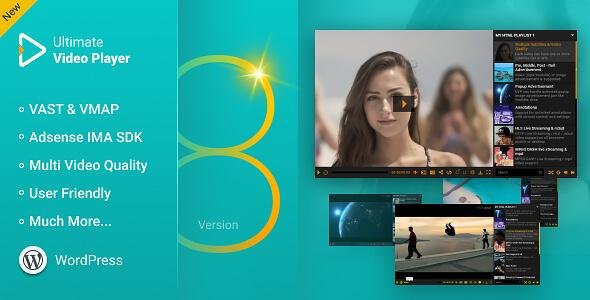
Ultimate Video Player is a powerful, fully responsive video/audio player that supports local media, streaming, YouTube, Vimeo/Vimeo Pro, and HLS/DASH live streams. It’s optimized for mobile and desktop, supports unlimited playlists, and comes packed with advanced features for customization, advertising, interactivity, and analytics.
This makes it one of the most complete video players available for websites today.
⚡ Core Features
Media Compatibility
Play local MP4 videos / MP3 audio files.
Stream videos/audio from servers, YouTube, Vimeo/Vimeo Pro.
HLS / m3u8 live streaming and DASH MPEG support.
360° / Virtual Reality (VR) video support.
Unlimited playlists with unlimited items each.
Mixed playlists (MP4, MP3, YouTube, Vimeo).
Responsive & Cross-Platform
Mobile and desktop optimized (iOS, Android, all browsers).
Responsive layouts and skins.
Inline or fullscreen playback (iOS default supported).
Optional “fill entire video screen” mode.
Playlist & UI Features
Multiple playlist types: HTML markup, XML, video/audio folders, YouTube/Vimeo playlists.
Playlist can be positioned bottom or right.
Customizable thumbnails, hover effects, scrolling playlists.
Optional combo-box category selector.
Optional auto-open for playlists or categories window.
Playback & Interaction
Multi-quality video support with optional quality selector.
Optional playback speed/rate selector.
A-to-B loop functionality for specific video segments.
Inline subtitles support (.srt, .vtt, txt) with encryption option.
Optional annotations with animation, mobile support, and HTML/CSS control.
Timestamp support (start/stop video via URL).
Keyboard shortcuts: fullscreen, volume, mute, play/pause, skip forward/back.
Audio Features
Real-time audio spectrum visualizer with customizable colors.
Advertising Support
Pre-roll, mid-roll, post-roll video or image ads.
Popup ads on pause.
Google AdSense & Interactive Media Ads SDK (IMA, DFP).
VAST / VMAP ad support with pods and timestamp control.
Advanced Features
Chromecast support (MP4/MP3).
Deeplinking: unique shareable link per video/playlist.
Video download button (optional).
Rewind button with customizable seconds.
Optional share window.
Lazy loading (initialize player only when visible).
Open a new page at video end (same or new window).
Security & Analytics
Digital fingerprint stamp to track video access.
Google Analytics integration: track plays and downloads.
Customization
8 prebuilt skins (with PSD files).
Full HTML/CSS customization for annotations and player UI.
HEX/CSS color support for player buttons while retaining textures.
API & Developer Support
Complete API with functions for play, pause, stop, volume, scrubbing, and more.
Events and cue points for JavaScript integration.
🔹 Summary
Ultimate Video Player is ideal for content creators, educational platforms, streaming websites, or any site that requires a professional, flexible, and fully customizable video/audio solution. Its combination of multi-platform support, playlists, ads, VR/360°, advanced interactivity, and analytics makes it one of the most versatile players available today.
Be the first to review “Ultimate Video Player 10.1” Cancel reply
How to Install
Follow these quick steps to install from a .zip file or directly from your WP dashboard.
- 1
Go to Plugins → Add New
In your WordPress dashboard, open Plugins and click Add New.
- 2
Click Upload Plugin
Press Upload Plugin → Choose File and select the downloaded
plugin-name.zip. - 3
Install & Activate
Click Install Now, then Activate. You’re done!
- 4
(Optional) Enter License / Use Shortcode
Open Plugins → Your Plugin → Settings to enter your license. Add the box on the product page with:
[plugin_info_box]
Alternative: Install from WordPress directory
Go to Plugins → Add New, search the plugin name, click Install then Activate.
Manual (FTP) method
Unzip locally → upload the folder to /wp-content/plugins/ using FTP → activate from Plugins.
- 1
Go to Appearance → Themes
Click Add New → Upload Theme.
- 2
Upload the .zip file
Select
theme-name.zip, click Install Now, then Activate. - 3
Install Required Plugins
If prompted, click Begin installing plugins and activate them.
- 4
(Optional) Import Starter Content
Use the theme’s Demo Import (if provided) to load sample pages and settings.
Manual (FTP) theme install
Unzip the theme → upload to /wp-content/themes/ → activate from Appearance → Themes.




Reviews
There are no reviews yet.