
- ✔ Verified by VirusTotal
- ✔ 100% Original Product & Virus-Free
- ✔ Lifetime Free Updates on Single Purchase
- ✔ Unlimited Website Usage
- ✔ Prices in USD (Tax Included)
🔥 Limited-Time Deal — Ends Soon!
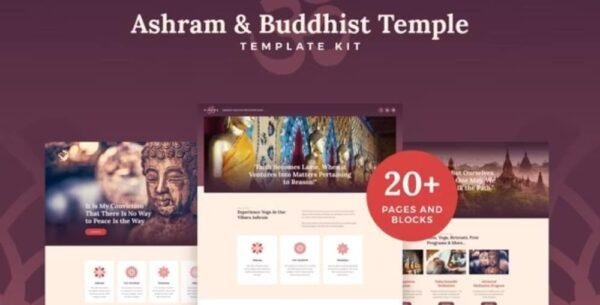
Vihara – Ashram & Oriental Buddhist Temple Elementor Template Kit
$29.00 Original price was: $29.00.$2.99Current price is: $2.99.
Instant Access
7 Day Money Back Guarantee
Online Support 24/7
Secure Payment
Description
🌸 Vihara Elementor Template Kit – Ashram & Buddhist Website Templates
The Vihara Elementor Template Kit is a thoughtfully crafted collection of modern, stylish, and spiritual pre-designed templates designed for building beautiful websites dedicated to Buddhism, ashrams, temples, retreats, meditation centers, yoga studios, churches, and spiritual communities.
With 15+ professionally designed demos, this kit helps you create a serene and inspiring online presence that reflects your mission, teachings, and practices.
🕊 Perfect for Spiritual & Cultural Websites
Vihara isn’t just limited to temples or ashrams. It’s a multi-purpose spiritual template kit that can be adapted for:
🪷 Buddhist Temples & Ashrams
🙏 Churches & Religious Organizations
🧘 Yoga & Meditation Retreat Centers
🌍 Cultural & Spiritual Events
🎓 Teaching Sessions, Workshops & Inspiration Classes
Whether you’re hosting meditation courses, yoga retreats, spiritual workshops, or cultural festivals, Vihara gives you the perfect foundation to build a professional and welcoming website.
✨ Key Features of Vihara Elementor Template Kit
📌 15+ Pre-Made Demos
Choose from a wide variety of layouts that reflect tranquility and balance, ready to customize for your needs.
📌 Optimized for Search Engines
SEO-friendly design ensures your community, classes, and events are easy to find online.
📌 Ultra Responsive Layout
Your website will look flawless on mobile phones, tablets, laptops, and desktops.
📌 Retina Ready
High-resolution graphics ensure your visuals remain crisp and elegant on any screen.
📌 Fully Customizable
Easily adjust colors, fonts, layouts, and images with Elementor’s drag-and-drop editor—no coding required.
📌 Powerful & Lightweight
Designed for speed and performance, your site will load quickly while keeping a clean, minimalist style.
📌 Cross-Browser Compatibility
Seamlessly works on Firefox, Chrome, Safari, Opera, and Edge.
📌 Elementor Free & Pro Support
Compatible with both versions, making it versatile for all users.
🌼 Why Choose Vihara for Your Spiritual Website?
✔ Ready-to-use templates save you time & effort
✔ Peaceful, elegant design crafted for spiritual communities
✔ Flexible layouts for events, classes, donations & teachings
✔ 100% responsive and retina-ready for all devices
✔ Lightweight & SEO-optimized for maximum visibility
🏆 Conclusion
The Vihara Elementor Template Kit is more than just a design—it’s a spiritual tool that helps you share your message with the world. Whether you are a Buddhist temple, yoga retreat, meditation center, or cultural organization, Vihara provides everything you need to create an inspiring online presence with ease.
Bring peace, spirituality, and professionalism to your website today with Vihara.
Be the first to review “Vihara – Ashram & Oriental Buddhist Temple Elementor Template Kit” Cancel reply
How to Install
Follow these quick steps to install from a .zip file or directly from your WP dashboard.
-
1
Go to Plugins → Add New
In your WordPress dashboard, open Plugins and click Add New.
-
2
Click Upload Plugin
Press Upload Plugin → Choose File and select the downloaded
plugin-name.zip. -
3
Install & Activate
Click Install Now, then Activate. You’re done!
-
4
(Optional) Enter License / Use Shortcode
Open Plugins → Your Plugin → Settings to enter your license. Add the box on the product page with:
[plugin_info_box]
Alternative: Install from WordPress directory
Go to Plugins → Add New, search the plugin name, click Install then Activate.
Manual (FTP) method
Unzip locally → upload the folder to /wp-content/plugins/ using FTP → activate from Plugins.
-
1
Go to Appearance → Themes
Click Add New → Upload Theme.
-
2
Upload the .zip file
Select
theme-name.zip, click Install Now, then Activate. -
3
Install Required Plugins
If prompted, click Begin installing plugins and activate them.
-
4
(Optional) Import Starter Content
Use the theme’s Demo Import (if provided) to load sample pages and settings.
Manual (FTP) theme install
Unzip the theme → upload to /wp-content/themes/ → activate from Appearance → Themes.



Reviews
There are no reviews yet.