
- ✔ Verified by VirusTotal
- ✔ 100% Original Product & Virus-Free
- ✔ Lifetime Free Updates on Single Purchase
- ✔ Unlimited Website Usage
- ✔ Prices in USD (Tax Included)
🔥 Limited-Time Deal — Ends Soon!
WooCommerce Advanced Product Labels 1.3.2
$57.00 Original price was: $57.00.$2.99Current price is: $2.99.
Instant Access
7 Day Money Back Guarantee
Online Support 24/7
Secure Payment
Description
🏷️ WooCommerce Advanced Product Labels – Latest GPL Version
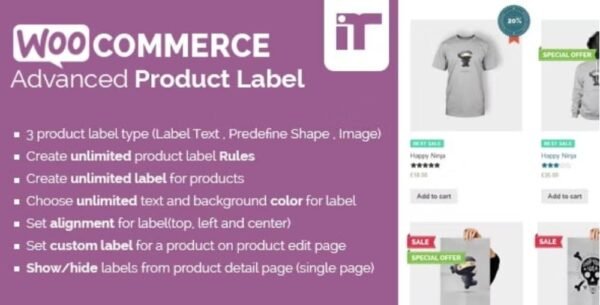
Want to make your products stand out? The WooCommerce Advanced Product Labels plugin lets you create eye-catching labels that highlight promotions, discounts, free shipping, or exclusive deals. With customizable rules and conditions, you can grab customer attention and increase conversions instantly.
This is a GPL-distributed version: clean, secure, and legally redistributed with no license restrictions. 🚀
🎯 Why Use WooCommerce Advanced Product Labels?
In today’s competitive online market, small visual cues can make a big difference. With Advanced Product Labels, you can:
🏷️ Add custom labels like “Free Shipping”, “Hot Deal”, or “Limited Offer”.
🎯 Target labels to specific products, categories, or conditions.
⚡ Make promotions stand out visually to increase clicks and sales.
🛍️ Create urgency and highlight best-selling or discounted products.
🌟 Key Features of WooCommerce Advanced Product Labels
🖌️ Customizable Labels
Design your own product labels with text that suits your promotion — from discount percentages to “New Arrival” badges.
🎯 Smart Conditions
Assign labels to products based on:
Category
Price range
Sale status
Free shipping availability
Specific products or groups
🏷️ Highlight Freebies & Discounts
Show off free products, bundled deals, or special offers with bold and attractive labels.
⚡ Quick Setup
No coding needed. Create and apply labels in just a few clicks.
📱 Responsive & Compatible
Works seamlessly with any WooCommerce theme and looks great on all devices.
🚀 Benefits for Your Store
💡 Boost sales by highlighting promotions.
👀 Attract attention with colorful and bold product labels.
🎯 Target specific customers by showing labels only where they matter most.
🛍️ Improve the shopping experience and reduce bounce rates.
🔄 Save time with easy setup and reusable label rules.
🏆 Conclusion
The WooCommerce Advanced Product Labels plugin gives you the tools to make your products pop and your deals shine. Whether you want to promote free shipping, highlight discounts, or showcase exclusive offers, this plugin ensures your products get noticed and drive conversions.
👉 A must-have for any WooCommerce store looking to increase sales and customer engagement with simple but powerful visual marketing.
Be the first to review “WooCommerce Advanced Product Labels 1.3.2” Cancel reply
How to Install
Follow these quick steps to install from a .zip file or directly from your WP dashboard.
-
1
Go to Plugins → Add New
In your WordPress dashboard, open Plugins and click Add New.
-
2
Click Upload Plugin
Press Upload Plugin → Choose File and select the downloaded
plugin-name.zip. -
3
Install & Activate
Click Install Now, then Activate. You’re done!
-
4
(Optional) Enter License / Use Shortcode
Open Plugins → Your Plugin → Settings to enter your license. Add the box on the product page with:
[plugin_info_box]
Alternative: Install from WordPress directory
Go to Plugins → Add New, search the plugin name, click Install then Activate.
Manual (FTP) method
Unzip locally → upload the folder to /wp-content/plugins/ using FTP → activate from Plugins.
-
1
Go to Appearance → Themes
Click Add New → Upload Theme.
-
2
Upload the .zip file
Select
theme-name.zip, click Install Now, then Activate. -
3
Install Required Plugins
If prompted, click Begin installing plugins and activate them.
-
4
(Optional) Import Starter Content
Use the theme’s Demo Import (if provided) to load sample pages and settings.
Manual (FTP) theme install
Unzip the theme → upload to /wp-content/themes/ → activate from Appearance → Themes.




Reviews
There are no reviews yet.