
- ✔ Verified by VirusTotal
- ✔ 100% Original Product & Virus-Free
- ✔ Lifetime Free Updates on Single Purchase
- ✔ Unlimited Website Usage
- ✔ Prices in USD (Tax Included)
🔥 Limited-Time Deal — Ends Soon!
WooCommerce Google Spreadsheet Addon – (Import / Export) 6.9
$59.00 Original price was: $59.00.$2.99Current price is: $2.99.
Instant Access
7 Day Money Back Guarantee
Online Support 24/7
Secure Payment
Description
WooCommerce Google Spreadsheet Addon (GPL Plugin)
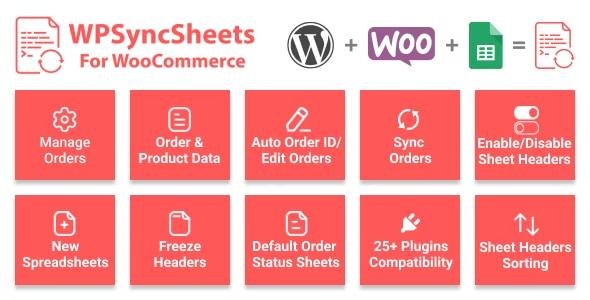
The WooCommerce Google Spreadsheet Addon (WPSyncSheets) is a powerful tool that connects your WooCommerce store with Google Spreadsheets. This GPL-licensed plugin helps you automate data synchronization for orders, products, customers, coupons, and events — all in real-time. With advanced customization and automation features, this plugin reduces manual work and makes data management simple, fast, and efficient.
Why Use WooCommerce Google Spreadsheet Addon?
Managing WooCommerce data manually can be time-consuming. This addon helps you:
Sync WooCommerce data with Google Spreadsheets in real time.
Automate imports and exports with scheduled synchronization.
Visualize store performance by generating detailed reports and graphs.
Collaborate easily with your team by sharing Google Sheets.
Key Features of WooCommerce Google Spreadsheet Addon
Import & Export with Ease
Import/export WooCommerce orders, products, coupons, customers, and events seamlessly.
Save time with automated synchronization instead of manual entries.
Scheduled Auto Export
Automate your data exports.
Schedule synchronization at specific times for hassle-free management.
Automatic Spreadsheet & Sheet Creation
WPSyncSheets automatically creates Google Spreadsheets & Sheets.
Organizes all WooCommerce data into structured sheets without extra setup.
Manage Order Wise or Product Wise
Create spreadsheets order-wise or product-wise, depending on your preference.
Maintain clear data organization for better insights.
Powerful Filtering Options
Filter data by product category.
Display only relevant product information inside the sheet.
Row Color & Column Customization
Highlight important rows with custom background colors.
Add, edit, delete, or reorder columns directly from the admin panel.
Advanced Capabilities
Sheets as Order Statuses
Automatically generate a new sheet for each order status (e.g., Pending, Completed, Cancelled).
Makes order management more structured and efficient.
Third-Party Compatibility
Works with 35+ WooCommerce plugins without conflicts.
Ensures smooth data synchronization across your store’s ecosystem.
Multi-Language & Multi-Site Ready
Translation-ready for multiple languages.
Full support for multisite WordPress installations.
Graphs & Reports
Generate visual graphs directly within Google Sheets.
Analyze your WooCommerce performance with ease.
User-Friendly Options
View, clear, or download spreadsheets with a single click.
One-time settings – configure once, and you’re done.
Freeze the first row for better readability.
Access all formatting tools from the plugin’s settings page.
Benefits of Using WooCommerce Google Spreadsheet Addon
Save Time: Automate data exports and reduce manual effort.
Improve Workflow: Share Google Sheets with your team for collaborative management.
Enhance Analysis: Generate graphs and reports for better business decisions.
Stay Organized: Separate sheets for orders, statuses, and categories keep everything clean.
Flexibility: Manage data your way with customizable columns and filters.
Final Thoughts
The WooCommerce Google Spreadsheet Addon (GPL Plugin) is an essential tool for any WooCommerce store owner who wants to simplify data management, improve reporting, and save time through automation. Whether you manage a small store or a large eCommerce site, WPSyncSheets gives you the flexibility and control to organize your WooCommerce data effectively in Google Sheets.
Be the first to review “WooCommerce Google Spreadsheet Addon – (Import / Export) 6.9” Cancel reply
How to Install
Follow these quick steps to install from a .zip file or directly from your WP dashboard.
-
1
Go to Plugins → Add New
In your WordPress dashboard, open Plugins and click Add New.
-
2
Click Upload Plugin
Press Upload Plugin → Choose File and select the downloaded
plugin-name.zip. -
3
Install & Activate
Click Install Now, then Activate. You’re done!
-
4
(Optional) Enter License / Use Shortcode
Open Plugins → Your Plugin → Settings to enter your license. Add the box on the product page with:
[plugin_info_box]
Alternative: Install from WordPress directory
Go to Plugins → Add New, search the plugin name, click Install then Activate.
Manual (FTP) method
Unzip locally → upload the folder to /wp-content/plugins/ using FTP → activate from Plugins.
-
1
Go to Appearance → Themes
Click Add New → Upload Theme.
-
2
Upload the .zip file
Select
theme-name.zip, click Install Now, then Activate. -
3
Install Required Plugins
If prompted, click Begin installing plugins and activate them.
-
4
(Optional) Import Starter Content
Use the theme’s Demo Import (if provided) to load sample pages and settings.
Manual (FTP) theme install
Unzip the theme → upload to /wp-content/themes/ → activate from Appearance → Themes.




Reviews
There are no reviews yet.