
- ✔ Verified by VirusTotal
- ✔ 100% Original Product & Virus-Free
- ✔ Lifetime Free Updates on Single Purchase
- ✔ Unlimited Website Usage
- ✔ Prices in USD (Tax Included)
🔥 Limited-Time Deal — Ends Soon!
WooCommerce Variation Swatches And Additional Gallery 5.1.0
$20.00 Original price was: $20.00.$2.99Current price is: $2.99.
Instant Access
7 Day Money Back Guarantee
Online Support 24/7
Secure Payment
Description
🎨 WooCommerce Variation Swatches And Additional Gallery Plugin
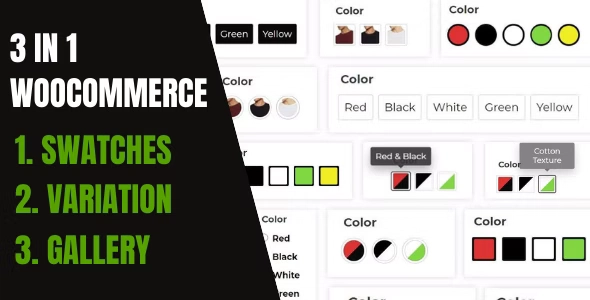
WooCommerce Variation Swatches And Additional Gallery by InnovativeWP is an all-in-one solution that combines Variation Swatches, Additional Product Galleries, and a Gallery Customizer — making your WooCommerce store visually dynamic and engaging.
With over 56+ customization options, this plugin lets you add color, image, dual color, text, and button swatches across product, shop, and archive pages. It also enhances your product gallery with vertical or horizontal layouts, zoom effects, and auto-playing slideshows — giving your customers a smooth and interactive shopping experience.
⚙️ Key Features of WooCommerce Variation Swatches
🖼️ Additional Gallery Images
Add multiple images per product variation.
Supports vertical and horizontal galleries.
Customize gallery size and layout per device.
Enable auto-play, zoom, and popup lightbox.
Show gallery images directly on shop pages.
🎨 Variation Swatches
Create color, image, dual color, button, and text swatches.
Quick View and AJAX variation loader supported.
Replace boring dropdowns with visual selectors.
Out-of-stock and not available animations.
Display stock info on single and archive pages.
🧩 Gallery Customizer & Design Control
Adjust swatch shapes, sizes, and alignment globally.
Customize number of thumbnails and gallery arrows.
Control gallery sizes based on device type.
Add animated preloaders and smooth transitions.
⚡ Performance & Compatibility
Transient caching control for faster performance.
Works seamlessly with WooCommerce themes and builders.
Fully responsive and mobile-friendly.
🚀 Why Use This Plugin?
This plugin simplifies product variation management while boosting visual appeal and usability. Instead of multiple tools, it gives you 3 features in 1 plugin — a perfect balance of performance, flexibility, and design for any WooCommerce store.
🛍️ Highlights at a Glance
✅ 3-in-1 Plugin – Swatches, Gallery, and Customizer
✅ 56+ Customization Options
✅ Works on Product, Shop & Archive Pages
✅ Fully Responsive and AJAX Compatible
✅ Supports Quick View and Zoom Effects
🔚 Conclusion
WooCommerce Variation Swatches And Additional Gallery transforms your product presentation with beautiful variation selectors and modern galleries. It’s the ultimate tool for making your WooCommerce store interactive, stylish, and conversion-focused — all without touching a line of code.
Be the first to review “WooCommerce Variation Swatches And Additional Gallery 5.1.0” Cancel reply
How to Install
Follow these quick steps to install from a .zip file or directly from your WP dashboard.
-
1
Go to Plugins → Add New
In your WordPress dashboard, open Plugins and click Add New.
-
2
Click Upload Plugin
Press Upload Plugin → Choose File and select the downloaded
plugin-name.zip. -
3
Install & Activate
Click Install Now, then Activate. You’re done!
-
4
(Optional) Enter License / Use Shortcode
Open Plugins → Your Plugin → Settings to enter your license. Add the box on the product page with:
[plugin_info_box]
Alternative: Install from WordPress directory
Go to Plugins → Add New, search the plugin name, click Install then Activate.
Manual (FTP) method
Unzip locally → upload the folder to /wp-content/plugins/ using FTP → activate from Plugins.
-
1
Go to Appearance → Themes
Click Add New → Upload Theme.
-
2
Upload the .zip file
Select
theme-name.zip, click Install Now, then Activate. -
3
Install Required Plugins
If prompted, click Begin installing plugins and activate them.
-
4
(Optional) Import Starter Content
Use the theme’s Demo Import (if provided) to load sample pages and settings.
Manual (FTP) theme install
Unzip the theme → upload to /wp-content/themes/ → activate from Appearance → Themes.




Reviews
There are no reviews yet.