
- ✔ Verified by VirusTotal
- ✔ 100% Original Product & Virus-Free
- ✔ Lifetime Free Updates on Single Purchase
- ✔ Unlimited Website Usage
- ✔ Prices in USD (Tax Included)
🔥 Limited-Time Deal — Ends Soon!
WooCommerce Wholesale Pro – By Barn2 Media 2.3.4
$30.00 Original price was: $30.00.$2.99Current price is: $2.99.
Instant Access
7 Day Money Back Guarantee
Online Support 24/7
Secure Payment
Description
🌟 WooCommerce Wholesale Pro – Add Wholesale Functionality to Your Store
Want to unlock B2B potential and increase revenue on your WooCommerce store? WooCommerce Wholesale Pro is the ultimate plugin to add wholesale functionality to your public store. This GPL-distributed version is clean, secure, and legally redistributed under the GPL license.
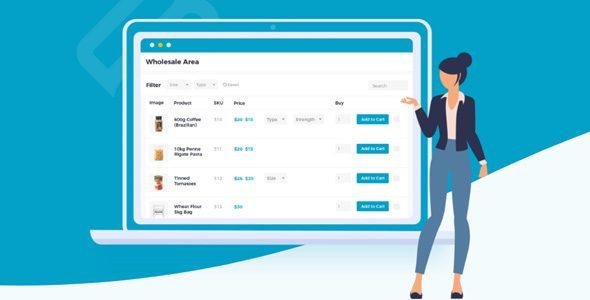
With Wholesale Pro, you can create hidden wholesale areas, assign roles, set B2B pricing, and offer quick order forms, giving your wholesale customers a seamless shopping experience.
💰 Advanced Wholesale Pricing & Discounts
Maximize profits with flexible pricing for wholesale customers:
Create unlimited wholesale roles, each with unique pricing
Set global or category percentage discounts
Add wholesale prices for individual products
Ensure wholesale buyers get specialized pricing without affecting your retail customers
👤 Easily Add Wholesale Users
Managing wholesale buyers is simple and straightforward:
Allow wholesale buyers to register directly on your site
Choose between moderated accounts or instant access
Manually add wholesale users or quickly convert existing customer accounts
Streamline wholesale onboarding for a smooth business workflow
🛒 One-Page Wholesale Order Forms
Combine WooCommerce Wholesale Pro with the WooCommerce Product Table plugin to offer:
Quick wholesale order forms for bulk purchases
A bulk buying interface designed specifically for wholesale
Maximize your wholesale revenue with efficient ordering
Provide your B2B customers with a fast and user-friendly experience
🔧 Recent Updates & Improvements
WooCommerce Wholesale Pro continues to stay compatible and optimized:
Fix: WooCommerce Product Addons now correctly handles sale prices for non-wholesale customers
Fix: Resolved errors registering wholesale users with existing usernames
Tweak: Improved handling of wholesale roles with no global discounts
Dev: Filter for price transients for better third-party integrations
Dev: Switched to Composer autoloader for cleaner coding
Tested up to WooCommerce 5.4.1 and WordPress 5.8 ✅
🏆 Why Choose WooCommerce Wholesale Pro?
✅ Hidden Wholesale Area – Only accessible to wholesale users
✅ Wholesale Registration – Easy signup for B2B customers
✅ Advanced Pricing – Role-based discounts and product-specific pricing
✅ Quick Order Forms – Bulk buying made simple
✅ Flexible User Management – Moderate accounts or instant access
✅ B2B Focused – Designed to maximize wholesale revenue
✅ GPL Licensed – Secure, clean, and legally redistributed
Unlock wholesale opportunities and grow your B2B revenue with WooCommerce Wholesale Pro. From advanced pricing to quick order forms, this plugin gives your wholesale customers a professional and seamless shopping experience. 🌟
Be the first to review “WooCommerce Wholesale Pro – By Barn2 Media 2.3.4” Cancel reply
How to Install
Follow these quick steps to install from a .zip file or directly from your WP dashboard.
-
1
Go to Plugins → Add New
In your WordPress dashboard, open Plugins and click Add New.
-
2
Click Upload Plugin
Press Upload Plugin → Choose File and select the downloaded
plugin-name.zip. -
3
Install & Activate
Click Install Now, then Activate. You’re done!
-
4
(Optional) Enter License / Use Shortcode
Open Plugins → Your Plugin → Settings to enter your license. Add the box on the product page with:
[plugin_info_box]
Alternative: Install from WordPress directory
Go to Plugins → Add New, search the plugin name, click Install then Activate.
Manual (FTP) method
Unzip locally → upload the folder to /wp-content/plugins/ using FTP → activate from Plugins.
-
1
Go to Appearance → Themes
Click Add New → Upload Theme.
-
2
Upload the .zip file
Select
theme-name.zip, click Install Now, then Activate. -
3
Install Required Plugins
If prompted, click Begin installing plugins and activate them.
-
4
(Optional) Import Starter Content
Use the theme’s Demo Import (if provided) to load sample pages and settings.
Manual (FTP) theme install
Unzip the theme → upload to /wp-content/themes/ → activate from Appearance → Themes.




Reviews
There are no reviews yet.