
- ✔ Verified by VirusTotal
- ✔ 100% Original Product & Virus-Free
- ✔ Lifetime Free Updates on Single Purchase
- ✔ Unlimited Website Usage
- ✔ Prices in USD (Tax Included)
🔥 Limited-Time Deal — Ends Soon!
WPCodeBox – Add Any Code Snippets to WordPress 1.2.1
$30.00 Original price was: $30.00.$2.99Current price is: $2.99.
Instant Access
7 Day Money Back Guarantee
Online Support 24/7
Secure Payment
Description
🧑💻 WPCodeBox – Add Any Code Snippets to WordPress
☁️ Manage & Share Code Snippets in the Cloud
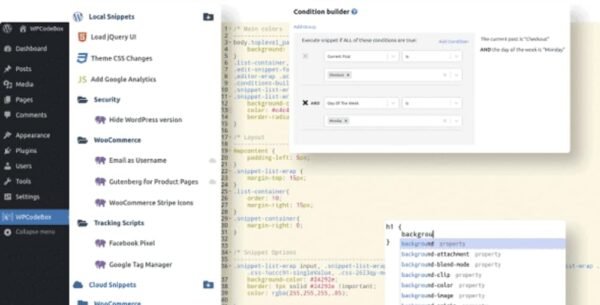
WPCodeBox is a powerful WordPress plugin that lets you save, organize, and share code snippets across unlimited WordPress sites 🌍. With its cloud storage and snippet repository 📚, you can forget the hassle of copying and pasting snippets one by one.
🔑 Key Features of WPCodeBox
1️⃣ Cloud-Based Code Snippets
Save your snippets directly to the cloud ☁️ and sync them across multiple WordPress sites in seconds.
2️⃣ Snippet Repository
Access a growing library of tested, ready-to-use snippets 📚 to speed up development and reduce plugin usage.
3️⃣ Works With All Page Builders
Fully compatible with Oxygen, Elementor, Bricks Builder, and more 🎨 – extend functionality without bloating plugins.
4️⃣ Support for All Code Types
PHP ⚡
CSS / SCSS / LESS 🎨
JavaScript (inline or external) ⚙️
Easily compile SCSS or LESS into CSS with built-in tools.
5️⃣ Smart Code Editor
WPCodeBox comes with the most advanced editor ever built into a WordPress plugin 🧑💻. Enjoy:
Code completion for WordPress, PHP, CSS, JS, and SCSS
Contextual suggestions for hooks, actions & filters
Emmet support for faster HTML & CSS coding
🚀 Why Use WPCodeBox?
✅ Reduce the number of plugins installed
✅ Enhance functionality with custom snippets
✅ Store, reuse, and share snippets across sites
✅ Improve site performance & flexibility
🎯 Final Thoughts
If you want to streamline your WordPress development and manage snippets like a pro, WPCodeBox is the ultimate solution 🏆. Secure, GPL-licensed, and beginner-friendly, it saves you time while giving you full coding power.
Be the first to review “WPCodeBox – Add Any Code Snippets to WordPress 1.2.1” Cancel reply
How to Install
Follow these quick steps to install from a .zip file or directly from your WP dashboard.
-
1
Go to Plugins → Add New
In your WordPress dashboard, open Plugins and click Add New.
-
2
Click Upload Plugin
Press Upload Plugin → Choose File and select the downloaded
plugin-name.zip. -
3
Install & Activate
Click Install Now, then Activate. You’re done!
-
4
(Optional) Enter License / Use Shortcode
Open Plugins → Your Plugin → Settings to enter your license. Add the box on the product page with:
[plugin_info_box]
Alternative: Install from WordPress directory
Go to Plugins → Add New, search the plugin name, click Install then Activate.
Manual (FTP) method
Unzip locally → upload the folder to /wp-content/plugins/ using FTP → activate from Plugins.
-
1
Go to Appearance → Themes
Click Add New → Upload Theme.
-
2
Upload the .zip file
Select
theme-name.zip, click Install Now, then Activate. -
3
Install Required Plugins
If prompted, click Begin installing plugins and activate them.
-
4
(Optional) Import Starter Content
Use the theme’s Demo Import (if provided) to load sample pages and settings.
Manual (FTP) theme install
Unzip the theme → upload to /wp-content/themes/ → activate from Appearance → Themes.




Reviews
There are no reviews yet.