
- ✔ Verified by VirusTotal
- ✔ 100% Original Product & Virus-Free
- ✔ Lifetime Free Updates on Single Purchase
- ✔ Unlimited Website Usage
- ✔ Prices in USD (Tax Included)
🔥 Limited-Time Deal — Ends Soon!
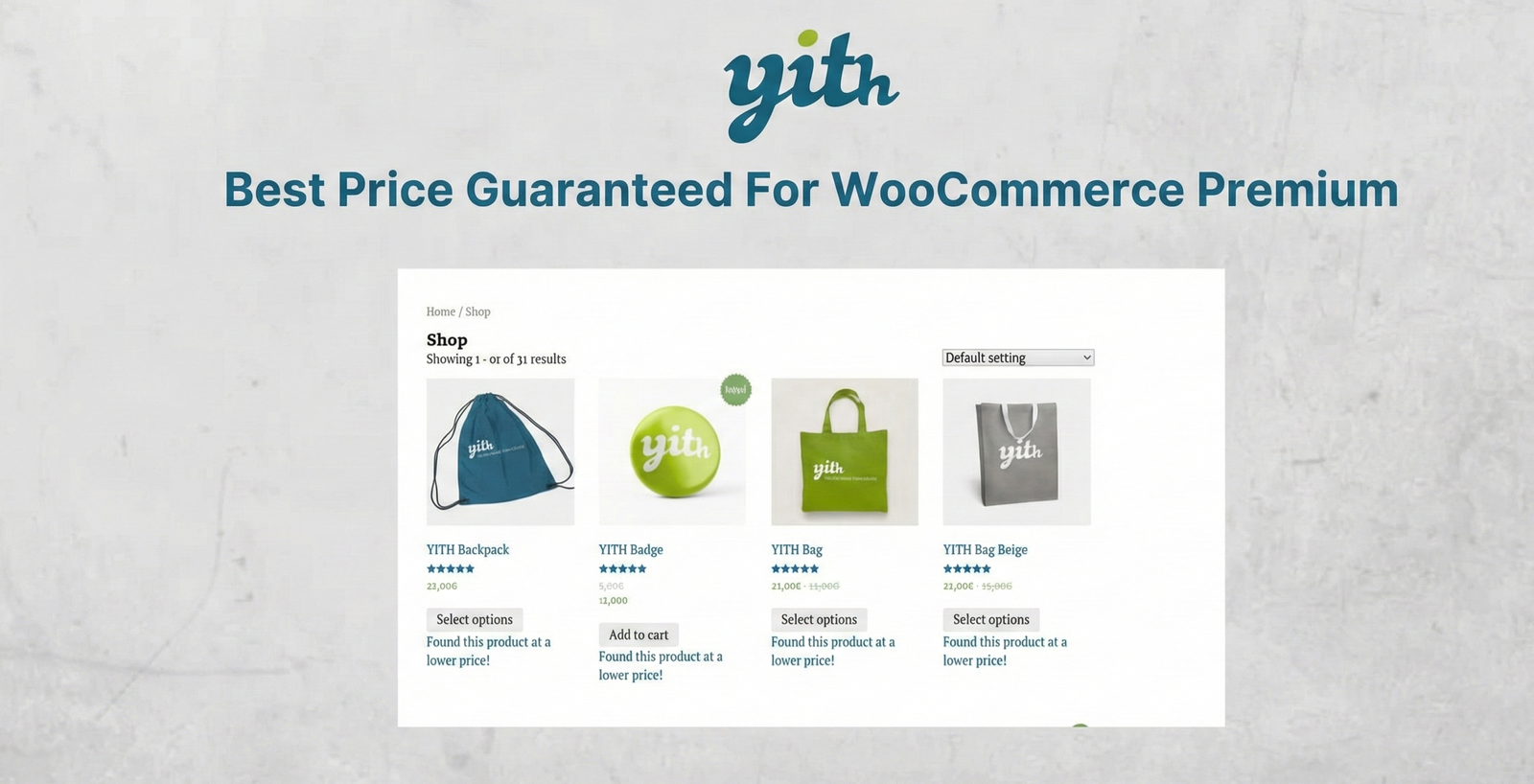
YITH Best Price Guaranteed For WooCommerce Premium 1.3.1
$60.00 Original price was: $60.00.$2.99Current price is: $2.99.
Instant Access
7 Day Money Back Guarantee
Online Support 24/7
Secure Payment
Description
YITH Best Price Guaranteed for WooCommerce Premium 🏷️💰
📌 This is a GPL-distributed version. No official support. Clean, secure, and legally redistributed under the GPL license.
What Does This Plugin Do? ❓
YITH Best Price Guaranteed for WooCommerce Premium gives your customers the chance to notify you when they find the same product at a lower price on another site. Instead of losing the sale, you can respond with a discount, match the competitor’s price, or adjust your store’s pricing strategy to remain competitive.
It’s like having a real-time pricing assistant—powered by your customers.
Why It Matters 🚀
In today’s market, even a small difference in price can push buyers to competitors. Customers expect fair pricing, transparency, and trust. With this plugin, you can:
✅ Retain loyal customers who may otherwise leave for cheaper alternatives.
📩 Get notified instantly when a competitor offers a lower price.
🛍️ Offer discounts on the spot to close more sales.
📊 Continuously adjust your prices to stay competitive in your niche.
Key Features 🌟
✔ Customer Notification Form – Shoppers can submit competitor price details directly from product or shop pages.
✔ Flexible Placement – Show the “Found a better price?” link before/after the price, add-to-cart button, or excerpt.
✔ Admin Alerts – Receive automatic emails for every customer price request.
✔ Customizable Popup – Set popup size, labels, and colors to match your store’s branding.
✔ Discount Management – Instantly propose your product at the suggested lower price.
✔ Variable Products Support – Works seamlessly with product variations.
✔ Currency Compatibility – Integrated with Aelia WooCommerce Currency Switcher for international stores.
Real-World Use Cases 💡
🛒 Electronics stores – Compete with giants by offering price-match guarantees.
📚 Bookshops & eBooks – Stay competitive in a fast-changing digital pricing market.
👕 Fashion retailers – Retain customers even if they find the same outfit cheaper elsewhere.
🌍 Global sellers – Manage competitive pricing across multiple currencies.
Why Choose YITH Best Price Guaranteed for WooCommerce Premium? ✅
Because pricing is one of the biggest deal-breakers in e-commerce. This plugin:
Keeps customers engaged instead of bouncing to competitors.
Builds trust and loyalty by showing you care about their budget.
Helps you optimize pricing strategies while boosting conversions and revenue.
With YITH Best Price Guaranteed for WooCommerce Premium, you turn price sensitivity into an opportunity—keeping customers on your side and increasing sales.
Be the first to review “YITH Best Price Guaranteed For WooCommerce Premium 1.3.1” Cancel reply
How to Install
Follow these quick steps to install from a .zip file or directly from your WP dashboard.
-
1
Go to Plugins → Add New
In your WordPress dashboard, open Plugins and click Add New.
-
2
Click Upload Plugin
Press Upload Plugin → Choose File and select the downloaded
plugin-name.zip. -
3
Install & Activate
Click Install Now, then Activate. You’re done!
-
4
(Optional) Enter License / Use Shortcode
Open Plugins → Your Plugin → Settings to enter your license. Add the box on the product page with:
[plugin_info_box]
Alternative: Install from WordPress directory
Go to Plugins → Add New, search the plugin name, click Install then Activate.
Manual (FTP) method
Unzip locally → upload the folder to /wp-content/plugins/ using FTP → activate from Plugins.
-
1
Go to Appearance → Themes
Click Add New → Upload Theme.
-
2
Upload the .zip file
Select
theme-name.zip, click Install Now, then Activate. -
3
Install Required Plugins
If prompted, click Begin installing plugins and activate them.
-
4
(Optional) Import Starter Content
Use the theme’s Demo Import (if provided) to load sample pages and settings.
Manual (FTP) theme install
Unzip the theme → upload to /wp-content/themes/ → activate from Appearance → Themes.

Reviews
There are no reviews yet.