
- ✔ Verified by VirusTotal
- ✔ 100% Original Product & Virus-Free
- ✔ Lifetime Free Updates on Single Purchase
- ✔ Unlimited Website Usage
- ✔ Prices in USD (Tax Included)
🔥 Limited-Time Deal — Ends Soon!
YITH Sequential Order Number Premium 1.48.0
$57.00 Original price was: $57.00.$2.99Current price is: $2.99.
Instant Access
7 Day Money Back Guarantee
Online Support 24/7
Secure Payment
Description
🔢 YITH Sequential Order Number Premium (Latest Version)
📌 This is a GPL-distributed version. No official support. Clean, secure, and legally redistributed under the GPL license.
📖 What Does It Do?
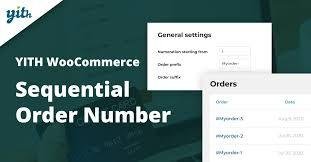
By default, WooCommerce assigns random order IDs (shared with posts, pages, or media files), which often leads to gaps and non-sequential order numbers. This can create confusion for both store owners and customers.
With YITH Sequential Order Number Premium, you can rearrange WooCommerce order numbers into a sequential, consecutive, or custom format. Whether you want a clean numeric sequence, prefixes/suffixes, or date-based numbering, this plugin gives you full control.
🚀 Why It’s Important
🛍 Professional order tracking → Makes managing thousands of orders simple.
🔎 Quick search → Find any order instantly by its sequential ID.
📊 Accurate reporting → Easily estimate and analyze daily or monthly order volumes.
📑 Better record keeping → No more random IDs; every order has a logical sequence.
🌟 Free Features
✔️ Generate sequential order numbers.
✔️ Set a custom starting number for orders.
✔️ Add a prefix (e.g., SHOP-, INV-).
✔️ Add order date as prefix.
✔️ Choose order number templates (number only, prefix + number, date + number, etc.).
✔️ Define a custom order number length (e.g., 000123).
✔️ Option to retain existing order numbers.
✔️ Preview order numbers before applying changes.
✔️ Enable custom order numbers in admin search.
✔️ Full support for WooCommerce Subscriptions & tracking.
✔️ Compatible with WooCommerce HPOS & tested with WooCommerce 9.3.3 and PHP 8.2.
🌟 Premium Features
✅ Add a custom suffix.
✅ Add order date as suffix.
✅ Auto-reset order numbers daily, monthly, or yearly.
✅ Define a separate sequence for free orders.
✅ More advanced order number templates.
✅ Set a custom increment (e.g., +5, +10 instead of +1).
🔗 Compatible With
WooCommerce Subscriptions
WooCommerce Stripe & PayPal Gateways
WooCommerce POS & Shipment Tracking
WebToffee PDF Invoices & Packing Slips
Advanced Order Export Plugins
Multi-currency plugins like Aelia Currency Switcher
WPML for multilingual stores
💡 Benefits for Store Owners
Streamlined store management → Sequential IDs make handling bulk orders effortless.
Faster tracking & refunds → Easily locate a customer’s order without confusion.
Clear order history → Get accurate order counts at a glance.
Professional invoices → Present customers with neat, business-like order numbers.
Scalable solution → Works perfectly whether you process 10 orders/day or 10,000.
🎯 Why Use YITH Sequential Order Number Premium?
A professional eCommerce store needs organized and trackable order IDs. With this plugin, you eliminate the chaos of random numbers, ensure clear records, and give both your team and customers a better order management experience.
Be the first to review “YITH Sequential Order Number Premium 1.48.0” Cancel reply
How to Install
Follow these quick steps to install from a .zip file or directly from your WP dashboard.
-
1
Go to Plugins → Add New
In your WordPress dashboard, open Plugins and click Add New.
-
2
Click Upload Plugin
Press Upload Plugin → Choose File and select the downloaded
plugin-name.zip. -
3
Install & Activate
Click Install Now, then Activate. You’re done!
-
4
(Optional) Enter License / Use Shortcode
Open Plugins → Your Plugin → Settings to enter your license. Add the box on the product page with:
[plugin_info_box]
Alternative: Install from WordPress directory
Go to Plugins → Add New, search the plugin name, click Install then Activate.
Manual (FTP) method
Unzip locally → upload the folder to /wp-content/plugins/ using FTP → activate from Plugins.
-
1
Go to Appearance → Themes
Click Add New → Upload Theme.
-
2
Upload the .zip file
Select
theme-name.zip, click Install Now, then Activate. -
3
Install Required Plugins
If prompted, click Begin installing plugins and activate them.
-
4
(Optional) Import Starter Content
Use the theme’s Demo Import (if provided) to load sample pages and settings.
Manual (FTP) theme install
Unzip the theme → upload to /wp-content/themes/ → activate from Appearance → Themes.



Reviews
There are no reviews yet.