
- ✔ Verified by VirusTotal
- ✔ 100% Original Product & Virus-Free
- ✔ Lifetime Free Updates on Single Purchase
- ✔ Unlimited Website Usage
- ✔ Prices in USD (Tax Included)
🔥 Limited-Time Deal — Ends Soon!
YITH WooCommerce Added to Cart Popup Premium 2.31.0
$58.00 Original price was: $58.00.$2.99Current price is: $2.99.
Instant Access
7 Day Money Back Guarantee
Online Support 24/7
Secure Payment
Description
YITH Added to Cart Popup Premium 🛒✨
📌 This is a GPL-distributed version. No official support. Clean, secure, and legally redistributed under the GPL license.
What the Plugin Does ❓
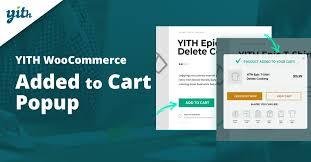
YITH WooCommerce Added to Cart Popup Premium enhances the shopping experience by showing a smart modal popup whenever a product is added to the cart. Instead of leaving customers guessing or forcing them to reload the cart page, they immediately see what’s in their cart—making the purchase flow smoother, quicker, and more enjoyable.
This plugin also doubles as a sales booster: inside the popup, you can showcase related, cross-sell, or up-sell products to encourage additional purchases and increase the average order value.
YITH WooCommerce Added Why You Need It 🚀
✔️ Boost Conversions – Keep customers engaged by reducing friction during checkout.
✔️ Encourage Cross-Selling – Display related products directly in the popup.
✔️ Improve User Experience – Instant feedback makes customers feel secure about their purchase.
✔️ Save Time – Buyers can continue shopping without being redirected.
✔️ Mobile-Friendly – Optimized for mobile devices to increase conversions on all screens.
Key Features 🌟
🔔 Popup Notification whenever a product is added to the cart.
🛍️ Add “View Cart” and/or “Continue Shopping” buttons.
🎨 Customize popup button \ and overall \ scheme.
🎭 8 popup entrance animations for dynamic effects.
📐 Adjust popup size to match your store design.
🖥️ Enable/disable popups on the Shop page and Product Detail pages.
🔎 Choose content to display: cart summary or product details.
✅ Show/hide in-popup details like:
Variations
Cart total
Shipping fees
Applied taxes
➕ “Add to Cart” buttons for suggested products.
🚀 Direct redirect-to-checkout button option.
🖼️ Display product images inside the popup.
🏷️ Customize popup button labels.
📱 Mobile-compatible popups.
🛒 Suggest products by:
Related items
Cross-sells
Up-sells
Custom product selection
🎯 Show a selection of products at the end of the popup.
🛍️ Add suggested products to the cart without leaving the popup.
🔄 Floating mini-cart icon showing live cart status (products + count). (New)
🔗 Full compatibility with YITH Frequently Bought Together plugin – auto popup trigger. (New)
🔗 Compatible with \ Gravity Forms Product Add-Ons. (New)
YITH WooCommerce Added Benefits for Your Store 💼
✅ Reduce cart abandonment with clear cart visibility.
✅ Increase sales by upselling and cross-selling directly in the popup.
✅ Faster shopping process with fewer clicks and page loads.
✅ Better customer experience with engaging animations and real-time feedback.
👉 YITH WooCommerce Added to Cart Popup Premium is the perfect tool to make your checkout process smoother, your shop more interactive, and your sales higher!
Be the first to review “YITH WooCommerce Added to Cart Popup Premium 2.31.0” Cancel reply
How to Install
Follow these quick steps to install from a .zip file or directly from your WP dashboard.
-
1
Go to Plugins → Add New
In your WordPress dashboard, open Plugins and click Add New.
-
2
Click Upload Plugin
Press Upload Plugin → Choose File and select the downloaded
plugin-name.zip. -
3
Install & Activate
Click Install Now, then Activate. You’re done!
-
4
(Optional) Enter License / Use Shortcode
Open Plugins → Your Plugin → Settings to enter your license. Add the box on the product page with:
[plugin_info_box]
Alternative: Install from WordPress directory
Go to Plugins → Add New, search the plugin name, click Install then Activate.
Manual (FTP) method
Unzip locally → upload the folder to /wp-content/plugins/ using FTP → activate from Plugins.
-
1
Go to Appearance → Themes
Click Add New → Upload Theme.
-
2
Upload the .zip file
Select
theme-name.zip, click Install Now, then Activate. -
3
Install Required Plugins
If prompted, click Begin installing plugins and activate them.
-
4
(Optional) Import Starter Content
Use the theme’s Demo Import (if provided) to load sample pages and settings.
Manual (FTP) theme install
Unzip the theme → upload to /wp-content/themes/ → activate from Appearance → Themes.



Reviews
There are no reviews yet.