
- ✔ Verified by VirusTotal
- ✔ 100% Original Product & Virus-Free
- ✔ Lifetime Free Updates on Single Purchase
- ✔ Unlimited Website Usage
- ✔ Prices in USD (Tax Included)
🔥 Limited-Time Deal — Ends Soon!
YITH WooCommerce Ajax Product Filter Premium 5.14.3
$57.00 Original price was: $57.00.$2.99Current price is: $2.99.
Instant Access
7 Day Money Back Guarantee
Online Support 24/7
Secure Payment
Description
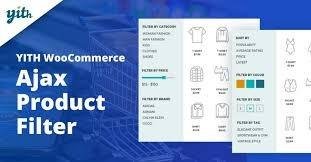
⚡ YITH WooCommerce Ajax Product Filter Premium
Finding the right product in a WooCommerce store can be challenging for customers, especially in large catalogs. Research shows that 75% of users leave a store if they can’t find what they’re looking for within 15 seconds.
YITH WooCommerce Ajax Product Filter Premium is the perfect solution. It allows your customers to filter products instantly by category, size, color, brand, price, rating, and more—making shopping faster, simpler, and increasing your store’s conversion rates.
🛒 Key Features
Unlimited Filter Presets 🎛️
Create unlimited filter groups (presets) for different product or category pages
Show filters where you want using a widget, shortcode, Gutenberg block, or Elementor widget
Customize filters for specific pages, categories, or custom layouts
Toggle Filters Option ✅
Choose to show filters in toggle mode (collapsed/expanded) to save space
Or display all filter options openly for full visibility
Ready-to-Use Default Preset ⚡
Includes a pre-configured filter preset with all available options
Disable filters you don’t need and set their display location in seconds
Compatible with shop sidebar, shortcodes, Gutenberg, and Elementor
🏷️ Filter Options
Category Filter: Let users select the product category
Tag Filter: Filter products based on tags
Price Filter: Display a price range slider for budget-friendly shopping
Color & Size Filter: Create filters for all attributes, with swatches or custom images
Rating Filter: Show products based on customer reviews
Brand Filter: Integrates with YITH Brands Add-on for brand-specific filtering
On-Sale Products Filter: Show products currently discounted
In-Stock Products Filter: Only display products available for purchase
⚙️ Flexible Display Options
Show filters on WooCommerce shop pages, category pages, or custom pages
Use widget areas, Gutenberg blocks, shortcodes, or Elementor widgets
Filters update instantly via Ajax, so your users don’t wait for page reloads
🚀 Benefits
Improve user experience and help customers find products faster
Reduce bounce rates by keeping visitors engaged
Boost conversion rates by guiding users to their ideal product
Ideal for stores with large catalogs or complex product listings
YITH WooCommerce Ajax Product Filter Premium is a must-have plugin for WooCommerce stores that want to provide fast, intuitive, and powerful filtering. With its flexibility, multiple display options, and instant Ajax updates, your customers will enjoy a seamless shopping experience, and your sales will benefit from better product discovery.
Be the first to review “YITH WooCommerce Ajax Product Filter Premium 5.14.3” Cancel reply
How to Install
Follow these quick steps to install from a .zip file or directly from your WP dashboard.
-
1
Go to Plugins → Add New
In your WordPress dashboard, open Plugins and click Add New.
-
2
Click Upload Plugin
Press Upload Plugin → Choose File and select the downloaded
plugin-name.zip. -
3
Install & Activate
Click Install Now, then Activate. You’re done!
-
4
(Optional) Enter License / Use Shortcode
Open Plugins → Your Plugin → Settings to enter your license. Add the box on the product page with:
[plugin_info_box]
Alternative: Install from WordPress directory
Go to Plugins → Add New, search the plugin name, click Install then Activate.
Manual (FTP) method
Unzip locally → upload the folder to /wp-content/plugins/ using FTP → activate from Plugins.
-
1
Go to Appearance → Themes
Click Add New → Upload Theme.
-
2
Upload the .zip file
Select
theme-name.zip, click Install Now, then Activate. -
3
Install Required Plugins
If prompted, click Begin installing plugins and activate them.
-
4
(Optional) Import Starter Content
Use the theme’s Demo Import (if provided) to load sample pages and settings.
Manual (FTP) theme install
Unzip the theme → upload to /wp-content/themes/ → activate from Appearance → Themes.

Reviews
There are no reviews yet.