
- ✔ Verified by VirusTotal
- ✔ 100% Original Product & Virus-Free
- ✔ Lifetime Free Updates on Single Purchase
- ✔ Unlimited Website Usage
- ✔ Prices in USD (Tax Included)
🔥 Limited-Time Deal — Ends Soon!
YITH WooCommerce Anti-Fraud Premium 1.4.5
$31.00 Original price was: $31.00.$2.99Current price is: $2.99.
Instant Access
7 Day Money Back Guarantee
Online Support 24/7
Secure Payment
Description
YITH WooCommerce Anti-Fraud Premium 🛡️🔒
📌 This is a GPL-distributed version. No official support. Clean, secure, and legally redistributed under the GPL license.
What the Plugin Does❓
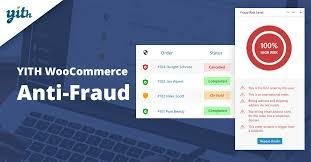
YITH WooCommerce Anti-Fraud helps you create safety rules to block suspicious or fraudulent purchases in your store. By automatically checking multiple variables (IP address, email, geolocation, and more), it prevents scammers from completing harmful transactions.
Why You Need It 🚨
Fraudulent purchases are one of the biggest threats to online stores. Did you know that in 90% of fraudulent credit card transactions, banks refund the buyer? That means you lose:
💸 The money from the sale
📦 The product shipped
🕒 Time wasted dealing with disputes
⚠️ Risk of being flagged by banks
👎 Damage to your store’s reputation
With YITH WooCommerce Anti-Fraud, you can say goodbye to scams before they damage your business.
How It Works ⚙️
The plugin monitors purchases in real time.
Each order is given a risk coefficient based on suspicious parameters.
If the risk is too high, the order is automatically blocked and set to pending.
You get an instant email notification to manually review and decide whether to approve or reject the order.
This lets you stop scammers before losing money or products.
Key Benefits 🌟
✔️ Apply automatic cross-checks on multiple variables (IP, email, geolocation, etc.)
✔️ Block suspicious orders before payment is finalized
✔️ Reduce chargebacks and financial losses
✔️ Protect your store from being added to bank blacklists
✔️ Save valuable time by letting the plugin handle fraud detection automatically
✔️ Maintain a strong business reputation by ensuring secure transactions
Why Choose YITH WooCommerce Anti-Fraud 🔑
This plugin was designed for store owners who work hard to increase sales but are tired of seeing those efforts wasted due to fraudulent purchases. By proactively blocking scams, you ensure that your e-commerce remains secure, professional, and trusted by customers.
👉 With YITH WooCommerce Anti-Fraud Premium, you can focus on growing your business without worrying about scammers.
Be the first to review “YITH WooCommerce Anti-Fraud Premium 1.4.5” Cancel reply
How to Install
Follow these quick steps to install from a .zip file or directly from your WP dashboard.
-
1
Go to Plugins → Add New
In your WordPress dashboard, open Plugins and click Add New.
-
2
Click Upload Plugin
Press Upload Plugin → Choose File and select the downloaded
plugin-name.zip. -
3
Install & Activate
Click Install Now, then Activate. You’re done!
-
4
(Optional) Enter License / Use Shortcode
Open Plugins → Your Plugin → Settings to enter your license. Add the box on the product page with:
[plugin_info_box]
Alternative: Install from WordPress directory
Go to Plugins → Add New, search the plugin name, click Install then Activate.
Manual (FTP) method
Unzip locally → upload the folder to /wp-content/plugins/ using FTP → activate from Plugins.
-
1
Go to Appearance → Themes
Click Add New → Upload Theme.
-
2
Upload the .zip file
Select
theme-name.zip, click Install Now, then Activate. -
3
Install Required Plugins
If prompted, click Begin installing plugins and activate them.
-
4
(Optional) Import Starter Content
Use the theme’s Demo Import (if provided) to load sample pages and settings.
Manual (FTP) theme install
Unzip the theme → upload to /wp-content/themes/ → activate from Appearance → Themes.


Reviews
There are no reviews yet.