
- ✔ Verified by VirusTotal
- ✔ 100% Original Product & Virus-Free
- ✔ Lifetime Free Updates on Single Purchase
- ✔ Unlimited Website Usage
- ✔ Prices in USD (Tax Included)
🔥 Limited-Time Deal — Ends Soon!
YITH WooCommerce Bulk Product Editing 3.21.0
$58.00 Original price was: $58.00.$2.99Current price is: $2.99.
Instant Access
7 Day Money Back Guarantee
Online Support 24/7
Secure Payment
Description
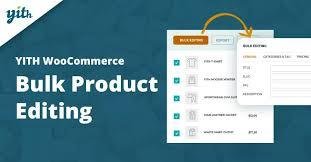
YITH WooCommerce Bulk Product Editing – Latest Version ⚡🛍️
📌 This is a GPL-distributed version. No official support. Clean, secure, and legally redistributed under the GPL license.
Save Time and Edit Multiple Products at Once ⏱️
Managing an online store often means handling hundreds or thousands of products. Adjusting prices, editing descriptions, or updating categories one by one can take hours — even days. With YITH WooCommerce Bulk Product Editing, you can update multiple products in just a few clicks.
Whether you need to change product prices for a seasonal sale, update descriptions, or bulk edit variations, this plugin makes it quick, efficient, and stress-free.
Why You Need It 🚀
🛒 Save hours of manual work by editing multiple products at once
📊 Apply bulk discounts or seasonal promotions quickly
✍️ Update product descriptions, categories, tags, and attributes in bulk
🔄 Import/export products easily using CSV files
⚡ Boost productivity and reduce workload for your staff
YITH WooCommerce Bulk Product Editing Features 🛠️
Bulk Editing Tools ✍️
Change prices simultaneously for all or selected products
Round up prices automatically based on WooCommerce settings
Edit titles, SKUs, descriptions, short descriptions, categories, and tags
Bulk update catalog visibility, attributes, and shipping classes
Advanced Filtering 🔍
Filter products by category, tag, price, SKU, or visibility
Find and edit products quickly using smart filters
Apply REGEX search for advanced text editing
Variations Management 🎯
Edit product variations in bulk
Enable/disable variations with one click
Update variation descriptions and purchase notes
Product Management 📦
Delete multiple products in one click
Create new products directly from the plugin edit page
Export product data into CSV for bulk import/export
Associate custom taxonomies to products massively
Customization & Flexibility ⚡
Create or edit custom fields for products in bulk
Enable or disable product variations by setting their status
Simplify bulk editing tasks with a user-friendly interface
Benefits for Your Store 🌟
⏳ Save valuable time with mass updates
🛍️ Keep your catalog always updated and optimized
📈 Respond quickly to seasonal changes or promotions
💼 Improve efficiency for store managers and staff
🔄 Manage small or large WooCommerce shops with ease
Be the first to review “YITH WooCommerce Bulk Product Editing 3.21.0” Cancel reply
How to Install
Follow these quick steps to install from a .zip file or directly from your WP dashboard.
-
1
Go to Plugins → Add New
In your WordPress dashboard, open Plugins and click Add New.
-
2
Click Upload Plugin
Press Upload Plugin → Choose File and select the downloaded
plugin-name.zip. -
3
Install & Activate
Click Install Now, then Activate. You’re done!
-
4
(Optional) Enter License / Use Shortcode
Open Plugins → Your Plugin → Settings to enter your license. Add the box on the product page with:
[plugin_info_box]
Alternative: Install from WordPress directory
Go to Plugins → Add New, search the plugin name, click Install then Activate.
Manual (FTP) method
Unzip locally → upload the folder to /wp-content/plugins/ using FTP → activate from Plugins.
-
1
Go to Appearance → Themes
Click Add New → Upload Theme.
-
2
Upload the .zip file
Select
theme-name.zip, click Install Now, then Activate. -
3
Install Required Plugins
If prompted, click Begin installing plugins and activate them.
-
4
(Optional) Import Starter Content
Use the theme’s Demo Import (if provided) to load sample pages and settings.
Manual (FTP) theme install
Unzip the theme → upload to /wp-content/themes/ → activate from Appearance → Themes.



Reviews
There are no reviews yet.