
- ✔ Verified by VirusTotal
- ✔ 100% Original Product & Virus-Free
- ✔ Lifetime Free Updates on Single Purchase
- ✔ Unlimited Website Usage
- ✔ Prices in USD (Tax Included)
🔥 Limited-Time Deal — Ends Soon!
YITH WooCommerce Category Accordion Pro 2.23.0
$57.00 Original price was: $57.00.$2.99Current price is: $2.99.
Instant Access
7 Day Money Back Guarantee
Online Support 24/7
Secure Payment
Description
YITH WooCommerce Category Accordion Premium 📂✨
📌 This is a GPL-distributed version. No official support. Clean, secure, and legally redistributed under the GPL license.
What the Plugin Does ❓
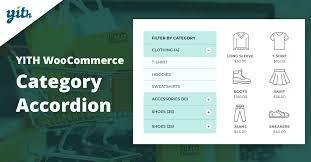
YITH WooCommerce Category Accordion Premium makes product browsing easier by displaying your WooCommerce categories and subcategories in an elegant, collapsible accordion style. Instead of long and messy lists, your store visitors will enjoy a clean, organized navigation menu that enhances usability and improves the shopping experience.
Why You Need It 🚀
✔️ Improve Store Navigation – Customers can quickly find categories and products without scrolling endlessly.
✔️ Save Space & Reduce Clutter – Accordion-style menus keep your site tidy and user-friendly.
✔️ Professional Look – Upgrade your shop design with a modern navigation system already used by top e-commerce stores.
✔️ Better Conversions – A smoother navigation means customers spend more time exploring products, leading to higher sales.
Key Features 🌟
✅ Premium Features
Show unlimited categories and subcategories in accordion view.
Set the subcategory depth level to display.
Control the number of categories shown.
Sort categories by ID, name, or number of products.
Option to show tags and menus alongside categories.
Hide the category list on selected pages, posts, or categories.
Choose from 4 customizable styles with color options.
Decide how accordion opens: hover or click.
Option to hide empty categories.
Display list as always open or accordion style.
Add accordion via shortcode (same features as widget).
✅ Free Features
Display categories in accordion style.
Highlight the current active category on product detail pages.
Show WordPress and/or WooCommerce categories.
Option to display subcategories.
Includes 1 widget for sidebars.
Benefits for Your Store 💼
🔹 Provides a clearer and more intuitive product navigation.
🔹 Enhances your site’s appearance and usability.
🔹 Keeps customers engaged by reducing frustration in finding products.
🔹 Suitable for small shops and large e-commerce sites with hundreds of categories.
👉 YITH WooCommerce Category Accordion Premium is the perfect solution to improve your store navigation, keep your layout professional, and boost your sales.
Be the first to review “YITH WooCommerce Category Accordion Pro 2.23.0” Cancel reply
How to Install
Follow these quick steps to install from a .zip file or directly from your WP dashboard.
-
1
Go to Plugins → Add New
In your WordPress dashboard, open Plugins and click Add New.
-
2
Click Upload Plugin
Press Upload Plugin → Choose File and select the downloaded
plugin-name.zip. -
3
Install & Activate
Click Install Now, then Activate. You’re done!
-
4
(Optional) Enter License / Use Shortcode
Open Plugins → Your Plugin → Settings to enter your license. Add the box on the product page with:
[plugin_info_box]
Alternative: Install from WordPress directory
Go to Plugins → Add New, search the plugin name, click Install then Activate.
Manual (FTP) method
Unzip locally → upload the folder to /wp-content/plugins/ using FTP → activate from Plugins.
-
1
Go to Appearance → Themes
Click Add New → Upload Theme.
-
2
Upload the .zip file
Select
theme-name.zip, click Install Now, then Activate. -
3
Install Required Plugins
If prompted, click Begin installing plugins and activate them.
-
4
(Optional) Import Starter Content
Use the theme’s Demo Import (if provided) to load sample pages and settings.
Manual (FTP) theme install
Unzip the theme → upload to /wp-content/themes/ → activate from Appearance → Themes.


Reviews
There are no reviews yet.