
- ✔ Verified by VirusTotal
- ✔ 100% Original Product & Virus-Free
- ✔ Lifetime Free Updates on Single Purchase
- ✔ Unlimited Website Usage
- ✔ Prices in USD (Tax Included)
🔥 Limited-Time Deal — Ends Soon!
YITH WooCommerce Compare Premium 2.36.0
$60.00 Original price was: $60.00.$2.99Current price is: $2.99.
Instant Access
7 Day Money Back Guarantee
Online Support 24/7
Secure Payment
Description
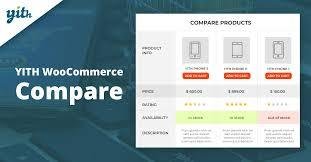
🔍 YITH WooCommerce Compare Premium GPL – Help Customers Choose the Perfect Product
📌 This is a GPL-distributed version. No official support. Clean, secure, and legally redistributed under the GPL license.
🛒 Why Use YITH WooCommerce Compare?
When your store has many similar products, customers can easily get confused and overwhelmed. Research shows that the more options buyers have, the more time they spend analyzing features before making a purchase.
YITH WooCommerce Compare Premium solves this problem by giving shoppers an easy-to-use product comparison tool. With just a few clicks, customers can view multiple products side by side, analyze features, and quickly decide which one best fits their needs.
This means faster decision-making, smoother shopping experiences, and more sales for your store.
🌟 YITH WooCommerce Compare Premium Features
✔️ All free version features included.
✔️ Display comparison tables on shop pages.
✔️ Show modal only when 2+ products are added.
✔️ Sort products by category inside comparison tables.
✔️ Restrict comparison to specific product categories.
✔️ Add a custom image above the comparison table.
✔️ Product images inside compare widget.
✔️ Dynamic comparison fields (only show attributes used).
✔️ Compare custom product attributes.
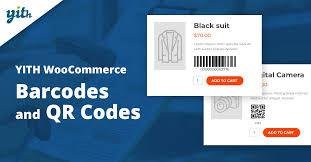
✔️ Display product SKU in comparison tables.
✔️ Share compare pages on social networks (Facebook, Twitter, Google, Pinterest) or via email.
✔️ Show related products with same tag/category in a slider.
✔️ Fully customizable style & layout.
✔️ Highlight differences across product features.
✔️ Auto-generate shortcodes for specific product comparisons.
✔️ Widgets for compare list and product counters.
✔️ Choose number of fixed columns in the comparison table.
✔️ Limit how many products can be added to the table.
🎯 Benefits for Your Store
🛒 Simplify decision-making → Customers quickly find the right product.
📈 Boost conversions → Remove confusion and hesitation.
⏱ Faster purchases → Shorten buying time with clear comparisons.
🤝 Improve user experience → Build trust by making shopping easier.
🔗 Social sharing → Customers can share compare results with friends before buying.
🚀 Why Choose YITH WooCommerce Compare Premium GPL?
This plugin is the perfect tool for large WooCommerce stores with multiple similar products. By offering an intuitive product comparison system, you reduce hesitation, increase satisfaction, and push customers toward faster purchases.
With YITH WooCommerce Compare Premium GPL, you’re not just adding a feature — you’re giving your store a competitive edge.
Be the first to review “YITH WooCommerce Compare Premium 2.36.0” Cancel reply
How to Install
Follow these quick steps to install from a .zip file or directly from your WP dashboard.
-
1
Go to Plugins → Add New
In your WordPress dashboard, open Plugins and click Add New.
-
2
Click Upload Plugin
Press Upload Plugin → Choose File and select the downloaded
plugin-name.zip. -
3
Install & Activate
Click Install Now, then Activate. You’re done!
-
4
(Optional) Enter License / Use Shortcode
Open Plugins → Your Plugin → Settings to enter your license. Add the box on the product page with:
[plugin_info_box]
Alternative: Install from WordPress directory
Go to Plugins → Add New, search the plugin name, click Install then Activate.
Manual (FTP) method
Unzip locally → upload the folder to /wp-content/plugins/ using FTP → activate from Plugins.
-
1
Go to Appearance → Themes
Click Add New → Upload Theme.
-
2
Upload the .zip file
Select
theme-name.zip, click Install Now, then Activate. -
3
Install Required Plugins
If prompted, click Begin installing plugins and activate them.
-
4
(Optional) Import Starter Content
Use the theme’s Demo Import (if provided) to load sample pages and settings.
Manual (FTP) theme install
Unzip the theme → upload to /wp-content/themes/ → activate from Appearance → Themes.

Reviews
There are no reviews yet.