
- ✔ Verified by VirusTotal
- ✔ 100% Original Product & Virus-Free
- ✔ Lifetime Free Updates on Single Purchase
- ✔ Unlimited Website Usage
- ✔ Prices in USD (Tax Included)
🔥 Limited-Time Deal — Ends Soon!
YITH WooCommerce Customize My Account Page Premium 4.23.0
$66.00 Original price was: $66.00.$2.99Current price is: $2.99.
Instant Access
7 Day Money Back Guarantee
Online Support 24/7
Secure Payment
Description
📖 Long SEO Description
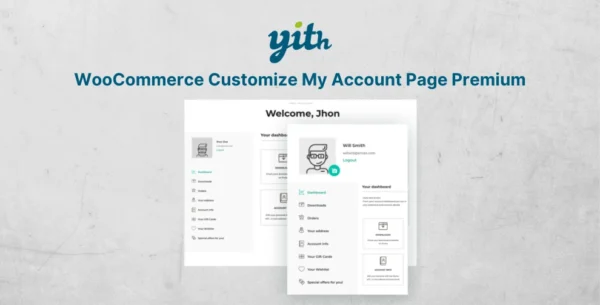
YITH WooCommerce Customize My Account Page Premium GPL is the ultimate solution to personalize and manage the WooCommerce My Account page with ease. This powerful GPL plugin allows you to redesign the default account page, organize important information, and create a better user experience for your customers.
With this plugin, you can add custom tabs, menus, links, and sections to the My Account area, making it easier for users to access their orders, invoices, downloads, wishlists, and guides. You can also remove unnecessary sections or rearrange them to highlight the most important details for your customers.
By customizing the My Account page, you can increase user engagement, improve navigation, and boost repeat purchases. A clean and well-organized account dashboard not only improves customer satisfaction but also helps store owners promote additional services, upsells, or personalized offers.
🔑 Key Features of YITH WooCommerce Customize My Account Page Premium GPL:
Fully customizable WooCommerce My Account page plugin
Add unlimited custom tabs, menus, and sections
Remove or reorder existing WooCommerce account sections
Assign different content types: text, links, forms, or shortcodes
Restrict specific sections to certain user roles
Easy drag-and-drop interface for customization
Supports third-party plugins integration
Translation ready & GDPR compliant
100% GPL licensed – clean, secure, and legally redistributed
🚀 Why Choose YITH WooCommerce Customize My Account Page?
Most eCommerce stores overlook the importance of the My Account page. By default, WooCommerce provides only basic options. With this plugin, you can turn it into a powerful customer dashboard that showcases everything your users need in one place. From managing downloads and invoices to accessing personalized offers – you have complete control.
Whether you want to build a professional WooCommerce account dashboard, improve user satisfaction, or increase conversions, this plugin is the perfect choice.
✅ Focus Keywords Included:
YITH WooCommerce Customize My Account Page Premium GPL
WooCommerce My Account page plugin
Customize WooCommerce account dashboard
WooCommerce GPL plugin
WooCommerce My Account customization
Be the first to review “YITH WooCommerce Customize My Account Page Premium 4.23.0” Cancel reply
How to Install
Follow these quick steps to install from a .zip file or directly from your WP dashboard.
-
1
Go to Plugins → Add New
In your WordPress dashboard, open Plugins and click Add New.
-
2
Click Upload Plugin
Press Upload Plugin → Choose File and select the downloaded
plugin-name.zip. -
3
Install & Activate
Click Install Now, then Activate. You’re done!
-
4
(Optional) Enter License / Use Shortcode
Open Plugins → Your Plugin → Settings to enter your license. Add the box on the product page with:
[plugin_info_box]
Alternative: Install from WordPress directory
Go to Plugins → Add New, search the plugin name, click Install then Activate.
Manual (FTP) method
Unzip locally → upload the folder to /wp-content/plugins/ using FTP → activate from Plugins.
-
1
Go to Appearance → Themes
Click Add New → Upload Theme.
-
2
Upload the .zip file
Select
theme-name.zip, click Install Now, then Activate. -
3
Install Required Plugins
If prompted, click Begin installing plugins and activate them.
-
4
(Optional) Import Starter Content
Use the theme’s Demo Import (if provided) to load sample pages and settings.
Manual (FTP) theme install
Unzip the theme → upload to /wp-content/themes/ → activate from Appearance → Themes.
Reviews
There are no reviews yet.