
- ✔ Verified by VirusTotal
- ✔ 100% Original Product & Virus-Free
- ✔ Lifetime Free Updates on Single Purchase
- ✔ Unlimited Website Usage
- ✔ Prices in USD (Tax Included)
🔥 Limited-Time Deal — Ends Soon!
YITH WooCommerce Gift Cards Premium 4.27.0
$156.00 Original price was: $156.00.$2.99Current price is: $2.99.
Instant Access
7 Day Money Back Guarantee
Online Support 24/7
Secure Payment
Description
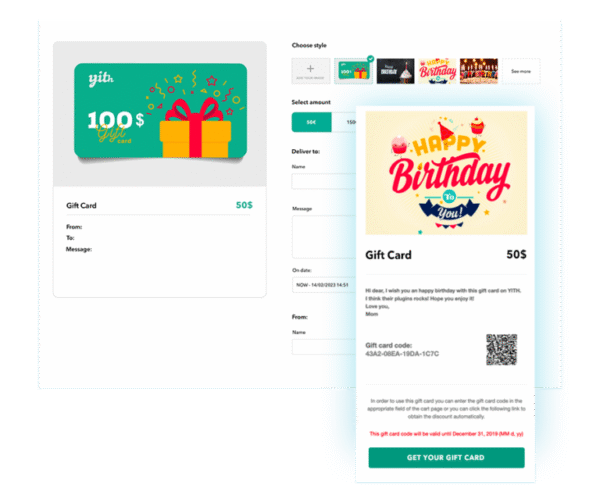
YITH WooCommerce Gift Cards Premium GPL v4.27.0 is the ultimate solution to boost your WooCommerce store sales by allowing customers to purchase, send, and redeem digital or physical gift cards. Gift cards are one of the most powerful eCommerce marketing tools because they increase revenue, attract new customers, and improve brand loyalty.
With this plugin, you can easily create customizable gift cards with fixed or variable amounts, personalized images, and custom messages. Customers can buy gift cards for themselves or send them to friends and family via email, printable PDF, or physical delivery. During checkout, recipients can redeem the gift card code just like a discount coupon, making it convenient and user-friendly.
🔑 Key Features of YITH WooCommerce Gift Cards Premium GPL:
Create digital or physical gift cards with custom amounts
Pre-set gift card values or allow customers to choose the amount
Upload and use your own images for gift card designs
Customers can add a personal message to their gift cards
Send gift cards via email, download as printable PDF, or ship as a physical product
Schedule delivery date for sending gift cards automatically
Track all issued gift cards from the admin panel (balance, usage, expiration)
Set expiration dates for gift cards
Partial use of gift card balance (remaining credit available for future purchases)
Allow gift cards to be used together with discount coupons
Compatible with all WooCommerce themes and multi-language sites
Fully customizable design and layout to match your store branding
Works seamlessly with WooCommerce Subscriptions, Multi-Vendor, and Booking plugins
🚀 Why Choose YITH WooCommerce Gift Cards Premium?
Boost sales & revenue – gift cards guarantee you earn upfront before products are redeemed.
Attract new customers – recipients of gift cards often become loyal buyers.
Increase average order value – users often spend more than the gift card balance.
Perfect for holidays & occasions – gift cards are highly popular during Christmas, Black Friday, birthdays, anniversaries, and special events.
Enhance customer experience – easy to buy, send, and redeem gift cards with no hassle.
Whether you run a fashion boutique, electronics store, or digital products marketplace, YITH WooCommerce Gift Cards Premium GPL v4.27.0 is a must-have plugin to grow your eCommerce business.
✅ Focus Keywords Included:
YITH WooCommerce Gift Cards Premium GPL
WooCommerce gift card plugin
Digital gift cards WooCommerce
WooCommerce gift voucher plugin
WooCommerce GPL plugins
Be the first to review “YITH WooCommerce Gift Cards Premium 4.27.0” Cancel reply
How to Install
Follow these quick steps to install from a .zip file or directly from your WP dashboard.
- 1
Go to Plugins → Add New
In your WordPress dashboard, open Plugins and click Add New.
- 2
Click Upload Plugin
Press Upload Plugin → Choose File and select the downloaded
plugin-name.zip. - 3
Install & Activate
Click Install Now, then Activate. You’re done!
- 4
(Optional) Enter License / Use Shortcode
Open Plugins → Your Plugin → Settings to enter your license. Add the box on the product page with:
[plugin_info_box]
Alternative: Install from WordPress directory
Go to Plugins → Add New, search the plugin name, click Install then Activate.
Manual (FTP) method
Unzip locally → upload the folder to /wp-content/plugins/ using FTP → activate from Plugins.
- 1
Go to Appearance → Themes
Click Add New → Upload Theme.
- 2
Upload the .zip file
Select
theme-name.zip, click Install Now, then Activate. - 3
Install Required Plugins
If prompted, click Begin installing plugins and activate them.
- 4
(Optional) Import Starter Content
Use the theme’s Demo Import (if provided) to load sample pages and settings.
Manual (FTP) theme install
Unzip the theme → upload to /wp-content/themes/ → activate from Appearance → Themes.


Reviews
There are no reviews yet.