
- ✔ Verified by VirusTotal
- ✔ 100% Original Product & Virus-Free
- ✔ Lifetime Free Updates on Single Purchase
- ✔ Unlimited Website Usage
- ✔ Prices in USD (Tax Included)
🔥 Limited-Time Deal — Ends Soon!
YITH WooCommerce Live Chat Premium 1.9.0
$60.00 Original price was: $60.00.$2.99Current price is: $2.99.
Instant Access
7 Day Money Back Guarantee
Online Support 24/7
Secure Payment
Description
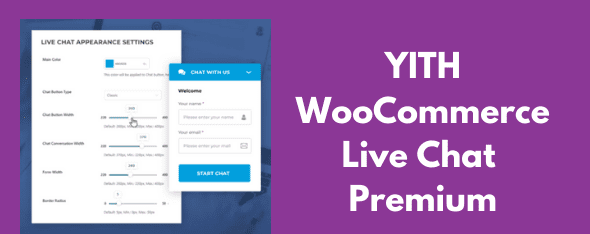
💬 YITH WooCommerce Live Chat Premium GPL – Just Like In Person
📌 This is a GPL-distributed version. No official support. Clean, secure, and legally redistributed under the GPL license.
🛍 Why YITH WooCommerce Live Chat Matters
Did you know that 70% of online shoppers prefer live chat to ask questions before making a purchase? Customers often seek instant answers and reassurance when they’re just about to buy. A small delay in response via email or contact forms can result in lost sales and abandoned carts.
With YITH WooCommerce Live Chat Premium, you can provide real-time support, build trust, and guide customers directly to checkout — just like they would experience in a physical store.
🌟 Key Features of YITH WooCommerce Live Chat Premium
✔️ Fully customizable chat messages (welcome, start, closing, offline, busy).
✔️ Unlimited simultaneous conversations.
✔️ Personalized agent profiles.
✔️ Assign chat roles to different WordPress users.
✔️ Option to disable chat on mobile devices or for guests.
✔️ Offline message support when no operator is available.
✔️ Chat logs saved for review & email conversation transcripts.
✔️ Customer feedback system (chat rating: good/bad).
✔️ Advanced design customization & chat duration timer.
✔️ Automatic deactivation when operators are offline.
✔️ Full compatibility with YITH WooCommerce Multi Vendor plugin.
✔️ Show chat on all pages or only selected pages (shop, product, blog, home).
✔️ Configure macros and pre-set answers for quick replies.
✔️ Option to trigger chat popup via a link.
🎯 Benefits for Your Store
🛒 Boost conversions → Help customers instantly when they hesitate.
🤝 Build trust & loyalty → Customers feel supported, just like in a real shop.
⏱ Reduce response time → Pre-set answers make operators more efficient.
📈 Increase customer satisfaction → Direct interaction creates stronger relationships.
✉️ Never miss a lead → Offline messages ensure customers stay connected even when operators are away.
🔑 Why Choose YITH WooCommerce Live Chat Premium GPL?
This plugin is more than just a chat tool — it’s a powerful sales booster for your WooCommerce store. By offering instant support, you remove customer doubts, minimize cart abandonment, and encourage repeat purchases. Whether you’re running a single shop or a multi-vendor marketplace, this plugin helps create a personalized shopping experience that feels human, fast, and reliable.
Be the first to review “YITH WooCommerce Live Chat Premium 1.9.0” Cancel reply
How to Install
Follow these quick steps to install from a .zip file or directly from your WP dashboard.
-
1
Go to Plugins → Add New
In your WordPress dashboard, open Plugins and click Add New.
-
2
Click Upload Plugin
Press Upload Plugin → Choose File and select the downloaded
plugin-name.zip. -
3
Install & Activate
Click Install Now, then Activate. You’re done!
-
4
(Optional) Enter License / Use Shortcode
Open Plugins → Your Plugin → Settings to enter your license. Add the box on the product page with:
[plugin_info_box]
Alternative: Install from WordPress directory
Go to Plugins → Add New, search the plugin name, click Install then Activate.
Manual (FTP) method
Unzip locally → upload the folder to /wp-content/plugins/ using FTP → activate from Plugins.
-
1
Go to Appearance → Themes
Click Add New → Upload Theme.
-
2
Upload the .zip file
Select
theme-name.zip, click Install Now, then Activate. -
3
Install Required Plugins
If prompted, click Begin installing plugins and activate them.
-
4
(Optional) Import Starter Content
Use the theme’s Demo Import (if provided) to load sample pages and settings.
Manual (FTP) theme install
Unzip the theme → upload to /wp-content/themes/ → activate from Appearance → Themes.

Reviews
There are no reviews yet.