
- ✔ Verified by VirusTotal
- ✔ 100% Original Product & Virus-Free
- ✔ Lifetime Free Updates on Single Purchase
- ✔ Unlimited Website Usage
- ✔ Prices in USD (Tax Included)
🔥 Limited-Time Deal — Ends Soon!
YITH WooCommerce Membership Premium 2.25.0
$89.00 Original price was: $89.00.$2.99Current price is: $2.99.
Instant Access
7 Day Money Back Guarantee
Online Support 24/7
Secure Payment
Description
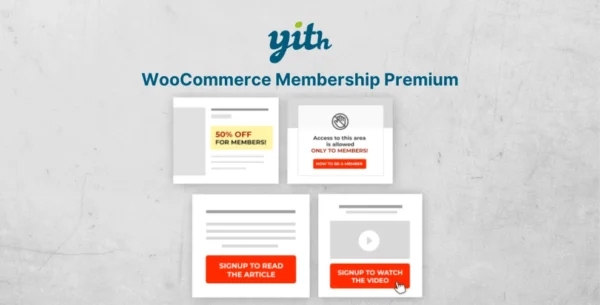
YITH WooCommerce Membership Premium GPL (Latest Version) is a powerful plugin that allows you to create and manage unlimited membership plans in your WooCommerce store. With this plugin, you can restrict access to exclusive content, digital products, courses, premium services, and more — giving your customers the perfect reason to subscribe and stay loyal to your brand.
Memberships are one of the fastest-growing online business models. Platforms like Udemy, Skillshare, and Treehouse have proven the profitability of selling restricted access to valuable content. With YITH WooCommerce Membership GPL, you can replicate this successful strategy directly on your WordPress WooCommerce website.
Whether you want to sell online courses, training programs, e-books, premium blog content, video tutorials, or VIP services, this plugin helps you create flexible membership plans, manage content drip schedules, and deliver a professional subscription experience.
🔑 Key Features of YITH WooCommerce Membership Premium GPL:
✅ Create unlimited membership plans in your WooCommerce store
✅ Restrict access to pages, posts, products, media files, categories, or tags
✅ Assign one or more products that grant access to a membership plan
✅ Set expiration dates for memberships (days, months, years)
✅ Drip-feed content (make articles or products available only after a certain number of days)
✅ Allow users to have multiple memberships at once
✅ Protect download links, videos, or files from non-members
✅ Restrict “Add to Cart” and product prices to members only
✅ Provide free access to certain plans for registered users
✅ Membership dashboard in the My Account page for members
✅ Integrated messaging system (members can send messages to the admin)
✅ Admin panel with full membership history, credits, start/end dates, and status
✅ Send automated emails for membership events (new, expiring, or cancelled memberships)
✅ Offer free or discounted shipping only for members
✅ Fully compatible with YITH WooCommerce Subscription for recurring payments
✅ 100% integrated with YITH WooCommerce Dynamic Pricing & Discounts
🚀 Why Choose YITH WooCommerce Membership Premium?
Monetize exclusive content – sell e-learning courses, VIP blog posts, digital files, and more.
Boost customer loyalty – encourage repeat purchases by offering exclusive benefits.
Increase recurring revenue – combine memberships with subscriptions for steady income.
Flexible access control – protect exactly what you want, when you want.
Perfect for any business model – online schools, fitness trainers, bloggers, SaaS services, agencies, and eCommerce stores.
With YITH WooCommerce Membership Premium GPL, you can finally build a profitable membership site on top of WooCommerce, offering your audience a seamless and engaging premium experience.
✅ Focus Keywords Included:
YITH WooCommerce Membership Premium GPL
WooCommerce membership plugin
Membership site WooCommerce
Restrict content WooCommerce
WooCommerce GPL plugins
Be the first to review “YITH WooCommerce Membership Premium 2.25.0” Cancel reply
How to Install
Follow these quick steps to install from a .zip file or directly from your WP dashboard.
-
1
Go to Plugins → Add New
In your WordPress dashboard, open Plugins and click Add New.
-
2
Click Upload Plugin
Press Upload Plugin → Choose File and select the downloaded
plugin-name.zip. -
3
Install & Activate
Click Install Now, then Activate. You’re done!
-
4
(Optional) Enter License / Use Shortcode
Open Plugins → Your Plugin → Settings to enter your license. Add the box on the product page with:
[plugin_info_box]
Alternative: Install from WordPress directory
Go to Plugins → Add New, search the plugin name, click Install then Activate.
Manual (FTP) method
Unzip locally → upload the folder to /wp-content/plugins/ using FTP → activate from Plugins.
-
1
Go to Appearance → Themes
Click Add New → Upload Theme.
-
2
Upload the .zip file
Select
theme-name.zip, click Install Now, then Activate. -
3
Install Required Plugins
If prompted, click Begin installing plugins and activate them.
-
4
(Optional) Import Starter Content
Use the theme’s Demo Import (if provided) to load sample pages and settings.
Manual (FTP) theme install
Unzip the theme → upload to /wp-content/themes/ → activate from Appearance → Themes.

Reviews
There are no reviews yet.