
- ✔ Verified by VirusTotal
- ✔ 100% Original Product & Virus-Free
- ✔ Lifetime Free Updates on Single Purchase
- ✔ Unlimited Website Usage
- ✔ Prices in USD (Tax Included)
🔥 Limited-Time Deal — Ends Soon!
YITH WooCommerce Popup Premium 1.5.4
$58.00 Original price was: $58.00.$2.99Current price is: $2.99.
Instant Access
7 Day Money Back Guarantee
Online Support 24/7
Secure Payment
Description
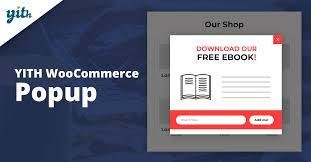
YITH WooCommerce Popup Premium 🎯💡
📌 This is a GPL-distributed version. No official support. Clean, secure, and legally redistributed under the GPL license.
What the Plugin Does ❓
YITH WooCommerce Popup lets you create powerful, customizable popup windows that grab user attention without being intrusive. With popups, you can:
📩 Collect emails with newsletter forms
📞 Display contact or feedback forms
🛒 Showcase WooCommerce products (specific, random, or category-based)
🎁 Promote discounts, offers, or seasonal deals
🔗 Share social content or announcements
Popups appear instantly without forcing users to load another page, boosting conversions and creating a seamless shopping experience.
Why You Need It 🚀
Popups are one of the most effective marketing tools to:
✔️ Increase sales and conversions
✔️ Improve newsletter sign-ups
✔️ Highlight special promotions or discounts
✔️ Show relevant products at the right moment
✔️ Engage visitors without disrupting their browsing experience
When used wisely, popups help you capture customer interest instantly and turn casual visitors into loyal buyers.
Key Features of YITH WooCommerce Popup Premium 🌟
✅ All features of the free version included
✅ Set up and manage popups directly from your site pages
✅ Choose from 5 content types: Text, Newsletter, Form, WooCommerce products, or Social content
✅ Define the popup position (center, corner, sidebar, etc.)
✅ Control the exact moment popups appear (on page load, after X seconds, on exit intent, etc.)
✅ Add a delay timer before showing popups
✅ Customize the close button design
✅ Insert custom CSS or JavaScript for full styling freedom
✅ Show specific products, random ones, or entire categories inside the popup
Benefits for Your Store 💼
🔹 Highlight promotions and discounts instantly
🔹 Encourage users to subscribe to your mailing list
🔹 Reduce cart abandonment with targeted product popups
🔹 Promote special campaigns without creating new pages
🔹 Deliver a modern, user-friendly shopping experience
👉 With YITH WooCommerce Popup Premium, you can create unlimited, fully customizable popups that engage visitors, promote products, and increase sales—all in just a few clicks.
Be the first to review “YITH WooCommerce Popup Premium 1.5.4” Cancel reply
How to Install
Follow these quick steps to install from a .zip file or directly from your WP dashboard.
-
1
Go to Plugins → Add New
In your WordPress dashboard, open Plugins and click Add New.
-
2
Click Upload Plugin
Press Upload Plugin → Choose File and select the downloaded
plugin-name.zip. -
3
Install & Activate
Click Install Now, then Activate. You’re done!
-
4
(Optional) Enter License / Use Shortcode
Open Plugins → Your Plugin → Settings to enter your license. Add the box on the product page with:
[plugin_info_box]
Alternative: Install from WordPress directory
Go to Plugins → Add New, search the plugin name, click Install then Activate.
Manual (FTP) method
Unzip locally → upload the folder to /wp-content/plugins/ using FTP → activate from Plugins.
-
1
Go to Appearance → Themes
Click Add New → Upload Theme.
-
2
Upload the .zip file
Select
theme-name.zip, click Install Now, then Activate. -
3
Install Required Plugins
If prompted, click Begin installing plugins and activate them.
-
4
(Optional) Import Starter Content
Use the theme’s Demo Import (if provided) to load sample pages and settings.
Manual (FTP) theme install
Unzip the theme → upload to /wp-content/themes/ → activate from Appearance → Themes.
Reviews
There are no reviews yet.