
- ✔ Verified by VirusTotal
- ✔ 100% Original Product & Virus-Free
- ✔ Lifetime Free Updates on Single Purchase
- ✔ Unlimited Website Usage
- ✔ Prices in USD (Tax Included)
🔥 Limited-Time Deal — Ends Soon!
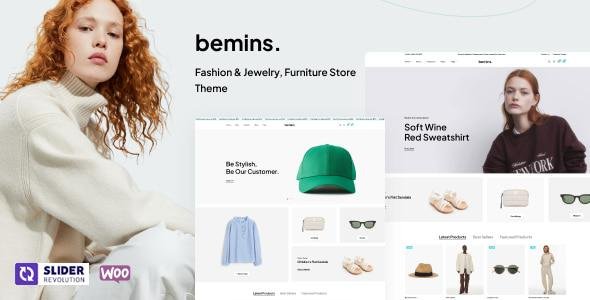
Bemins Theme – Fashion & Jewelry, Furniture Store Theme 1.1.9
$59.00 Original price was: $59.00.$2.99Current price is: $2.99.
Instant Access
7 Day Money Back Guarantee
Online Support 24/7
Secure Payment
Description
🛍️ Bemins Theme– Fashion, Jewelry & Furniture WooCommerce Theme (GPL Latest Version)
Bemins Theme by Wpbingo is a powerful and stylish WooCommerce WordPress theme designed for fashion boutiques, jewelry shops, furniture stores, and multi-vendor marketplaces. With a modern design built on Bootstrap and powered by Elementor, Bemins delivers a premium shopping experience focused on beautifully showcasing products and categories.
Perfect for high-end brands and online stores, Bemins includes advanced product filtering, built-in mega menus, product showcase widgets, trending sliders, and smooth category browsing. It supports popular multi-vendor plugins like Dokan, MultiVendorX, and WC Vendors, making it ideal for creating marketplace websites like Amazon or Etsy.
If you’re looking for a clean, elegant, and conversion-focused WooCommerce theme — Bemins is built for you.
✨ Key Features of Bemins Theme
✅ Modern Store & Product Showcase
Stylish layouts for fashion, jewelry & furniture stores
Banner sliders for featured & trending products
Top-selling product widgets
Smooth product category browsing
🧩 Elementor Page Builder
Drag-and-drop customization
Multiple pre-designed page styles
Unlimited colors & layouts
🛒 Advanced eCommerce Features
Live AJAX search
AJAX login for fast checkout experience
Powerful product filtering:
Categories
Brands
Price range
Colors, sizes & availability
Product conditions & more
🏪 Multi-Vendor Ready
Compatible with Dokan, WC Vendors & MultiVendorX
Build marketplace-style stores easily
Plugins integrate seamlessly (managed via plugin settings)
🌐 Optimized & Responsive
Mobile-friendly, fast-loading design
SEO optimized
RTL language support
🎨 Customization & Usability
Large widget collection
Social sharing tools
Flexible menu & layout options
💡 Why Choose Bemins Theme?
Designed for modern eCommerce brands
Perfect for single-store or marketplace websites
Strong product presentation + rich UI components
Built on reliable frameworks (Bootstrap + Elementor)
Fast, optimized, and beginner-friendly
Seamless multi-vendor support for business growth
Advanced search & filter tools improve conversion rates
If you want a feature-rich, stylish and scalable WooCommerce theme, Bemins stands out as a complete solution.
🏁 Conclusion
Bemins Theme is a premium WooCommerce theme built for performance, flexibility, and stylish product presentation. Whether you’re launching a boutique online store or a full multi-seller marketplace, Bemins gives you all the tools to deliver a polished shopping experience and grow your business.
Create a stunning, fast, and modern online shop with Bemins — your gateway to premium eCommerce success.
Be the first to review “Bemins Theme – Fashion & Jewelry, Furniture Store Theme 1.1.9” Cancel reply
How to Install
Follow these quick steps to install from a .zip file or directly from your WP dashboard.
-
1
Go to Plugins → Add New
In your WordPress dashboard, open Plugins and click Add New.
-
2
Click Upload Plugin
Press Upload Plugin → Choose File and select the downloaded
plugin-name.zip. -
3
Install & Activate
Click Install Now, then Activate. You’re done!
-
4
(Optional) Enter License / Use Shortcode
Open Plugins → Your Plugin → Settings to enter your license. Add the box on the product page with:
[plugin_info_box]
Alternative: Install from WordPress directory
Go to Plugins → Add New, search the plugin name, click Install then Activate.
Manual (FTP) method
Unzip locally → upload the folder to /wp-content/plugins/ using FTP → activate from Plugins.
-
1
Go to Appearance → Themes
Click Add New → Upload Theme.
-
2
Upload the .zip file
Select
theme-name.zip, click Install Now, then Activate. -
3
Install Required Plugins
If prompted, click Begin installing plugins and activate them.
-
4
(Optional) Import Starter Content
Use the theme’s Demo Import (if provided) to load sample pages and settings.
Manual (FTP) theme install
Unzip the theme → upload to /wp-content/themes/ → activate from Appearance → Themes.




Reviews
There are no reviews yet.