
- ✔ Verified by VirusTotal
- ✔ 100% Original Product & Virus-Free
- ✔ Lifetime Free Updates on Single Purchase
- ✔ Unlimited Website Usage
- ✔ Prices in USD (Tax Included)
🔥 Limited-Time Deal — Ends Soon!
JetSmart Filters Premium 3.6.9
$20.00 Original price was: $20.00.$2.99Current price is: $2.99.
Instant Access
7 Day Money Back Guarantee
Online Support 24/7
Secure Payment
Description
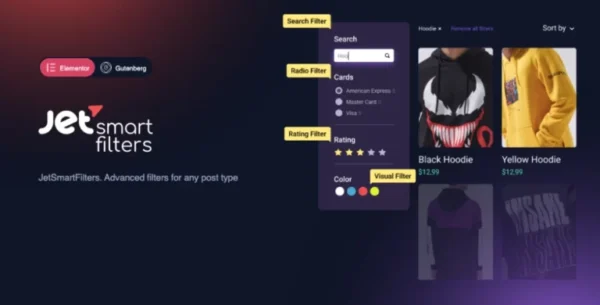
🔍 JetSmart Filters for Elementor (GPL) – Advanced AJAX Filtering for WooCommerce & Custom Posts
This is a GPL-distributed version of JetSmartFilters. It is 100% clean, secure, and legally redistributed under the GPL license. (No official developer support is included.)
JetSmartFilters is the ultimate solution for adding fast, advanced filtering functionality to your WordPress site. Whether you’re building WooCommerce stores, product archives, or custom post listings, JetSmartFilters makes it effortless for visitors to find exactly what they’re looking for—without page reloads.
With AJAX-based filtering, your users can apply multiple filters instantly, making their shopping and browsing experience smooth, seamless, and frustration-free.
✨ JetSmartFilters Features
⚡ Lightning-Fast AJAX Filtering
Apply multiple filters instantly without reloading the page.
Improve user experience with real-time, instant results.
Keep visitors engaged and increase conversions.
🛍 Perfect for WooCommerce & Custom Posts
Filter WooCommerce products by attributes like price, categories, tags, or custom fields.
Works seamlessly with JetEngine and JetWooBuilder templates.
Customize filters for posts, services, events, portfolios, or directories.
🎛 Versatile Filter Types
JetSmartFilters provides 7 unique filter types to match any project:
Checkboxes
Range sliders
Search filters
Select dropdowns
Radio filters
Date range pickers
Switches / toggles
🧩 Elementor Integration
Built specifically for Elementor Page Builder.
Comes with 7 filter widgets to easily insert filters into archive and shop pages.
Drag-and-drop simplicity—no coding required.
🔄 Extra Options for Better UX
AJAX-based pagination for smoother browsing.
Enable/disable active filters with a single click.
Smart reset option to clear all filters instantly.
Combine multiple filter types for highly customized user experiences.
🎯 Why JetSmartFilters?
Think about your own online shopping experience. How frustrating is it when:
❌ You click on a price filter, only to wait for the page to reload…
❌ You want to apply multiple filters, but the site keeps refreshing…
❌ The filters are clunky, limited, or don’t show relevant results.
That’s exactly what JetSmartFilters solves! With this plugin, your visitors can:
✔️ Find products or posts faster.
✔️ Apply multiple filters at once.
✔️ Get instant results—no waiting, no refreshing.
✔️ Enjoy a smooth shopping or browsing journey.
Better UX = Higher conversions + More sales 💰
💡 Example Use Cases
✔️ WooCommerce Stores – Filter products by price, size, color, stock, or rating.
✔️ Real Estate Sites – Let users filter properties by price range, location, or number of rooms.
✔️ Job Boards & Directories – Add advanced filters for categories, skills, or company.
✔️ Event Listings – Filter events by date, venue, or category.
✔️ Portfolio Sites – Showcase projects and allow visitors to filter by type, style, or tags.
🎯 Why Choose JetSmartFilters GPL?
🔓 100% Genuine GPL Files – Clean, safe & secure.
🌍 Unlimited Usage – Install on as many websites as you want.
💰 Cost-Effective – All premium features at a fraction of the cost.
⚡ Regular Updates – Always the latest version.
🧩 Works perfectly with Elementor, JetEngine & JetWooBuilder.
Be the first to review “JetSmart Filters Premium 3.6.9” Cancel reply
How to Install
Follow these quick steps to install from a .zip file or directly from your WP dashboard.
-
1
Go to Plugins → Add New
In your WordPress dashboard, open Plugins and click Add New.
-
2
Click Upload Plugin
Press Upload Plugin → Choose File and select the downloaded
plugin-name.zip. -
3
Install & Activate
Click Install Now, then Activate. You’re done!
-
4
(Optional) Enter License / Use Shortcode
Open Plugins → Your Plugin → Settings to enter your license. Add the box on the product page with:
[plugin_info_box]
Alternative: Install from WordPress directory
Go to Plugins → Add New, search the plugin name, click Install then Activate.
Manual (FTP) method
Unzip locally → upload the folder to /wp-content/plugins/ using FTP → activate from Plugins.
-
1
Go to Appearance → Themes
Click Add New → Upload Theme.
-
2
Upload the .zip file
Select
theme-name.zip, click Install Now, then Activate. -
3
Install Required Plugins
If prompted, click Begin installing plugins and activate them.
-
4
(Optional) Import Starter Content
Use the theme’s Demo Import (if provided) to load sample pages and settings.
Manual (FTP) theme install
Unzip the theme → upload to /wp-content/themes/ → activate from Appearance → Themes.


Reviews
There are no reviews yet.