
- ✔ Verified by VirusTotal
- ✔ 100% Original Product & Virus-Free
- ✔ Lifetime Free Updates on Single Purchase
- ✔ Unlimited Website Usage
- ✔ Prices in USD (Tax Included)
🔥 Limited-Time Deal — Ends Soon!
Mega Project Theme – Construction WordPress 1.3.8
$54.00 Original price was: $54.00.$2.99Current price is: $2.99.
Instant Access
7 Day Money Back Guarantee
Online Support 24/7
Secure Payment
Description
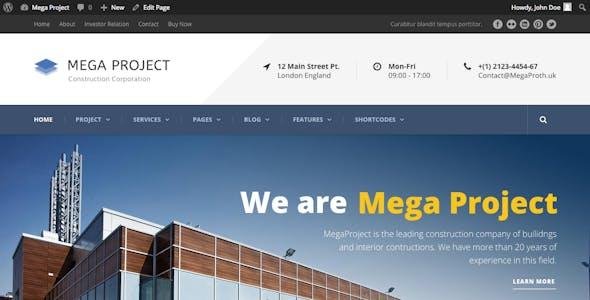
🏗️ Mega Project Theme GPL – Construction WordPress Theme 1.3.8
Mega Project Theme ek premium Construction WordPress Theme hai jo specially design kiya gaya hai construction companies, architecture firms, building contractors, renovation services, and real estate businesses ke liye. Yeh theme ek professional corporate layout ke saath aata hai jo tumhari construction-related services ko showcase karne ke liye perfect hai.
Version 1.3.8 mein updated compatibility aur smooth performance ensure ki gayi hai, jisse tum apni business website ko responsive, SEO-friendly aur client-focused bana sakte ho.
🚀 Mega Project Theme Highlights
🏗️ Specially designed for construction & architecture businesses
📱 Fully Responsive & Mobile Friendly
🎨 Built-in Page Builder for drag & drop customization
💡 SEO Optimized + Fast Loading
🛠️ Custom Post Types for Projects, Services & Team
🌍 WPML & Translation Ready
🔑 Mega Project GPL Theme Features
🎨 Design & Layout
Clean & modern corporate design for construction niche
Multiple homepage layouts & inner pages
Unlimited color schemes with theme customizer
Parallax sections & full-width slider support
Advanced typography with Google Fonts
🛠 Functionality
Built-in Page Builder for drag & drop editing
Project Showcase with filters & categories
Service detail pages for company offerings
Team member profiles with contact details
Testimonial section for client reviews
One-click demo import for fast setup
🌍 Technical & Performance
WordPress 5.x+ compatibility
WooCommerce support for selling products/services
WPML support for multilingual sites
Responsive across devices (desktop, tablet, mobile)
SEO friendly with clean HTML5/CSS3 code
Cross-browser compatible (Chrome, Firefox, Safari, Edge, Opera)
Child Theme support for customization safety
🎯 Perfect For
🏗️ Construction Companies
🏢 Architecture & Interior Design Firms
🛠️ Building Contractors
🏠 Real Estate & Property Developers
🔧 Renovation & Engineering Services
Be the first to review “Mega Project Theme – Construction WordPress 1.3.8” Cancel reply
How to Install
Follow these quick steps to install from a .zip file or directly from your WP dashboard.
-
1
Go to Plugins → Add New
In your WordPress dashboard, open Plugins and click Add New.
-
2
Click Upload Plugin
Press Upload Plugin → Choose File and select the downloaded
plugin-name.zip. -
3
Install & Activate
Click Install Now, then Activate. You’re done!
-
4
(Optional) Enter License / Use Shortcode
Open Plugins → Your Plugin → Settings to enter your license. Add the box on the product page with:
[plugin_info_box]
Alternative: Install from WordPress directory
Go to Plugins → Add New, search the plugin name, click Install then Activate.
Manual (FTP) method
Unzip locally → upload the folder to /wp-content/plugins/ using FTP → activate from Plugins.
-
1
Go to Appearance → Themes
Click Add New → Upload Theme.
-
2
Upload the .zip file
Select
theme-name.zip, click Install Now, then Activate. -
3
Install Required Plugins
If prompted, click Begin installing plugins and activate them.
-
4
(Optional) Import Starter Content
Use the theme’s Demo Import (if provided) to load sample pages and settings.
Manual (FTP) theme install
Unzip the theme → upload to /wp-content/themes/ → activate from Appearance → Themes.




Reviews
There are no reviews yet.