
- ✔ Verified by VirusTotal
- ✔ 100% Original Product & Virus-Free
- ✔ Lifetime Free Updates on Single Purchase
- ✔ Unlimited Website Usage
- ✔ Prices in USD (Tax Included)
🔥 Limited-Time Deal — Ends Soon!
MotoPress Hotel Booking Checkout Fields 1.2.3
$64.00 Original price was: $64.00.$2.99Current price is: $2.99.
Instant Access
7 Day Money Back Guarantee
Online Support 24/7
Secure Payment
Description
🏨 MotoPress Hotel Booking Checkout Fields – Customize Your Checkout Experience
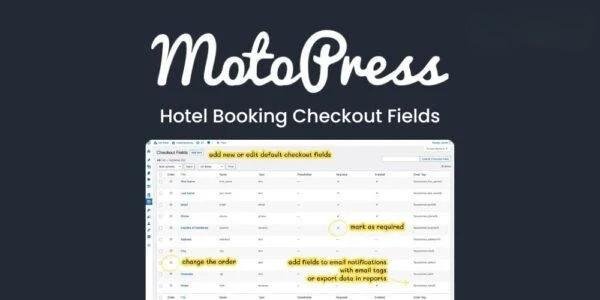
MotoPress Hotel Booking Checkout Fields is a powerful addon that lets you tailor the checkout process on your hotel or property booking website. Add new fields, edit existing ones, and organize data collection exactly how your business requires — all without coding. Perfect for hotels, vacation rentals, and property managers who want a personalized booking experience.
⚙️ Key Features
Add or Edit Checkout Fields: Modify default checkout fields like country or ZIP, or create your own custom ones with full flexibility.
Multiple Field Types: Choose from text, checkbox, email, phone, select, textarea, country, date of birth, file upload, and more.
Custom Placeholders & Labels: Add guidance and clarity with custom labels, placeholders, and tooltips for each field.
Drag & Drop Ordering: Rearrange fields easily to optimize user flow and improve the booking experience.
Custom Field Styling: Use CSS classes to style or highlight important fields and ensure a visually appealing checkout form.
Email Integration: Include custom field data in admin and guest emails for better communication and record keeping.
Advanced Data Export: Export all custom field data alongside other booking details for reporting and analysis.
Informative Headers & Instructions: Add paragraph or heading fields to display additional instructions, policies, or reminders.
Legal Compliance: Gather necessary legal or policy-related information based on your country’s regulations.
Guest Experience Optimization: Allow guests to leave comments, specify arrival times, or share referral details.
🚀 What We Offer
With MotoPress Hotel Booking Checkout Fields, you gain total control over how information is collected at checkout. Enhance guest satisfaction by gathering only the data that matters most while keeping the process smooth and intuitive.
🏆 Conclusion
The MotoPress Hotel Booking Checkout Fields addon transforms your booking checkout into a powerful, customizable form builder. By collecting the right information at the right time, you’ll streamline operations, stay compliant, and offer your guests a more personalized and efficient booking experience — all within your WordPress dashboard.
Be the first to review “MotoPress Hotel Booking Checkout Fields 1.2.3” Cancel reply
How to Install
Follow these quick steps to install from a .zip file or directly from your WP dashboard.
-
1
Go to Plugins → Add New
In your WordPress dashboard, open Plugins and click Add New.
-
2
Click Upload Plugin
Press Upload Plugin → Choose File and select the downloaded
plugin-name.zip. -
3
Install & Activate
Click Install Now, then Activate. You’re done!
-
4
(Optional) Enter License / Use Shortcode
Open Plugins → Your Plugin → Settings to enter your license. Add the box on the product page with:
[plugin_info_box]
Alternative: Install from WordPress directory
Go to Plugins → Add New, search the plugin name, click Install then Activate.
Manual (FTP) method
Unzip locally → upload the folder to /wp-content/plugins/ using FTP → activate from Plugins.
-
1
Go to Appearance → Themes
Click Add New → Upload Theme.
-
2
Upload the .zip file
Select
theme-name.zip, click Install Now, then Activate. -
3
Install Required Plugins
If prompted, click Begin installing plugins and activate them.
-
4
(Optional) Import Starter Content
Use the theme’s Demo Import (if provided) to load sample pages and settings.
Manual (FTP) theme install
Unzip the theme → upload to /wp-content/themes/ → activate from Appearance → Themes.



Reviews
There are no reviews yet.