
- ✔ Verified by VirusTotal
- ✔ 100% Original Product & Virus-Free
- ✔ Lifetime Free Updates on Single Purchase
- ✔ Unlimited Website Usage
- ✔ Prices in USD (Tax Included)
🔥 Limited-Time Deal — Ends Soon!
Oxygen Builder The Visual Website Builder With Addons 6.0.0
$99.00 Original price was: $99.00.$2.99Current price is: $2.99.
Instant Access
7 Day Money Back Guarantee
Online Support 24/7
Secure Payment
Description
⚡ Oxygen Builder – The Visual Website Builder
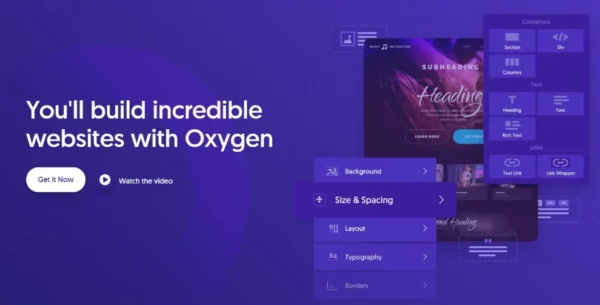
Oxygen Builder is a powerful WordPress visual website builder that gives you full control over every aspect of your site design. From responsive layouts to advanced CSS features, Oxygen empowers you to build beautiful, professional websites without coding.
🎨 Key Features
Responsive Control – Show or hide elements on specific devices. Customize layout, spacing, colors, and CSS settings across multiple media queries.
Flexbox & CSS Grid Visual Editing – Align, space, and structure your content visually using modern layout tools.
Scroll Animations – Choose from 27 tasteful animation types with precise control over timing, delay, and triggers.
Custom Fonts & Typography – Integrate Google Fonts, Adobe Fonts, or upload your own font files.
Custom Icon Sets – Use IcoMoon, LinearIcons, or upload SVG icon fonts.
CSS Filters & Transforms – Apply blur, brightness, contrast, rotation, zoom, and 3D effects visually.
Classes & States – Style multiple elements at once with reusable classes. Hover states and tweaks apply globally.
Display Conditions – Create logic-based layouts without code. Extend functionality with the Oxygen API.
⚡ Why Choose Oxygen Builder
Oxygen is perfect for designers, developers, and site owners who want full creative control. Its visual approach allows you to build responsive, interactive, and highly optimized websites without relying on multiple plugins or heavy code.
✅ Conclusion
With Oxygen Builder, you can craft stunning, fully responsive websites with modern layouts, animations, and advanced design features. From small businesses to complex projects, Oxygen provides all the tools to bring your WordPress website to life.
Be the first to review “Oxygen Builder The Visual Website Builder With Addons 6.0.0” Cancel reply
How to Install
Follow these quick steps to install from a .zip file or directly from your WP dashboard.
-
1
Go to Plugins → Add New
In your WordPress dashboard, open Plugins and click Add New.
-
2
Click Upload Plugin
Press Upload Plugin → Choose File and select the downloaded
plugin-name.zip. -
3
Install & Activate
Click Install Now, then Activate. You’re done!
-
4
(Optional) Enter License / Use Shortcode
Open Plugins → Your Plugin → Settings to enter your license. Add the box on the product page with:
[plugin_info_box]
Alternative: Install from WordPress directory
Go to Plugins → Add New, search the plugin name, click Install then Activate.
Manual (FTP) method
Unzip locally → upload the folder to /wp-content/plugins/ using FTP → activate from Plugins.
-
1
Go to Appearance → Themes
Click Add New → Upload Theme.
-
2
Upload the .zip file
Select
theme-name.zip, click Install Now, then Activate. -
3
Install Required Plugins
If prompted, click Begin installing plugins and activate them.
-
4
(Optional) Import Starter Content
Use the theme’s Demo Import (if provided) to load sample pages and settings.
Manual (FTP) theme install
Unzip the theme → upload to /wp-content/themes/ → activate from Appearance → Themes.




Reviews
There are no reviews yet.