
- ✔ Verified by VirusTotal
- ✔ 100% Original Product & Virus-Free
- ✔ Lifetime Free Updates on Single Purchase
- ✔ Unlimited Website Usage
- ✔ Prices in USD (Tax Included)
🔥 Limited-Time Deal — Ends Soon!
ProjectHuddle – WP Plugin For Designers & Developers 4.8.0
$57.00 Original price was: $57.00.$2.99Current price is: $2.99.
Instant Access
7 Day Money Back Guarantee
Online Support 24/7
Secure Payment
Description
📌 ProjectHuddle – WP Plugin For Designers & Developers
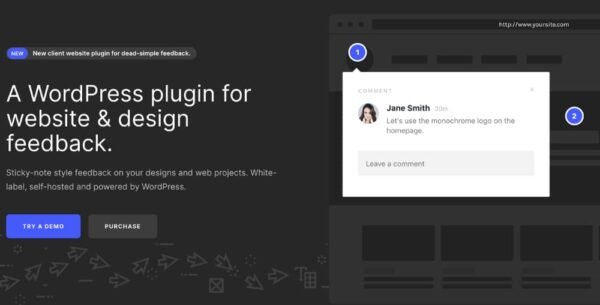
ProjectHuddle GPL – One Dashboard, Unlimited Websites is a powerful, self-hosted client feedback and collaboration tool for agencies, designers, and developers. Once installed on WordPress, it works across any CMS or platform—letting you manage unlimited websites from a single, centralized dashboard.
Deliver professional, white-label feedback presentations, streamline client communication, and eliminate endless email chains with point-and-click annotations directly on live sites or design mockups.
🔑 Key Features of ProjectHuddle – WP Plugin
🖥️ Unlimited Websites, Any CMS – Collect feedback on WordPress, Shopify, Drupal, HTML sites, and more.
🎨 100% White-Label – Brand the experience as your own for clients.
⚡ 1-Click Approvals – Clients can approve designs and mockups instantly.
📝 Sticky-Note Style Feedback – Visual annotations directly on top of live websites or images.
👥 Team Collaboration – Share contextual UI feedback with developers, designers, and clients.
🛠️ Centralized Dashboard – Manage all projects and feedback from one WordPress-powered hub.
📂 Organized Requests – Keep client comments structured and actionable, avoiding messy email threads.
🌐 Self-Hosted Solution – Full control over data and branding, powered by WordPress.
🎯 Use Cases of ProjectHuddle – WP Plugin
Agencies & Freelancers – Deliver professional, branded design feedback portals for clients.
Web Developers – Collect bug reports visually with point-and-click context.
Design Teams – Streamline approval workflows for mockups, wireframes, and prototypes.
Remote Teams – Collaborate in real-time with clear, visual communication.
✅ Conclusion
With ProjectHuddle GPL, you can manage feedback and approvals across unlimited websites and platforms from one central dashboard. Its visual, white-label collaboration system keeps projects organized, feedback clear, and clients happy. Perfect for agencies, designers, and developers who want to save time and look professional.
Be the first to review “ProjectHuddle – WP Plugin For Designers & Developers 4.8.0” Cancel reply
How to Install
Follow these quick steps to install from a .zip file or directly from your WP dashboard.
-
1
Go to Plugins → Add New
In your WordPress dashboard, open Plugins and click Add New.
-
2
Click Upload Plugin
Press Upload Plugin → Choose File and select the downloaded
plugin-name.zip. -
3
Install & Activate
Click Install Now, then Activate. You’re done!
-
4
(Optional) Enter License / Use Shortcode
Open Plugins → Your Plugin → Settings to enter your license. Add the box on the product page with:
[plugin_info_box]
Alternative: Install from WordPress directory
Go to Plugins → Add New, search the plugin name, click Install then Activate.
Manual (FTP) method
Unzip locally → upload the folder to /wp-content/plugins/ using FTP → activate from Plugins.
-
1
Go to Appearance → Themes
Click Add New → Upload Theme.
-
2
Upload the .zip file
Select
theme-name.zip, click Install Now, then Activate. -
3
Install Required Plugins
If prompted, click Begin installing plugins and activate them.
-
4
(Optional) Import Starter Content
Use the theme’s Demo Import (if provided) to load sample pages and settings.
Manual (FTP) theme install
Unzip the theme → upload to /wp-content/themes/ → activate from Appearance → Themes.




Reviews
There are no reviews yet.