
- ✔ Verified by VirusTotal
- ✔ 100% Original Product & Virus-Free
- ✔ Lifetime Free Updates on Single Purchase
- ✔ Unlimited Website Usage
- ✔ Prices in USD (Tax Included)
🔥 Limited-Time Deal — Ends Soon!
QSM Export Results Addon 2.0.2
$71.00 Original price was: $71.00.$2.99Current price is: $2.99.
Instant Access
7 Day Money Back Guarantee
Online Support 24/7
Secure Payment
Description
📑 QSM Export Results Addon – Latest Version
This is a GPL-distributed version. No official support. Clean, secure, and legally redistributed under the GPL license.
🌟 Introduction
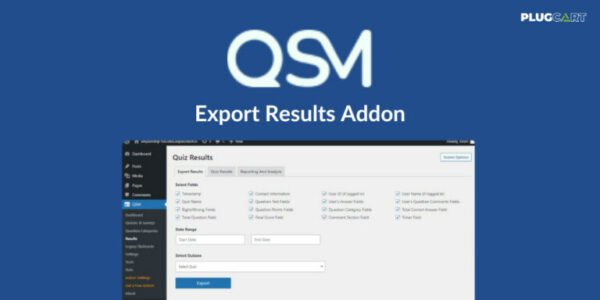
The QSM Export Results Addon is a must-have tool for anyone using Quiz and Survey Master (QSM). It allows quiz administrators to export results into CSV files for detailed analysis and lets quiz takers download their results as PDF files for reference.
Whether you’re running educational quizzes, employee training assessments, market research surveys, or recruitment tests, this addon makes it easy to export, analyze, and share results instantly.
⚡ Key Features of QSM Export Results Addon
📤 Export Quiz Results in CSV – Perfect for admins to analyze in Excel or Google Sheets.
📥 PDF Download for Quiz Takers – Give participants a professional copy of their results.
📅 Date Range Filtering – Export results from a specific time frame.
🎯 Custom Export Fields – Choose exactly which data points you want to include.
🖼️ Custom Branding – Add your own logo and content to PDF result sheets.
🌍 Multilingual Ready – Include specific text or language styles in the result PDFs.
🛠️ Flexible Quiz Selection – Export a single quiz, multiple quizzes, or all quizzes at once.
📊 Exportable Fields Include
Quiz Timestamp ⏱️
User ID & Contact Info 👤
Quiz Name & Questions 📝
User’s Answers & Comments 💬
Right/Wrong Fields ✅❌
Points & Categories 🎓
Final Score & Timer ⏳
💡 Popular Use Cases
🏫 Education – Teachers track student progress and generate report cards.
🏢 Employee Training – HR evaluates training effectiveness & retention.
📈 Market Research – Firms collect data to refine marketing strategies.
🎉 Event Planning – Organizers gather participant feedback to improve future events.
🧑💼 Recruitment – Companies conduct pre-employment assessments.
💻 User Testing – Developers analyze usability and product feedback.
🎯 Why Choose QSM Export Results Addon?
✅ Save time with quick CSV exports.
✅ Provide quiz takers with professional PDF reports.
✅ Analyze performance with detailed, exportable data.
✅ Boost transparency and improve quiz/test effectiveness.
✅ Conclusion
The QSM Export Results Addon is an essential tool for educators, businesses, and researchers who rely on quizzes for data collection and performance measurement. From CSV exports for admins to PDF reports for quiz takers, this addon ensures that quiz data is always accessible, shareable, and actionable.
Be the first to review “QSM Export Results Addon 2.0.2” Cancel reply
How to Install
Follow these quick steps to install from a .zip file or directly from your WP dashboard.
-
1
Go to Plugins → Add New
In your WordPress dashboard, open Plugins and click Add New.
-
2
Click Upload Plugin
Press Upload Plugin → Choose File and select the downloaded
plugin-name.zip. -
3
Install & Activate
Click Install Now, then Activate. You’re done!
-
4
(Optional) Enter License / Use Shortcode
Open Plugins → Your Plugin → Settings to enter your license. Add the box on the product page with:
[plugin_info_box]
Alternative: Install from WordPress directory
Go to Plugins → Add New, search the plugin name, click Install then Activate.
Manual (FTP) method
Unzip locally → upload the folder to /wp-content/plugins/ using FTP → activate from Plugins.
-
1
Go to Appearance → Themes
Click Add New → Upload Theme.
-
2
Upload the .zip file
Select
theme-name.zip, click Install Now, then Activate. -
3
Install Required Plugins
If prompted, click Begin installing plugins and activate them.
-
4
(Optional) Import Starter Content
Use the theme’s Demo Import (if provided) to load sample pages and settings.
Manual (FTP) theme install
Unzip the theme → upload to /wp-content/themes/ → activate from Appearance → Themes.




Reviews
There are no reviews yet.