
- ✔ Verified by VirusTotal
- ✔ 100% Original Product & Virus-Free
- ✔ Lifetime Free Updates on Single Purchase
- ✔ Unlimited Website Usage
- ✔ Prices in USD (Tax Included)
🔥 Limited-Time Deal — Ends Soon!
Softwerk Theme – Software & SaaS Startup Theme 1.4.1
$79.00 Original price was: $79.00.$2.99Current price is: $2.99.
Instant Access
7 Day Money Back Guarantee
Online Support 24/7
Secure Payment
Description
Softwerk Theme Introduction
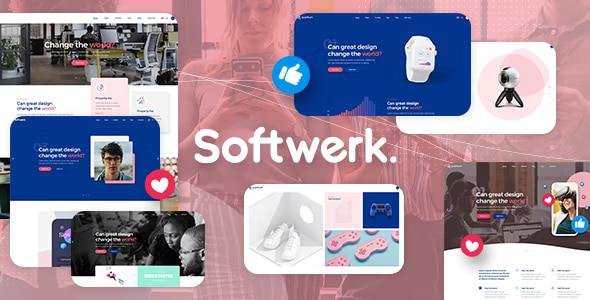
Softwerk is an astonishing multipurpose theme made for software startup websites. Its truly vast collection of beautiful layouts and powerful elements make it a great fit for SaaS, cryptocurrency, app, and tech companies, as well as for digital studios.
Softwerk comes with gorgeous app landing page templates and its entire content is highly customizable, allowing the user to quickly choose and set up the pages on their website and to import everything with just one click. The theme is fully intuitive, making it easy for you to build a remarkable website with no hassle!
Softwerk Theme Softwerk GPL – Software and SaaS Startup Theme
- Softwerk Theme Powerful Admin Interface
- Highly Customizable
- No coding knowledge required
- One-Click Demo Content Import
- Retina Ready
- Fully Responsive
- Large collection of predesigned home and inner pages
- WPBakery Page Builder Plugin for WordPress included ($46 value)
- Slider Revolution Responsive WordPress Slider Plugin included ($26 value)
- Portfolio List shortcode
- Portfolio Category List shortcode
- Portfolio Project Info shortcode
- Portfolio Slider shortcode
- Masonry Portfolio List
- Gallery Portfolio List
- Various Portfolio hover types
- Various Portfolio Single layouts
- Small Images Portfolio Single layout
- Images Portfolio Single layout
- Softwerk Theme Full-Width Custom Portfolio Single layout
- Small Slider Portfolio Single layout
- Slider Portfolio Single layout
- Gallery Portfolio Single layout
- Small Gallery Portfolio Single layout
- Masonry Portfolio Single layout
- Small Masonry Portfolio Single layout
- Custom Portfolio Single layouts
- Parallax sections
- Mega Menu
- Customizable Google Maps
- Smooth Page Transitions
- Choose between 7 amazing font icon sets
- Side Area
- Three Side Area types
- Twitter and Instagram social widgets
- Social Icons Group widget
- Social Icon widget
- Product List shortcode
- Product List – Carousel shortcode
- Countdown shortcode
- Twitter List shortcode
- Instagram List shortcode
- Call to Action shortcode
- Item Showcase shortcode
- Triple Frame Image Highlight shortcode
- Process shortcode
- Progress Bar shortcode
- Social Share shortcode
- Roadmap shortcode
- Infobox shortcode
- Video Button shortcode
- Animation Holder shortcode
- Text Marquee Shortcode
- Pricing Table shortcode
- Top Reviews shortcode
- Pie Chart shortcode
- Team Carousel shortcode
- Accordion shortcode
- Tabs shortcode
- Anchor link functionality for one-page sites
- Video Background Sections
- Background images in sections
- Multiple Flexible Header Types
- Standard Header Type
- Minimal Header Type
- Multiple header behaviors
- Change header skin from section to section
- Separate logos for Regular, Sticky, and Mobile headers
- Separate logo variants for dark and light header skin
- Upload different logos from page to page
- Header Top area
- Header Top and Header Bottom Widget areas
- Style mobile header separately
- Highly customizable title area
- Custom Sidebars
- Mikado Search – Optional functionality
- Separate Footer Top and Footer Bottom areas
- Customizable Footer Layout – up to 4 columns in Footer Top area
- Customizable Footer Layout – up to 3 columns in Footer Bottom area
- Regular and uncovering footer
- Choose your grid size
- 800 Google Fonts
- Custom Post Formats: Audio, Video, Standard, Gallery, Link, Quote
- Multiple Blog List Layouts
- Blog Chequered Layout
- Blog Standard Layout
- Blog List shortcode
- Blog Slider shortcode
- Optional social share functionality
- Testimonials
- Smooth Scroll
- Boxed layout option
- Back to Top button functionality
- Powerful typography options
- Child Theme Ready
- Translation ready
- WooCommerce Integration
- WPML Plugin Integration
- Dropdown Shop Cart widget
- Contact Form 7 Integration
Be the first to review “Softwerk Theme – Software & SaaS Startup Theme 1.4.1” Cancel reply
How to Install
Follow these quick steps to install from a .zip file or directly from your WP dashboard.
-
1
Go to Plugins → Add New
In your WordPress dashboard, open Plugins and click Add New.
-
2
Click Upload Plugin
Press Upload Plugin → Choose File and select the downloaded
plugin-name.zip. -
3
Install & Activate
Click Install Now, then Activate. You’re done!
-
4
(Optional) Enter License / Use Shortcode
Open Plugins → Your Plugin → Settings to enter your license. Add the box on the product page with:
[plugin_info_box]
Alternative: Install from WordPress directory
Go to Plugins → Add New, search the plugin name, click Install then Activate.
Manual (FTP) method
Unzip locally → upload the folder to /wp-content/plugins/ using FTP → activate from Plugins.
-
1
Go to Appearance → Themes
Click Add New → Upload Theme.
-
2
Upload the .zip file
Select
theme-name.zip, click Install Now, then Activate. -
3
Install Required Plugins
If prompted, click Begin installing plugins and activate them.
-
4
(Optional) Import Starter Content
Use the theme’s Demo Import (if provided) to load sample pages and settings.
Manual (FTP) theme install
Unzip the theme → upload to /wp-content/themes/ → activate from Appearance → Themes.




Reviews
There are no reviews yet.