
- ✔ Verified by VirusTotal
- ✔ 100% Original Product & Virus-Free
- ✔ Lifetime Free Updates on Single Purchase
- ✔ Unlimited Website Usage
- ✔ Prices in USD (Tax Included)
🔥 Limited-Time Deal — Ends Soon!
UserPro Community and User Profile WordPress Plugin 5.1.11
$39.00 Original price was: $39.00.$2.99Current price is: $2.99.
Instant Access
7 Day Money Back Guarantee
Online Support 24/7
Secure Payment
Description
UserPro – Community and User Profile WordPress Plugin (Latest Version)
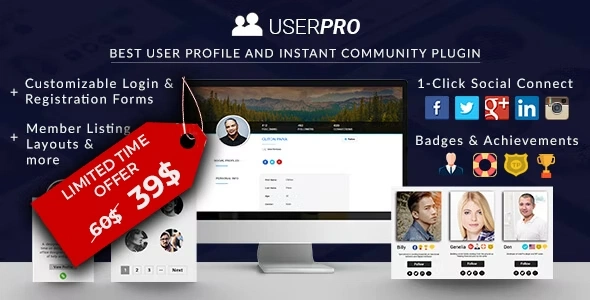
The UserPro WordPress Plugin is a powerful all-in-one solution for building user profiles, communities, and membership sites on WordPress. Whether you want to create a social community, a membership platform, or simply enhance your website with custom user profiles, UserPro provides all the tools you need.
This is a GPL-distributed version – clean, secure, and legally redistributed under the GPL license. No official support is included.
Key Features of UserPro Plugin
👤 Beautiful Front-End User Profiles
Give each user a customized and elegant profile page.
Provide editable personal information, profile pictures, social links, and achievements.
Add user posts, comments, and activity directly to profiles.
🔑 Login & Registration Customization
Replace boring default WordPress login forms with custom front-end login and signup forms.
Add social login integration (Facebook, Twitter, LinkedIn, Google, etc.).
Enable email verification and custom redirects after login.
🏆 Badges, Achievements & Verified Accounts
Award user badges automatically or manually.
Display achievements and recognition on profile pages.
Verify accounts for added credibility and trust.
📌 Community Building Tools
Follow/Unfollow system so users can connect and interact.
Social activity streams (public and private) to display registrations, posts, comments, and follows.
Member directory search with advanced filtering and custom fields.
Multiple member listing layouts (grid, table, or collage style).
📰 Front-End Publishing
Allow members to publish posts directly from the front-end.
Supports custom post types and categories.
Display user-submitted posts in profiles or sidebars.
🔒 Content Restriction & Access Control
Restrict posts, pages, or even the whole site to specific user roles.
Create exclusive content areas for verified members.
Manage access for logged-in vs. logged-out users.
🎨 Styling & Design Options
Choose from 5 ready-to-use skins or customize your own.
Full support for CSS customization and Google Fonts.
RTL (Right-to-Left) language support.
Translation ready with 12+ available languages.
⚙️ Essentials & Compatibility
Easy-to-use admin panel with intuitive settings.
Compatible with most well-coded WordPress themes and plugins.
Fully responsive design that works seamlessly on desktop, tablet, and mobile.
Auto-update feature included.
Why Choose UserPro for Your WordPress Site?
Build a community-driven platform with ease.
Encourage engagement with activity feeds, badges, and follows.
Replace WordPress default login/registration with modern front-end forms.
Manage private content and restricted access for members.
Provide a professional, user-friendly profile experience.
Conclusion
The UserPro WordPress Plugin is more than just a user profile tool – it’s a complete community and membership plugin for WordPress. With social login, customizable profiles, activity streams, content restriction, front-end publishing, and user achievements, it delivers everything needed to run a professional community-driven website.
Whether you’re building a social community, membership platform, or private network, UserPro is the all-in-one solution.
Be the first to review “UserPro Community and User Profile WordPress Plugin 5.1.11” Cancel reply
How to Install
Follow these quick steps to install from a .zip file or directly from your WP dashboard.
-
1
Go to Plugins → Add New
In your WordPress dashboard, open Plugins and click Add New.
-
2
Click Upload Plugin
Press Upload Plugin → Choose File and select the downloaded
plugin-name.zip. -
3
Install & Activate
Click Install Now, then Activate. You’re done!
-
4
(Optional) Enter License / Use Shortcode
Open Plugins → Your Plugin → Settings to enter your license. Add the box on the product page with:
[plugin_info_box]
Alternative: Install from WordPress directory
Go to Plugins → Add New, search the plugin name, click Install then Activate.
Manual (FTP) method
Unzip locally → upload the folder to /wp-content/plugins/ using FTP → activate from Plugins.
-
1
Go to Appearance → Themes
Click Add New → Upload Theme.
-
2
Upload the .zip file
Select
theme-name.zip, click Install Now, then Activate. -
3
Install Required Plugins
If prompted, click Begin installing plugins and activate them.
-
4
(Optional) Import Starter Content
Use the theme’s Demo Import (if provided) to load sample pages and settings.
Manual (FTP) theme install
Unzip the theme → upload to /wp-content/themes/ → activate from Appearance → Themes.




Reviews
There are no reviews yet.