
- ✔ Verified by VirusTotal
- ✔ 100% Original Product & Virus-Free
- ✔ Lifetime Free Updates on Single Purchase
- ✔ Unlimited Website Usage
- ✔ Prices in USD (Tax Included)
🔥 Limited-Time Deal — Ends Soon!
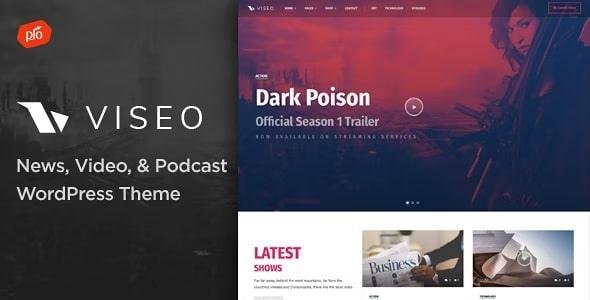
Viseo Theme – News, Video, & Podcast Theme 4.2
$59.00 Original price was: $59.00.$2.99Current price is: $2.99.
Instant Access
7 Day Money Back Guarantee
Online Support 24/7
Secure Payment
Description
🎬 Viseo Theme GPL – Ultimate WordPress Theme for Creators
Showcase your portfolio, videos, and creative projects with Viseo Theme, a fully-featured, easy-to-customize WordPress theme built for creators, agencies, and businesses. Whether you’re a filmmaker, designer, musician, or blogger, Viseo makes it simple to present your work in a professional, modern, and visually stunning way.
With drag & drop page building, unlimited colors, responsive layouts, and built-in multimedia support, you can launch a polished website in minutes without coding knowledge. This GPL version is fully clean, secure, and legally redistributed for developers and agencies.
🔑 Key Features of Viseo Theme
✔ Drag & Drop Page Builder – Build pages visually without touching code.
✔ Boosted Elements Add-on Included – Easily create sliders, popups, maps, and interactive elements.
✔ Audio & Video Player – Premium built-in media player optimized for all devices.
✔ Premium Slider – Add slideshows to any page with the integrated slider element.
✔ Demo Content Included – Import ready-to-use content for fast setup.
✔ eCommerce Ready – Sell your products or services using WooCommerce integration.
✔ Responsive Layout – Perfectly adapts to desktop, tablet, and mobile screens.
✔ Unlimited Colors & Fonts – Customize every color and font via the theme customizer.
✔ Mega Menus & Sticky Header – Enhance navigation and keep important links visible.
✔ Customizable Footer – 1–4 column layouts with logos, icons, and navigation.
✔ Contact Form Support – Easily create and display multiple contact forms.
✔ Translation Ready – Fully compatible with WPML or other translation plugins.
✔ Retina Ready – Optimized for high-resolution displays like iPhone, iPad, and MacBook Pro.
✔ SEO Optimized – Works seamlessly with popular SEO plugins to boost search engine rankings.
✔ Photoshop Files Included – Customize graphics or page elements as needed.
✔ Premium Support – Receive top-notch support for setup and troubleshooting.
📈 Why Choose Viseo Theme GPL?
🎥 Perfect for Creatives – Showcase videos, audio, photography, or design work effortlessly.
🌈 Fully Customizable – Colors, fonts, layouts, and headers all adjustable without coding.
⚡ Responsive & Retina Ready – Optimized for all devices and screen resolutions.
🛠️ Drag & Drop Simplicity – Build stunning pages with intuitive visual tools.
🏆 Professional Design – Modern, clean layouts that make your work stand out.
🏅 Best Use Cases
Filmmakers & Videographers
Photographers & Designers
Music & Audio Portfolios
Creative Agencies
eCommerce Stores for Digital Media
Be the first to review “Viseo Theme – News, Video, & Podcast Theme 4.2” Cancel reply
How to Install
Follow these quick steps to install from a .zip file or directly from your WP dashboard.
-
1
Go to Plugins → Add New
In your WordPress dashboard, open Plugins and click Add New.
-
2
Click Upload Plugin
Press Upload Plugin → Choose File and select the downloaded
plugin-name.zip. -
3
Install & Activate
Click Install Now, then Activate. You’re done!
-
4
(Optional) Enter License / Use Shortcode
Open Plugins → Your Plugin → Settings to enter your license. Add the box on the product page with:
[plugin_info_box]
Alternative: Install from WordPress directory
Go to Plugins → Add New, search the plugin name, click Install then Activate.
Manual (FTP) method
Unzip locally → upload the folder to /wp-content/plugins/ using FTP → activate from Plugins.
-
1
Go to Appearance → Themes
Click Add New → Upload Theme.
-
2
Upload the .zip file
Select
theme-name.zip, click Install Now, then Activate. -
3
Install Required Plugins
If prompted, click Begin installing plugins and activate them.
-
4
(Optional) Import Starter Content
Use the theme’s Demo Import (if provided) to load sample pages and settings.
Manual (FTP) theme install
Unzip the theme → upload to /wp-content/themes/ → activate from Appearance → Themes.




Reviews
There are no reviews yet.