
- ✔ Verified by VirusTotal
- ✔ 100% Original Product & Virus-Free
- ✔ Lifetime Free Updates on Single Purchase
- ✔ Unlimited Website Usage
- ✔ Prices in USD (Tax Included)
🔥 Limited-Time Deal — Ends Soon!
Web push notifications plugin for WordPress, Woocommerce and BuddyPress 3.1.2
$49.00 Original price was: $49.00.$2.99Current price is: $2.99.
Instant Access
7 Day Money Back Guarantee
Online Support 24/7
Secure Payment
Description
🔔 Letspush Web Push Notifications Plugin for WordPress
Letspush Web Push Notifications allows websites to send clickable messages directly to users’ devices, even when they are not browsing your site. No email or contact info is required. These notifications appear in real time and can boost engagement, traffic, and conversions.
This is a GPL-distributed version: clean, secure, legally redistributed, without official support.
✨ Key Features
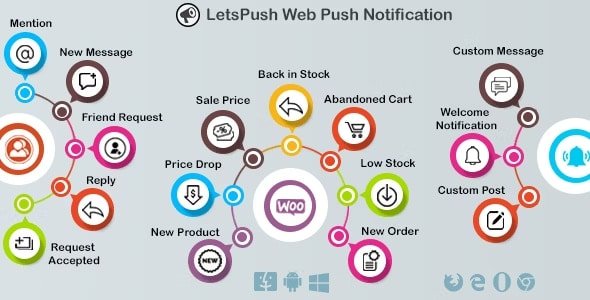
✔️ WordPress Notifications
Notify users when a new post is published.
Supports custom post types.
Send custom notifications for any content.
✔️ WooCommerce Notifications
Notify users for:
New product added
Price drops
Sale price changes
Back in stock
Abandoned cart reminders
Notify admin for low stock or new orders.
✔️ BuddyPress Notifications
Notify users when:
Mentioned in an update (
@username)A member replies to an update or comment
New message is received
New friend request received or accepted
✔️ Custom Notifications
Welcome notifications for new subscribers.
Scheduled notifications for planned campaigns.
Custom notifications for marketing or updates.
✔️ Opt-in & Subscriber Management
Fully customizable opt-in prompt for user subscriptions.
Test notifications before sending.
Maintain notification and subscriber logs.
✔️ Admin Panel & Usability
Easy-to-use and responsive admin panel.
Mobile-friendly and fully compatible with modern browsers.
✅ Benefits
Boost engagement by reaching users even when they’re away from your website.
Increase WooCommerce sales with price drop, back-in-stock, and abandoned cart notifications.
Enhance community interaction via BuddyPress notifications.
Plan campaigns with scheduled or custom notifications.
Track and monitor notification delivery via logs for better insights.
Conclusion:
Letspush Web Push Notifications is a powerful tool for real-time user engagement on WordPress. With support for WordPress posts, WooCommerce events, and BuddyPress interactions, it’s ideal for bloggers, eCommerce stores, and community websites looking to retain and engage their users.
Be the first to review “Web push notifications plugin for WordPress, Woocommerce and BuddyPress 3.1.2” Cancel reply
How to Install
Follow these quick steps to install from a .zip file or directly from your WP dashboard.
-
1
Go to Plugins → Add New
In your WordPress dashboard, open Plugins and click Add New.
-
2
Click Upload Plugin
Press Upload Plugin → Choose File and select the downloaded
plugin-name.zip. -
3
Install & Activate
Click Install Now, then Activate. You’re done!
-
4
(Optional) Enter License / Use Shortcode
Open Plugins → Your Plugin → Settings to enter your license. Add the box on the product page with:
[plugin_info_box]
Alternative: Install from WordPress directory
Go to Plugins → Add New, search the plugin name, click Install then Activate.
Manual (FTP) method
Unzip locally → upload the folder to /wp-content/plugins/ using FTP → activate from Plugins.
-
1
Go to Appearance → Themes
Click Add New → Upload Theme.
-
2
Upload the .zip file
Select
theme-name.zip, click Install Now, then Activate. -
3
Install Required Plugins
If prompted, click Begin installing plugins and activate them.
-
4
(Optional) Import Starter Content
Use the theme’s Demo Import (if provided) to load sample pages and settings.
Manual (FTP) theme install
Unzip the theme → upload to /wp-content/themes/ → activate from Appearance → Themes.




Reviews
There are no reviews yet.