
- ✔ Verified by VirusTotal
- ✔ 100% Original Product & Virus-Free
- ✔ Lifetime Free Updates on Single Purchase
- ✔ Unlimited Website Usage
- ✔ Prices in USD (Tax Included)
🔥 Limited-Time Deal — Ends Soon!
Woocommerce Buy One Get One Free 5.8.0
$56.00 Original price was: $56.00.$2.99Current price is: $2.99.
Instant Access
7 Day Money Back Guarantee
Online Support 24/7
Secure Payment
Description
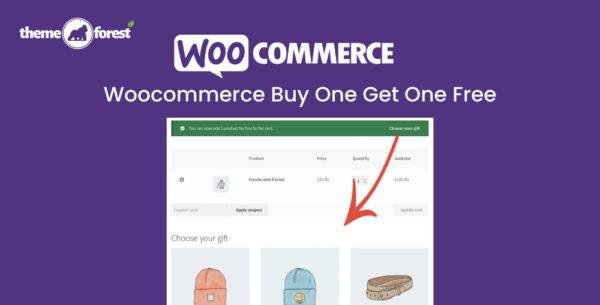
🛒 WooCommerce Buy One Get One Free – Latest Version
This is a GPL-distributed version of WooCommerce Buy One Get One Free. It’s a clean, secure, and legally redistributed plugin with no official support included.
The WooCommerce Buy One Get One Free plugin lets you create promotional offers like “Buy One, Get One Free,” helping you reward customers, clear inventory, and boost sales. Whether it’s a free product of the same kind or an item from another category, you can set up deals in just a few clicks.
🎁 What This Plugin Does
Give away one or more free items when customers purchase qualifying products.
You can define custom rules such as:
Buy a certain quantity of a product → get another free.
Buy from Category A → get free items from Category B.
Offer same-product or different-product rewards.
🧩 Examples of Promotions
Buy a Laptop → Get a Laptop Bag for free.
Buy from Hoodies category → Choose a free Accessory.
Buy one T-shirt → Get another T-shirt free.
🚀 Why Use BOGO Deals
BOGO (Buy One Get One) offers are proven to:
✅ Encourage customers to spend more
✅ Help move slow-selling inventory
✅ Improve customer satisfaction
✅ Increase overall sales volume
Customers love value — and BOGO deals are one of the most effective ways to create excitement in your store.
⚙️ Key Features
🎯 Customizable BOGO Rules — Create unique buy/get combinations for any product or category.
🔁 Flexible Quantities — Offer one or more free items based on quantity purchased.
🧮 Mix and Match Options — Let shoppers choose from eligible free items.
🧍 Same or Different Product Deals — Offer free versions of the same product or entirely different ones.
💸 Automatic Discounts — Free items automatically added to the cart.
🧱 Compatible with Variable Products — Works seamlessly with product variations.
🛍️ Boost Average Order Value — Encourage larger purchases with attractive offers.
💡 Perfect For
Seasonal promotions (e.g., Buy 2 Get 1 Free)
Clearing old stock efficiently
Upselling complementary items
Rewarding loyal customers with gifts
🏁 Conclusion
WooCommerce Buy One Get One Free is the easiest way to set up powerful BOGO promotions that drive conversions and increase revenue. Whether you’re offering a free add-on, duplicate item, or mix-and-match gift, this plugin gives you complete control over your promotional strategy — all inside your WooCommerce dashboard.
Be the first to review “Woocommerce Buy One Get One Free 5.8.0” Cancel reply
How to Install
Follow these quick steps to install from a .zip file or directly from your WP dashboard.
-
1
Go to Plugins → Add New
In your WordPress dashboard, open Plugins and click Add New.
-
2
Click Upload Plugin
Press Upload Plugin → Choose File and select the downloaded
plugin-name.zip. -
3
Install & Activate
Click Install Now, then Activate. You’re done!
-
4
(Optional) Enter License / Use Shortcode
Open Plugins → Your Plugin → Settings to enter your license. Add the box on the product page with:
[plugin_info_box]
Alternative: Install from WordPress directory
Go to Plugins → Add New, search the plugin name, click Install then Activate.
Manual (FTP) method
Unzip locally → upload the folder to /wp-content/plugins/ using FTP → activate from Plugins.
-
1
Go to Appearance → Themes
Click Add New → Upload Theme.
-
2
Upload the .zip file
Select
theme-name.zip, click Install Now, then Activate. -
3
Install Required Plugins
If prompted, click Begin installing plugins and activate them.
-
4
(Optional) Import Starter Content
Use the theme’s Demo Import (if provided) to load sample pages and settings.
Manual (FTP) theme install
Unzip the theme → upload to /wp-content/themes/ → activate from Appearance → Themes.




Reviews
There are no reviews yet.