
- ✔ Verified by VirusTotal
- ✔ 100% Original Product & Virus-Free
- ✔ Lifetime Free Updates on Single Purchase
- ✔ Unlimited Website Usage
- ✔ Prices in USD (Tax Included)
🔥 Limited-Time Deal — Ends Soon!
YITH WooCommerce Best Sellers Premium 1.22.0
$58.00 Original price was: $58.00.$2.99Current price is: $2.99.
Instant Access
7 Day Money Back Guarantee
Online Support 24/7
Secure Payment
Description
🏆 YITH WooCommerce Best Sellers Premium GPL – Boost Sales with Social Proof
📌 This is a GPL-distributed version. No official support. Clean, secure, and legally redistributed under the GPL license.
📈 Why Use Best Sellers in Your Store?
Shoppers often rely on herd mentality when making purchasing decisions. If a product is popular and many others have bought it, new visitors feel more confident buying it too. This psychological effect is used by major platforms like Amazon and AliExpress to boost conversions and increase average order value.
With YITH WooCommerce Best Sellers Premium, you can easily highlight your store’s top-selling products, guiding hesitant customers toward proven, trusted choices.
🌟 Key Features of YITH WooCommerce Best Sellers
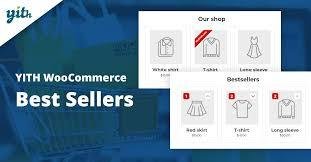
✔️ Add a “Bestsellers” section to showcase popular products.
✔️ Display bestsellers by category, product type, or globally.
✔️ Automatically calculate best-selling products over different time intervals.
✔️ Support cross-selling and up-selling by featuring related top products.
✔️ Customize widget and shortcode options to show bestsellers anywhere.
✔️ Display best-selling badges on product pages for instant trust signals.
✔️ Improve store image by highlighting customer favorites.
✔️ Compatible with modern WooCommerce themes and layouts.
✔️ Encourage impulse buying by showing trending and popular items.
✔️ Boost visibility of profitable products while building social proof.
🎯 Benefits for Your E-Commerce
🚀 Increase conversions – guide indecisive buyers with proven bestsellers.
💰 Higher average transaction value – combine with cross-sells & up-sells.
👥 Leverage social proof – show what others are buying to influence new customers.
🔥 Highlight trending items – keep your store updated with current customer interests.
🏪 Stronger brand image – demonstrate that your shop is active, trusted, and popular.
💡 How It Works
Imagine a new customer visits your store unsure of what to buy. Instead of browsing endlessly, they click on your Bestsellers section. Seeing products that many others have purchased reassures them, builds trust, and increases the chance they’ll complete their order.
This herd mentality effect transforms uncertainty into confidence — and more importantly, turns visitors into buyers.
🚀 Why Choose YITH WooCommerce Best Sellers Premium GPL?
With this plugin, you’re not just adding a feature — you’re using a proven sales psychology strategy to:
Influence purchase decisions.
Showcase your store’s credibility.
Increase customer satisfaction.
Generate more sales automatically.
Highlighting your bestsellers isn’t just smart — it’s essential for e-commerce growth.
Be the first to review “YITH WooCommerce Best Sellers Premium 1.22.0” Cancel reply
How to Install
Follow these quick steps to install from a .zip file or directly from your WP dashboard.
-
1
Go to Plugins → Add New
In your WordPress dashboard, open Plugins and click Add New.
-
2
Click Upload Plugin
Press Upload Plugin → Choose File and select the downloaded
plugin-name.zip. -
3
Install & Activate
Click Install Now, then Activate. You’re done!
-
4
(Optional) Enter License / Use Shortcode
Open Plugins → Your Plugin → Settings to enter your license. Add the box on the product page with:
[plugin_info_box]
Alternative: Install from WordPress directory
Go to Plugins → Add New, search the plugin name, click Install then Activate.
Manual (FTP) method
Unzip locally → upload the folder to /wp-content/plugins/ using FTP → activate from Plugins.
-
1
Go to Appearance → Themes
Click Add New → Upload Theme.
-
2
Upload the .zip file
Select
theme-name.zip, click Install Now, then Activate. -
3
Install Required Plugins
If prompted, click Begin installing plugins and activate them.
-
4
(Optional) Import Starter Content
Use the theme’s Demo Import (if provided) to load sample pages and settings.
Manual (FTP) theme install
Unzip the theme → upload to /wp-content/themes/ → activate from Appearance → Themes.

Reviews
There are no reviews yet.